Get a free sales audit to uncover hidden revenue opportunities!

How can intelligent CRM software help sales bosses compete like top FIFA World Cup managers? Read on, it’s easier than you might have thought.

Welcome to ‘The Beautiful Game’

Remember that Maradona goal? No, not the ‘Hand of God’, the other one.

1986, Estadio Azteca, Mexico City, FIFA World Cup quarter-final – Diego Armando Maradona Franco, the diminutive Argentinian wizard, picking up the ball in his own half, athletically twisting and turning, with the footwork of a ballet dancer, to beat what seemed like the entire English team, before coolly slotting the ball past a floundering Peter Shilton? Sheer individual brilliance, from the one they call El Pibe de Oro – the Golden Boy.

Yes, we remember the individuals, like; Pele, Jairzhino, Cruyff, Beckenbauer, Stoichkov, Tardelli, Suker, Ronaldo (feel free to add your own suggestion here), and we remember the great teams; Brazil, Italy, France, Germany, Argentina, Uruguay, Portugal, and Holland (again, it’s up to you).

But there are a combination of elements – like; fate, injury, refereeing decisions, and the woodwork – which go towards making these memories live forever in our minds.

Not least of these elements, are the managers.

There really is no ‘I’ in team

Unfortunately, I’m not going to make it to World Cup 2018, but, as a young boy I had a coach who probably already knew that. Somehow, that didn’t matter to him. It wasn’t the football that interested him. It was about getting the best from groups of boys who had nothing else to do.

He started a football club where nobody’s kit matched, where we changed in a cold leaking shed, where the balls were old, perpetually wet, and whose laces could remove and eye with an ill-timed header.

He would shout his own personal brand of encouragement from the sideline; “Kick the ball. Score a goal. Pass the ball. Don’t forget, you’re a team”. That was about it. Hardly the stuff of managerial legends like Vicente Del Bosque, or Marcello Lippi.

But it worked. And it worked because that manager really wanted the best from every boy in his charge. He wanted them to know how a team functioned, regardless of ability, he insisted that everyone was part of that team. That was his only strategy.

There’s more to management than managing

Whether it’s playing for your country at World Cup 2018, or part of a modern sales team, the structure is similar. A group of individuals aiming for a common goal, but each with their own unique skills.

At the team’s pinnacle is the manager. Again, whether football or sales, the manager is there to set the game plan, to organise and instil a structure, create the necessary motivation, and to encourage the ones lacking in confidence. The manager is also there to set the goalposts and to flatten the pitch for the whole team.

Some football management functions:

  • Team selection – Choosing the right players for the right position
  • Strategy planning – Deciding the game plan for individuals, and the entire team
  • Player motivation – Ensuring that each player is ready for the game ahead
  • Delegation – Issuing duties to various supporting roles and sharing of responsibilities
  • Talent search – Always on constant look-out for new, and emerging talent
  • PR and media – Being the public face of the team image
  • Marketing the team – Remaining in close contact with those responsible for marketing the team’s public image
  • Money management – Ensuring that targets are met and finances are available for future investment
  • Analysis – Even lost games can offer some form of insight for improvement

Just like football, sales managers share many of the same functions.

  • Sales managers choose the best team members. They ensure that these members play in the right position – that is, to be certain that the right talents are assigned to right duties, products, or geographic locations.
  • Some sales members may be lacking in confidence, it’s the duty of a great sales manager to get the best from their team. This may mean boosting the confidence of team members whose confidence may be flagging for one reason or another – not hitting targets, feeling frustrated at lack of opportunity, goals being set too high.
  • The sales manager is also responsible for delegation of tasks within the team. These tasks could be ensuring closer collaboration between sales and marketing, or sales and customer care teams.
  • Great sales teams – especially growing teams – are always on the look-out for new talent. It is the job of the sales manager to have these new talents brought to his or her attention.
  • In both good times and bad times, the sales manager will be the figurehead of the sales department. Delivering sales reports to board members, investors, and other executives. Keeping the right people informed about results, performance, and perceived complications.
  • Slightly different than football managers, sales managers need to constantly coordinate with their marketing team to ensure a constant supply of new leads and opportunities.
  • Money and financial issues are at the core of a sales manager’s role. Creating the resources for the success and expansion of the company, the sales manager’s role is allied to that of a football manager who identifies, and secures the talent needed to grow the team brand.
  • When sales are lost a good sales manager can see how, and why. They can learn from the process and correct these mistakes for the future.

Getting your tactics right – with CRM

Unlike top managers in ‘The Beautiful Game’, sales manager aren’t usually surrounded by a cohort of administrative supporters, waiting in the wings, at their beck and call.

That’s where a smartly designed, powerful, and analytical sales CRM comes to the fore.

With the ability to manage sales teams; coordinate their movements, set targets and goals, recognise where problems may exist, and suitably remedy those problems, analyse all aspects of the team’s performance, an intelligent sales CRM is pivotal in the quest for success.

A quality CRM allows the sales manager to nurture the best from star performers, while also helping those coming through the ranks to achieve their full potential. Instant access to all available information is central to achieving this full potential.

A CRM won’t solve all of your problems, but choosing the right one for your company’s needs will certainly enhance the qualities which you’ve been given, and allow you to set your sights on the trophy.

Use your resources wisely

At first glance football and sales may seem worlds apart.

But that’s not the case. Like a football manager’s quest for the ultimate prize, a sales manager is faced with many of the same challenges, which is, to get the best from their team players across all aspects of the game, both on, and off the field.

You’ll probably never have the backroom team enjoyed by Germany’s Joachim Low. You may not have the giant-killing ability of Iceland’s Heimir Hallgrimson. Or you may not be entrusted with the quality of players, like that of Didier Deschamps.

And, you may never get to manage at a FIFA World Cup, but, with a quality CRM like Teamgate on your side, and by using your resources wisely, you can prove your ability to compete with the best, on any sales playing field.

So, with that in mind, it’s time for the referee’s whistle, and to let the games begin. 

Do you have a CRM that keeps you organised?

The most user-friendly CRM on the market. 14-day free trial.

Start Free Trial

Painless setup, no credit card required
What you need to know about choosing the right CRM to help your small business grow.

A CRM for small business growth

You’re a small business with a great product. Your initial customers love you. Your investors love you too, and they want to see you grow.

So, it seems like you need a CRM that’s smart enough, and powerful enough to handle that growth. But, which one do you choose?

First, what is CRM? CRM stands for customer relationship management and is a type of software tool for sales professionals. CRMs help small businesses maintain, manage, and nurture their customer relationships from first contact to prospect to customer, build strong relationships.

Let’s explore some of the top factors a small business may consider when choosing a sales CRM.

We’ll look at how a CRM needs to grow as your business grows; pricing issues; and staff adoption of a new CRM.

Why small businesses need a CRM

Many small businesses don’t have the full set of resources needed to compete in the modern market.

Underfinanced, understaffed, unable to hire the experts needed, they see sales CRM software for small business as being expensive, and too much of a technical challenge.

But that’s where they’re wrong.

Best CRM For Small Business

No two businesses face the same challenges, and present the same issues to be resolved. That’s why finding the sales CRM that’s a perfect match for your business process is essential.

How to choose a CRM wisely

Pick a CRM that will grow with your business – Scalability is a major concern when investing in a CRM. A small business needs to choose a CRM which is fully scalable and is designed to grow with their business, capable of answering all their needs now, and in five years time.

Cheap doesn’t always mean value – Pricing can be a major concern for the small business. But, a small business should try to choose a CRM with scalable features – such as add-ons and integrations – and a price which matches this scalability.

Onboard your staff as well as your new CRM – Staff willingness to onboard is completely necessary for the success of your new CRM. In order for your staff to adopt the new CRM, their advice and involvement is vital. The CRM needs to solve all of their problems, face all their concerns, save them valuable time, and be simple to learn and use.

What do small businesses expect from a CRM?

What expectations should you have from a CRM software for small business?

  • Easy to get started
  • Affordable
  • Small but powerful
  • Fully customisable
  • Smart integrations
  • Scalable – Can grow as you grow

Easy to get started – Thanks to the Teamgate customer experience team, you can remove the fear of sales CRM onboarding.

From installation, personalised online tutorials, access to one-on-one customer care, and a super easy interface, Teamgate CRM sales software is the simplest, and strongest full sales solution for small business. It’s no wonder that Teamgate was awarded the number 1 slot in the Capterra Most User-Friendly CRM Software List.

Affordability – Small businesses can rarely afford expensive solutions.

Teamgate is the easily affordable sales CRM, which actually saves you money in the long run. Due to its scalable functionality, you decide how much you want to invest.

Small but powerful – Teamgate CRM solutions for small business cover every aspect of your sales process. Through an easy set-up, and simply designed interface, Teamgate offers a simplistic and understandable user-experience.

The scalability of Teamgate is one of the features which makes it one of the best online CRM programmes, ideal for small business. Its functionality is as complex, or as simple as you need it to be.

It expertly manages your whole sales process from lead management, contact management, and sales management, to closed deals and customer service, in clear, and easily managed steps.

Fully customisable – Every business has different needs to be resolved. Each stage of the Teamgate sales process is fully customisable, ready to match those needs.

With customised fields, each of your contacts can be uniquely labeled, identified and tracked. Along with pre-set fields and tags, it’s also possible to customise all of your contacts with your own fields and tags – making it fully flexible.

Smart integrations – In order to further enhance the functionality of CRM systems for small business, many CRM solutions allow smart integration with the company’s website.

Teamgate is no exception, with a huge range of integrations which add automated functionality to your sales process.

  • Collaborate easier between sales and sales support with integrations like Zendesk and Freshdesk.
  • Improve inter-team communication with Slack.
  • The intuitive integration between Teamgate CRM and MailChimp allows you to target specific leads and contacts with email marketing campaigns.
  • Teamgate Forms for WordPress gives you the power to connect your website directly with Teamgate.
  • Plus, a clever integration between Teamgate and LinkedIn lets you import targeted contacts directly from the LinkedIn network.

Scalability – Successful company’s grow, but they need to know how to grow, and how to perform adequately under ever-expanding commercial and physical demands. They need to be scalable.

That’s why small businesses need to have measures in place which allow for established processes to grow seamlessly.

Teamgate sales CRM is designed to scale as you grow, permitting its users to upgrade accordingly to their needs, from basic entry level all the way up to the CRMs enterprise plan.

With an ever-expanding range of integrations, Teamgate ensures that regardless of the size of your business, your CRM is always equipped to compete at each new level.

CRM software for Small Business

Smart CRM features for small business

There is a wide range of specifically designed CRM tools for small business, and should be carefully considered. Below are some of the key functions of the combination of these tools.

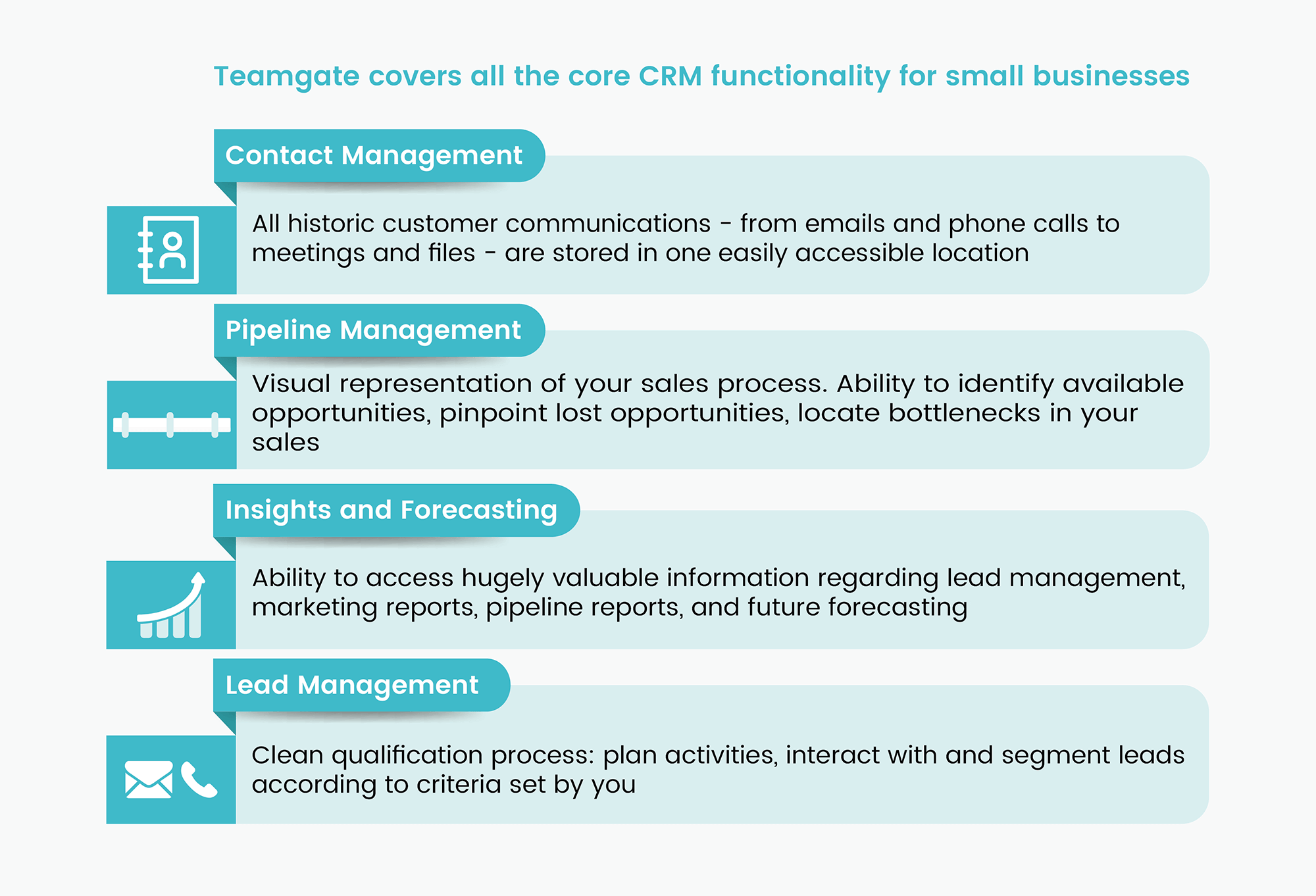
#1Contact management – Teamgate contact management abilities are designed to take your customer interactions to the next level.

All historic customer communications (both people and companies) – emails, phone calls, meetings, file transfers, and account ownership – are stored in one easily accessible location.

Detailed, and highly organised contact management give you a clearer overall picture of your customers and the health of your relationship. It’s also imperative to have access to all that information no matter where you go; giving you that complete picture of every customer.

Teamgate contact management also allows colleagues – with permission – to seamlessly take over customer handling with full access to all historic communication history.

#2Sales pipeline management – CRM systems for small business should be capable of managing every stage of the sales pipeline to suit your sales process.

From lead management to sales management Teamgate allows you to identify available opportunities, pinpoint lost opportunities, locate bottlenecks in your sales process, and forecast for the future.

With easily interpreted insights, Teamgate pipeline management offers you the ability to access hugely valuable information regarding lead management, marketing reports, pipeline reports, and future forecasting; all vital for the growth of any small business.

#3Lead management – Teamgate superior sales CRM is perfect lead management partner for small business.

Manage all of your leads from one convenient place, aiding a clean qualification process. Plan activities, interact with and segment leads according to criteria set by you, and simply convert qualified leads to deals.

Teamgate CRM tools for small business gives you a wide range of easy and intuitive lead import tools to use across multiple sources.

You’ll never again have to worry about duplicating contact details when imported data. Contacts can be segmented according to the categories. Additional filters may then be applied to the contacts – creating a well-organised and easily searchable database.

Let Teamgate CRM scale your sales

  1. As your business grows, choosing the right sales CRM, to suit your needs, is essential.
  2. Recognising your needs, and the correct CRM which can resolve those needs, and grow along with your business is a great start.
  3. Teamgate CRM can offer you all of the above, plus the software is constantly being upgraded seamlessly to match any future needs.
  4. It is scalable, affordable, easy to use, and chock full of features designed to handle, and simplify every stage of your small business sales process.
  5. Don’t let the tasks you once found easy become the obstacles which stunt your growth.

Do you have a CRM that keeps you organised?

The most user-friendly CRM on the market. 14-day free trial.

Start Free Trial

Painless setup, no credit card required
Having accurate and up-to-date information about your contacts makes it easier to understand their habits. Managing that information effectively is crucial to your sales success, that’s where Teamgate CRM can really help.

Once upon a time good customer contact management was defined by a bulging address book, containing no more than names, addresses, and telephone numbers.

Such was the value of this hard-sourced information, top salespeople were headhunted energetically, based on the contents of that little book.

Thankfully, the sales process has changed dramatically, and so has the technology behind it.

Source tracking, gathering, and management of valuable contact information has become an integral part of the customer sales journey. And, quality Top CRM software – such as Teamgate – are pivotal to effective sales contact management.

Contact gathering and management

The more you have of anything, the harder it is to find exactly what you want.

Closer collaboration between sales and marketing has greatly simplified the gathering of lead contact information. But, with that, comes problems.

More information, requires better management, and that management should offer intuitive filtering of real possibilities from time-wasters.

Smarter gathering; collation; management; segmentation; and filtering of those leads is key to separating the wheat from the chaff. Once the real opportunities have been identified, it’s time to start the sales process.

Common contact management problems

All stages of customer contact management bring their own particular problems. One of the factors which has made Teamgate a multi award-winning sales CRM, is the ability to adapt and foresee the contact relationship management problems of the present, as well as the future – and design with that in mind.

free contact management software

It’s said that hindsight is the twenty-twenty vision. If you look to the past, sales teams barely recognised that they were having sales contact management problems, until someone found a better way of doing things.

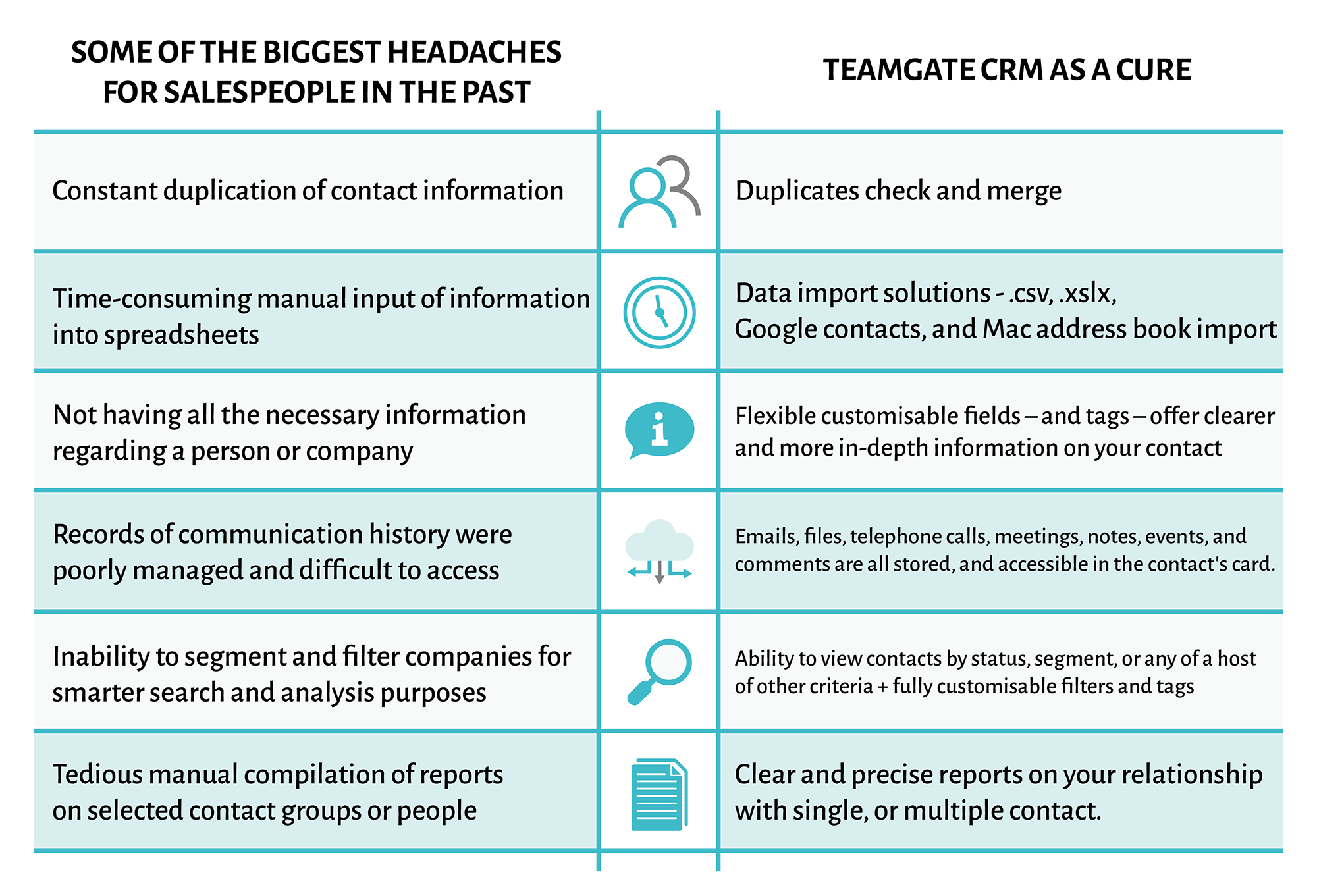
Some of the biggest headaches for salespeople in the past, were:

  • Constant duplication of contact information
  • Time-consuming manual input of information into spreadsheets
  • Not having all the necessary information regarding a person or company
  • Records of communication history were poorly managed and difficult to access
  • Inability to segment and filter companies for smarter search and analysis purposes
  • Tedious manual compilation of reports on selected contact groups or people

Sales contact management with your CRM

Teamgate is far more than a contacts book – recording names, numbers and addresses – Teamgate CRM software lets you track and manage all aspects of your customer relationship. Along with the most basic, and necessary, information, Teamgate gives you an overview of your contacts’ interactions; past history; won sales; preferred products; pain-points; and accordingly presents you with a visible and actionable analysis.

Addressing the problems associated with CRM contact management, Teamgate has innovated how salespeople can:

  1.    Prevent automatic duplication of imported contacts – Teamgate recognises when imported contacts, from any source are duplicates – CSV or XSLX files, Google contacts, Mac address book, or directly from LinkedIn – the software will request a further instruction on how to proceed.
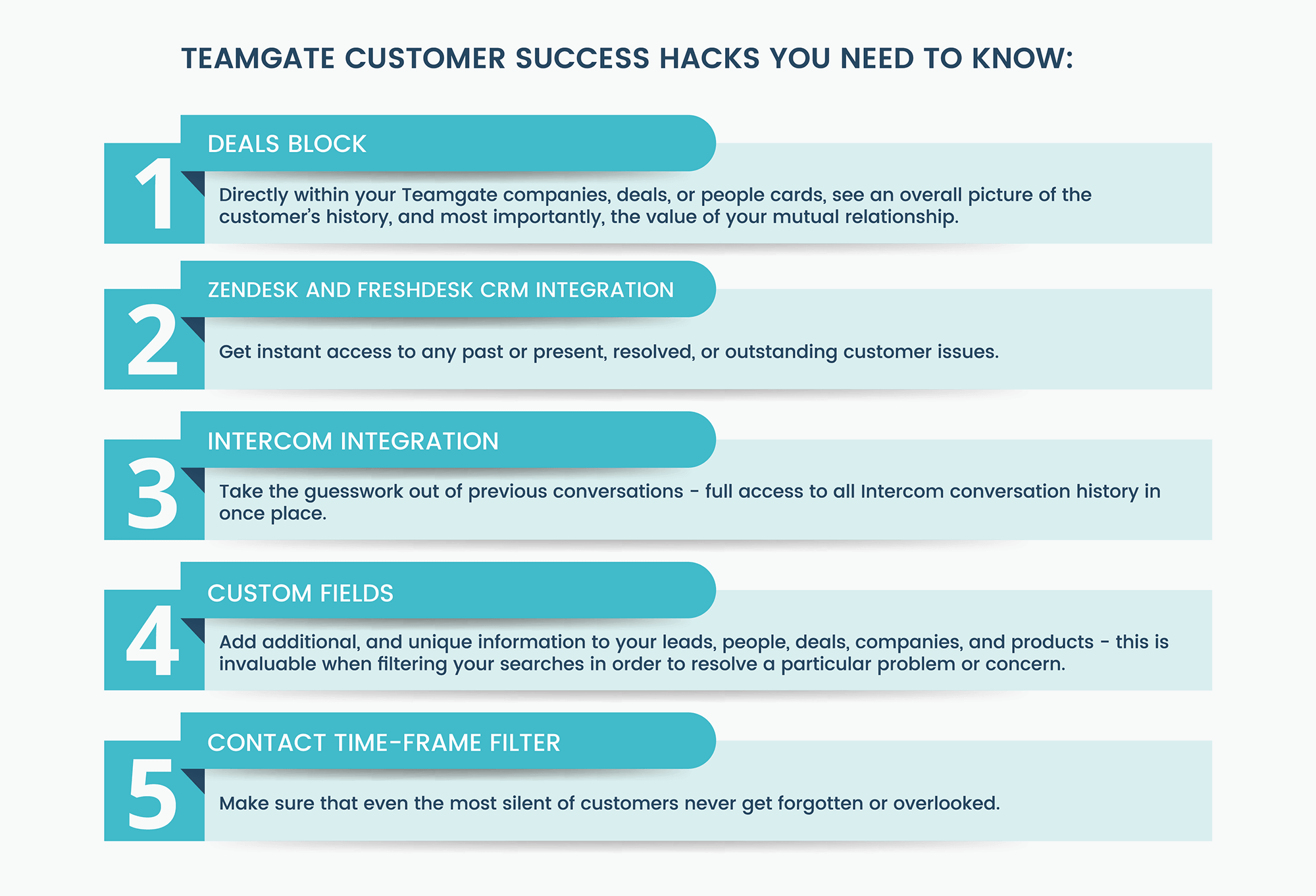
  2.    Allow you to fully customise the information you gather on both people, and companies. Flexible customisable fields – and tags – offer clearer and more in-depth information on your contacts, and allows you search your contact management database more efficiently, using multiple criteria.
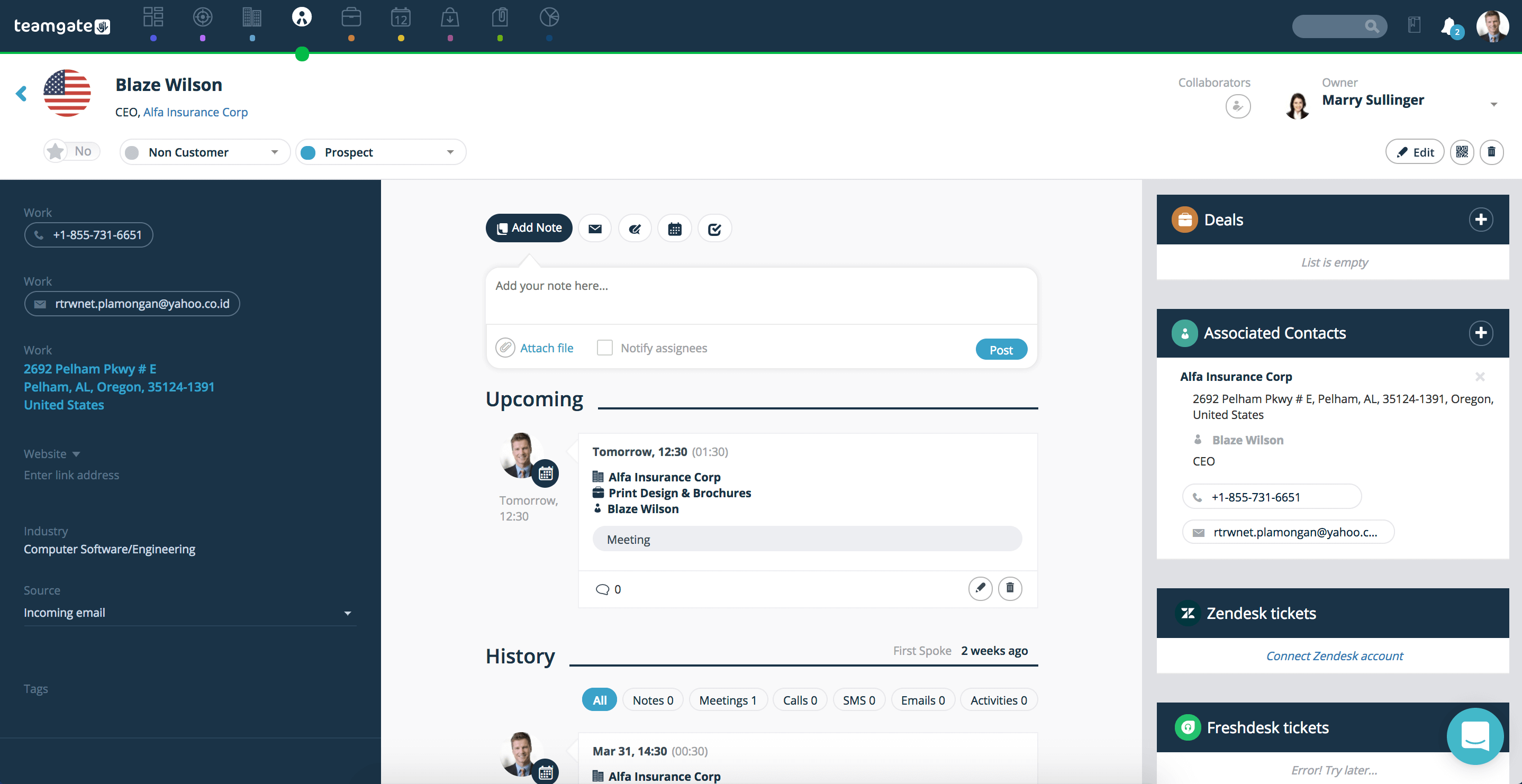
  3.    Manage all communication history with contacts far more easily. Emails, files, telephone calls, meetings, notes, events, and comments are all stored, and accessible in the contact’s card.
  4.    When searching files, the sales person has the ability to view contacts by status, segment, or any of a host of other criteria. All filtering options are fully customisable allowing you to create the necessary tags suitable for you, and your unique sales process.
  5.    Teamgate offers you the ability to clearly visualise all deals associated with each contact.
  6.    Conversations via Intercom CRM integration are all clearly visible, adding to the value of your contact communication history.
  7.    The Teamgate analysis section allows you to prepare and present reports on your relationship with single, or multiple contacts, easily, and with far more clarity.
online contact management
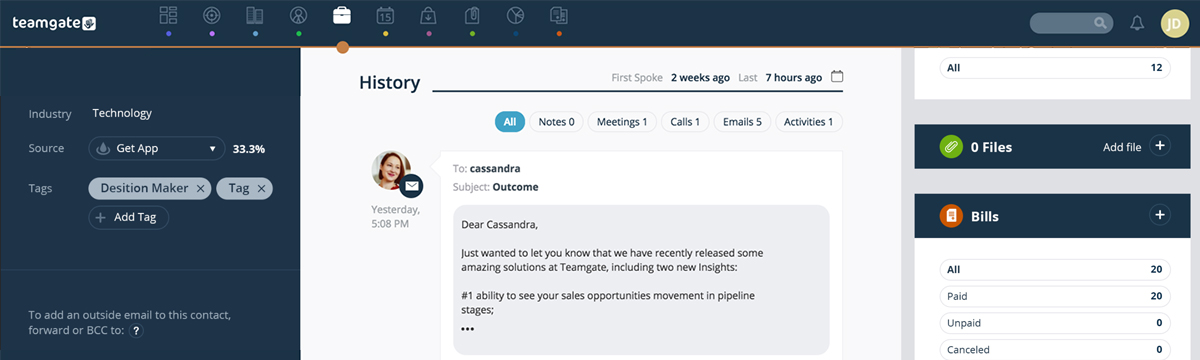
Contact Card on Teamgate CRM

The real benefits of better contact management

The benefits of CRM contact management – which come with award-winning software like Teamgate – are evident during every stage of your contact interaction.

Here’s how:

  • A clean database will simplify every task throughout your sales process. Well organised leads cards, containing all the information you may need, are always easily accessed, searchable, and containing all the knowledge you need to push your sales forward.
  • It doesn’t matter which one of your sales team is working with a customer, Teamgate CRM contact management contains all the necessary information, giving the appointed salesperson all the information they need, on the go. This seamless feature allows salespeople to take over exactly where a colleague has left off, armed with all the relevant information.
  • Segmentation of contacts allows for the creation of customisable sales categories – industry type, size, location, etc. – and even smarter filtering functionality. Meaning, searching for a contact among thousands can be defined by segment, or any other fully customisable criteria which suits your process.
  • Knowing your contact’s past history and relationship is vital for driving that relationship forward. Really great sales contact management abilities – like those available in Teamgate CRM – helps you fully analyse the importance of valued customers, simply and smartly, and react accordingly.
  • Location is no longer a barrier to contact management. Teamgate gives your sales team full mobility and access to all communication history, personal information, company information, notes, lead ownership, geographic mapping, in-app contact facility, and all from anywhere with an available internet connection.

Contact management should be uncomplicated, accessible, and burden-free. It should offer the sales team every fragment of customer information, when, and where it’s needed. And, most importantly, great contact management should actively drive the complete sales process forward. 

Do you have a CRM that keeps you organised?

The most user-friendly CRM on the market. 14-day free trial.

Start Free Trial

Painless setup, no credit card required
Managing your sales pipeline is critical to your businesses success. Your sales pipeline maps sales movements across every stage of your sales process. The clearer your sales pipeline picture, the more easily, and quickly you can react to any situation.

Problems with traditional sales pipelines

Individual sales move at different speeds. Some close quickly, while others crawl at a snail’s pace, blocking up your sales pipeline.

With traditional sales pipelines it is difficult to interpret a clear view of all the pipeline’s stages, and map its progress. From a lead, contact, deal, and accounts management perspective, identifying bottlenecks can be difficult. When problems are identified, the traditional pipeline offers little assistance to providing solutions.

Sales pipeline view
Classic Sales Pipeline view on Teamgate

Another problem associated with the traditional sales pipeline is the overburdening of salespeople with time-wasting tasks, along with the labour-intensive compilation of sales reports and projections.

Also, traditionally, it took personal knowledge of each individual lead, and the associated interactions, to get an accurate picture of where sales opportunities were causing blockages.

How sales pipeline movement solves these issues

Having a clear, instantly interpretable view of each sales opportunity in the pipeline is imperative to productivity. Additionally, the ability to instantly create a pipeline movement sales report removes once labour-intensive tasks, and frees up time.  

Using an intelligent sales CRM, sales managers can minutely analyse each stage of the sales pipeline. With this holistic view, the sales stage management process has become simplified and clearly illustrates the entire engagement process. Communications, meetings, follow-ups, etc. can all be monitored instantly, and the identification of blockages simplified.

Sales Pipeline Movement
Sales Pipeline Movement view on Teamgate

Sales managers, with an overall sales view, have the ability to identify where sales reps are becoming grounded. By analysing sales pipeline movement reports, generated in the sales CRM, the problem is more easily resolved, and the pipeline freed.

Sales pipeline movement reports also offer managers the ability to identify the performance of individual salespersons, and fully understand their strengths, their weaknesses, and also to interpret if goals have been set too high, or too low. The information gathered automatically by your sales software can be visualised instantly, using colour-coded charts and illustrations, it gives you a clear view of each and every stage of the sales pipeline. This visualisation allows sales teams to react quickly, and resolve urgent situations.

The bane of the traditional salesperson’s life was the constant creation of sales reports and attendance at daily, weekly, or monthly progress meetings. While the meetings are still a necessary part of sales, the task has become simplified by your sales CRM. Sales reports are instantly available. All activities are automatically tracked and recorded, building an accurate, up to the minute account of the entire sales pipeline.

What’s the value of clean pipeline movement?

The real values of a clean and fluid sales pipeline are:

  • It provides the ability to drastically improve all aspects of sales performance. With a holistic view of the pipeline and the automatic generation of intelligent sales reports, fewer blockages occur.
  • Through analysis of past sales cycles, sales managers can design and structure optimum timeframes for each stage of the pipeline. This can shorten the stages and allow salespeople to close deals faster.
  • The ability of colleagues to collaborate on multiple sales projects, interacting instantly on matters such as; next-step planning; communications management; meeting scheduling; etc, allows salespeople to cooperate, ultimately saving valuable time.
  • Nothing can be left to guesswork when a sales manager is presented with a constant clear picture of the complete sales pipeline. Your CRM software offers such a sales pipeline overview; of every prospect; every lead; every deal; and the progress of each team member in relation to each project.
  • Gone are the days when salespeople were chained to their desks writing time-draining sales reports. An intuitive sales CRM now handles this task for everyone, leading to clear, concise, and understandable graphs, illustrations and reports, illustrating every stage of the sales pipeline, and every person involved.

Do you have a CRM that keeps you organised?

The most user-friendly CRM on the market. 14-day free trial.

Start Free Trial

Painless setup, no credit card required
Smart lead qualification and scoring within your CRM allows your sales team to spend more of their valuable time focused on leads which are more likely to convert to deals.

What is a qualified lead?

A qualified lead – or marketing qualified lead – is a prospect whom you have identified and who has shown or registered an active interest in buying into your product or service. This lead is required to pass a set of qualification criteria to enable them to progress through your sales pipeline.

What is lead scoring?

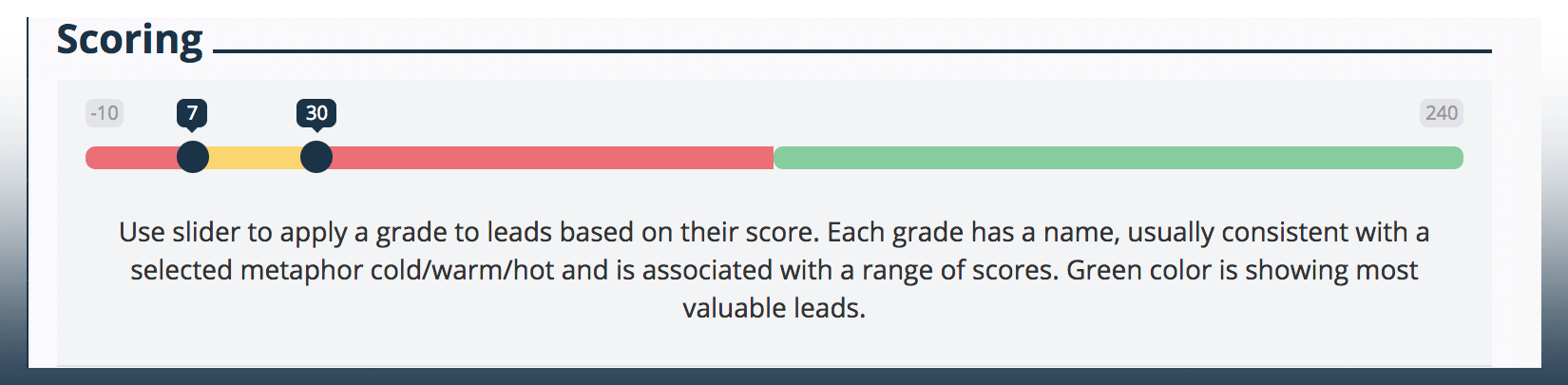
Sales people and sales teams use their CRM in order to analyse the value which each lead represents to a company, ranking them against a pre-established set of values. The score which they receive determines their value and are ranked and arranged in order of importance and priority accordingly.

With the goal of spending less time on leads which possess a lower likelihood of converting to deals, lead scoring offers you prime analysis facilities to focus on the leads most important to your pipeline.

What are the lead scoring and qualification processes?

Lead qualification and lead scoring go hand in hand, but what happens before a lead becomes qualified?

So, by means of landing pages on your website, personal networking, seminars and trade-shows – or any of multiple other sources – you’ve managed to acquire a lead’s contact details. But, how do you qualify that lead, and is it even worth you time?

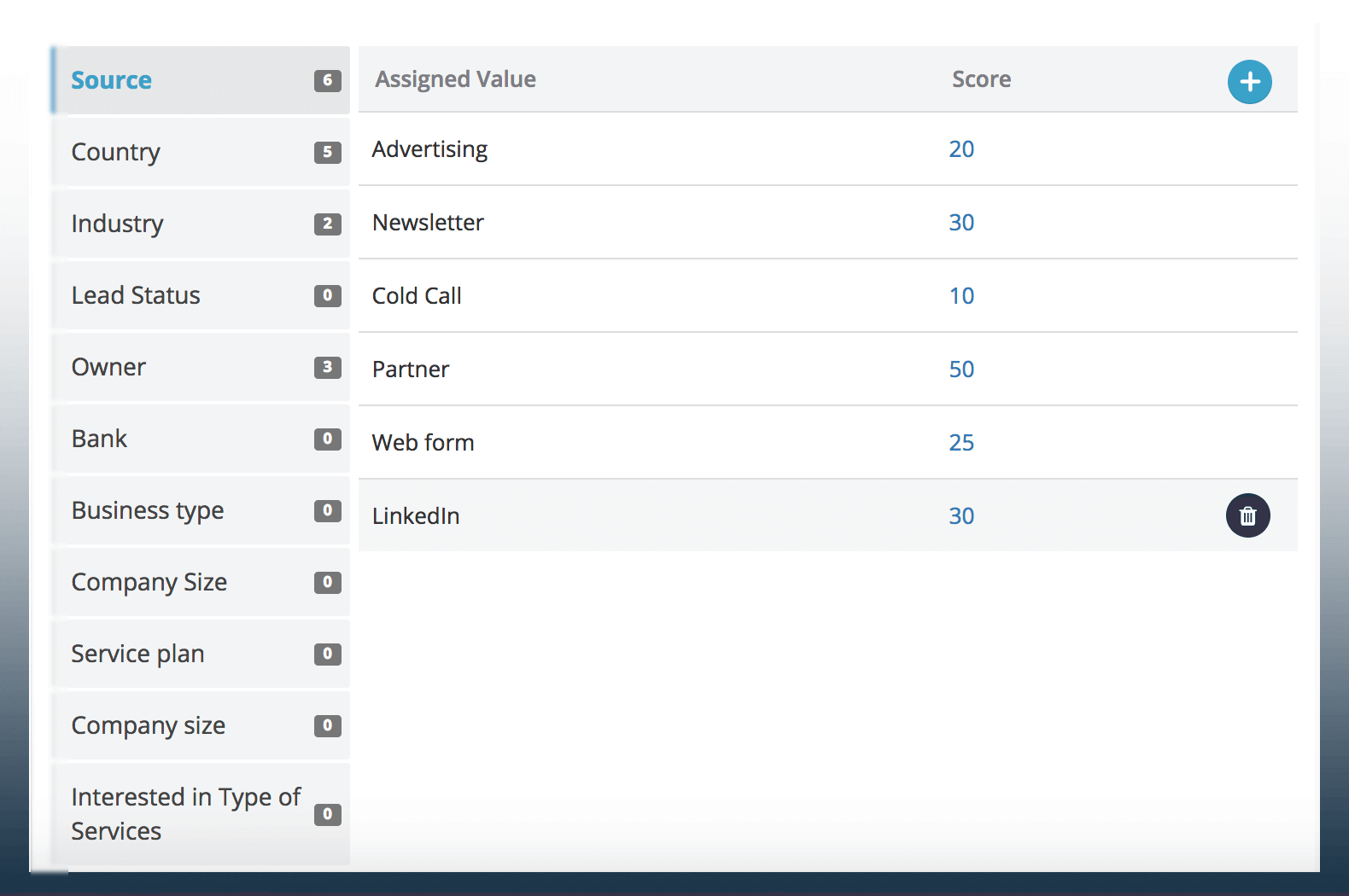
Based on previous experience, and the criteria you’ve set for yourself in your CRM, you can score your lead and prioritise the likelihood of that lead making a purchase. In short, the Teamgate sales CRM will smartly direct your efforts on how to qualify lead via analytical lead scoring. Plus, using source and industry tracking you can move prospects through the sales pipeline as they qualify using the simple drag and drop feature. Status of individuals and companies can be changed easily via another simple drop-down menu.

lead scoring

The Teamgate CRM is uniquely designed to make lead qualification and lead scoring a simplified and intuitive process. As all of your lead contacts, communications history and information are stored within your CRM and offer you the valuable possibility of evaluating and scoring the possibilities for each lead to qualify.

Lead scoring is a fully automated process controlled directly within the Teamgate CRM and managed according to your priority scoring parameters. Differing scores may be allocated to different categories of targeted leads. When the lead is transferred to Teamgate the CRM calculates the score, saving you valuable time and enabling you to react accordingly.

The information taken into account during the lead scoring process ideally doesn’t need to be too detailed in the initial stages of lead prioritisation. The criteria used for lead scoring can be added to as you grow and gather new avenues of information. It’s up to you to decide which criteria you will use to prioritise your leads more effectively – past examples of qualified leads will help you greatly with this process.

qualify lead

The scoring system you use when you qualify leads is decided by you, depending on criteria specific to your industry, past experience, or other factors; meaning that you decide your ideal customers’ profile. Within the Teamgate sales CRM the information you add about your marketing qualified leads will help you decide if a lead can be converted into a deal, or whether to unqualify. It’s worth remembering, that even unqualified leads may be recycled at any time as all the information will still exist in your CRM. Teamgate offers you the smartest set of tools to convert and re-qualify your leads at any time. CRM lead management and qualification analysis are the truly smart tools for the truly smart modern sales team.

Value to the client and how to measure it

An intuitive lead qualification process aids sales managers, sales teams, marketing professionals, and business development professionals determine and distinguish if leads are interested enough, are the correct fit, and are ready to be moved through the sales pipeline. The Teamgate CRM drag and drop pipeline model manages the whole sales process in a clutterless and interpretively visual and analytical manner, leading to better sales performance and higher profitability.

Do you have a CRM that keeps you organised?

The most user-friendly CRM on the market. 14-day free trial.

Start Free Trial

Painless setup, no credit card required
Here at Teamgate we’re not ones to boast – well, maybe just a little (if you don’t mind too much).

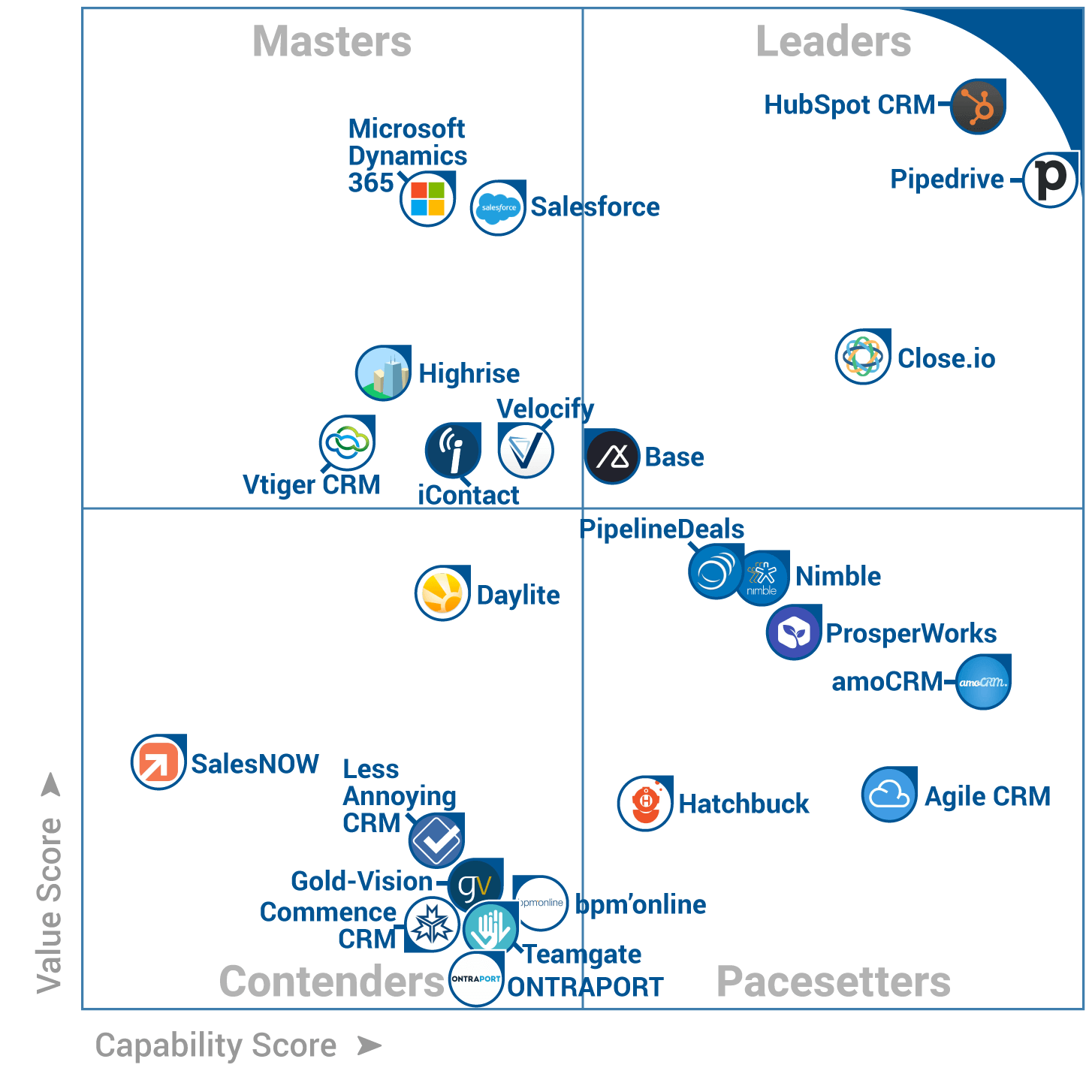
But, the truth is that we’re proud of our latest award – being included in Gartner’s 2018 CRM FrontRunner’s quadrant. Not so shabby we think you’ll agree.

But it didn’t happen by accident. It’s all down to a singular vision and a dedicated commitment to being the best.

In modern business it’s easy to endlessly recite the marketing mantra of how an organisation is “committed to excellence, quality, customer care, etc”. Proving it is another thing. That’s why we at Teamgate like to shout about each and every one of the awards and acknowledgments we receive – which go a long way towards truthfully illustrating that our commitment to excellence is for real. To put it simply, we really mean what we say.

To frame it in the words of the Teamgate CEO, Marijus Andrijauskas:

These awards and acknowledgments are the benchmarks of our continued commitment to excellence’.

Gartner’s quadrant FrontRunners for CRMs

Teamgate at FrontRunners Quadrant Gartner Software Advice

The FrontRunners quadrant, powered by Gartner Methodology, provides a data-driven assessment of products in a particular software category to determine which ones offer the best capability and value for businesses. It helps business leaders to make the right decision when choosing which software to buy.

To create this quadrant, Software Advice evaluated over 1,050 Customer Relationship Management Management products. Only ones with the top scores for their capability and value made the quadrant.

On 2016 September, Gartner launched a new type of quadrant called FrontRunners. It is released for four software markets, which are (1) CRM software, (2) Project Management software, (3) Help Desk software and (4) Applicant Tracking software.

All products that qualify as FrontRunners are top performing products in their market.They have been evaluated and given score for Capability and Value. Capability (x-axis) starts at 3.60 and ends at 4.60, while Value (y-axis) starts at 3.60 and ends at 4.70. FrontRunners evaluate the top 20-30 products in a quadrant format and it is completely data-driven with no analyst interpretation, also, it is heavily influenced by user reviews.

In 2017, Gartner launched more than 24 quadrants for different software markets. Also, they updated these quadrants at the beginning of 2018. 

Teamgate CRM FrontRunner Badge

The content for the FrontRunners quadrant is derived from actual end-user reviews and ratings as well as vendor-supplied and publicly available product and company information that gets applied against a documented methodology. The results neither represent the views of, nor constitute an endorsement by, Gartner or any of its affiliates.

Quadrant Methodology

As it was mentioned above, the FrontRunners methodology assesses and calculates a score for products on two primary dimensions: Capability and Value. Here’s how they both are calculated.

The Capability score is an overall weighted average of scores including:

  1. End-user ratings of 1 to 5 stars on the product’s functionality.
  2. End-user ratings of 1 to 5 stars ratings on the product’s ease of use.
  3. End-user ratings of 1 to 5 stars on the product’s customer support.
  4. A score, relative to other products in the market, for the product’s inclusion of key functionality for the software category.
  5. A score, relative to other products in the market, representing the number of other products that integrate with it.

The Value score is an overall weighted average of scores including:

  1. End-user ratings of 1 to 5 stars on overall satisfaction with the product.
  2. End-user ratings of 1 to 5 stars on how valuable users consider the product to be relative to its price.
  3. End-user ratings of 1 to 5 stars on how likely they are to recommend the product to others.
  4. A score, relative to other products in the market, for the size of the product’s customer base.
  5. A score, relative to other products in the market, for the number of professionals in the market who have experience with the product (e.g., users, developers, administrators).
  6. A score, relative to other products in the market, representing the total number of user reviews across the three Gartner web properties.
  7. A score, relative to other products in the market, representing the average number of times per month internet users search for the product on Google.

For a full report and methodology on Gartner’s FrontRunners quadrant, check out the information on Software Advice.

Onboarding a new sales CRM can be a daunting task, but with the Teamgate experience it doesn’t have to be

How do you choose your CRM software?

There are a variety of single reasons why companies decide they may require the use of sales CRM software, but there are also a combination of reasons for that decision, and more importantly, how that decision is made.

A sales CRM will allow company CEOs and CFOs to take a ‘future view’ of their revenue prospects. A well-chosen CRM will allow an insight into future trends, potential revenue sources, and possible pain-points gathered from the CRM’s analysis functionality.

Sales managers and sales teams will consider their CRM implementation process from a slightly different perspective. Their need is to manage the day-to-day functionality of the sales process, to capture leads automatically and to save time, convert leads to deals, close deals, and to track all stages throughout the complete sales pipeline. Also, the information gathered during the various stages of the pipeline is vital for future business generation and the successful visual analysis of performance.

Marketers will tend to choose a CRM which allows for harmonious interaction and cooperation with the sales department, in other words, ‘smarketing’.

A customer service manager will want to choose a CRM which closes deals effectively, is fully adaptable to ever-changing sales circumstances and time limits, and one which leads to an improved connection between company and client, and also allows for upselling to valuable clients.

However, it is also vital to talk with all those who will be involved in the final implementation, the end-users. These are the ones with the real information and who are qualified to offer their input in a highly significant manner.

Where do I start my onboarding process?

You wouldn’t buy a car without taking a test-drive, or a house without a thorough examination, the very same reasoning applies to your CRM onboarding process.

Before you choose the correct software for you, your company and your sales process, you’ll want to be sure that the product is suited exactly to your particular needs. But how do you do that?

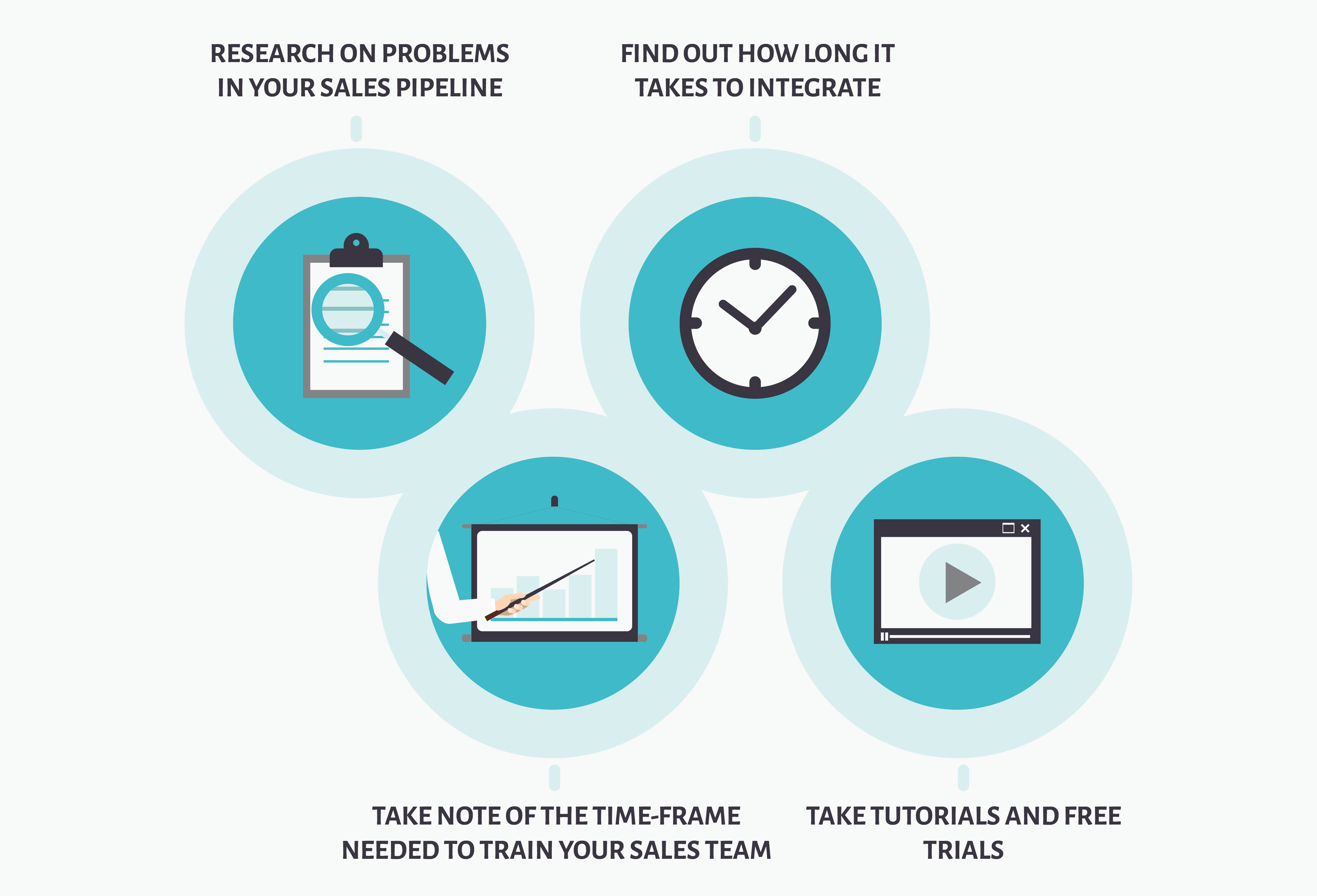
Firstly, before you begin your onboarding process you are going to want to do some serious research on any problems in your sales pipeline which you are attempting to correct – or trying to avert completely in the first place. This will entail identifying pain-points associated with lost leads and deals, bottlenecks in the sales pipeline, or the inability to source the correct leads in the most time-saving manner. Once you’ve done that it’s time to browse the CRM options available.

The length of time it will take to integrate your new online CRM software should be a major factor in these considerations. The more time it takes to integrate and onboard your CRM the longer it will take to make your new resource pay its way. 

successful onboarding

Another major consideration is the time-frame needed to train your sales team. The level of complexity of your chosen CRM can have a major bearing on your salespeople’s willingness to accept or reject a successful onboarding process. Your salespeople are the ones who have to be most comfortable with the new CRM, so they should be the ones at the core of your considerations. The last thing they need is an additional burden to deal with while attempting to do what they do best – namely, sell.

It’s recommended that you and your salespeople take the time to avail of as many online tutorials and free trials as possible during the selection process. The Teamgate Sales CRM offers comprehensive free trials, with the full attention of their highly-qualified customer support agents on-hand to lead you through the process. It is only through trials and hands-on experience of the CRM’s functionality can you fully appreciate how it can enhance your whole sales process.

Who is the onboarding process final decision maker?

At the end of the day someone has to make the decision about which Sales CRM is right for any organisation. Whoever makes that decision has to be absolutely sure that they’ve made the right choice to benefit the whole organisation and its future. The person responsible for the decision will invariably be responsible for the sales process; the company CEO, sales director, BDM (business development manager), marketing manager – however, whatever decision made could be in tandem with the head of the IT department, sales manager, or chief operations manager, and sales team.

Migrate, purchase, or evolve?

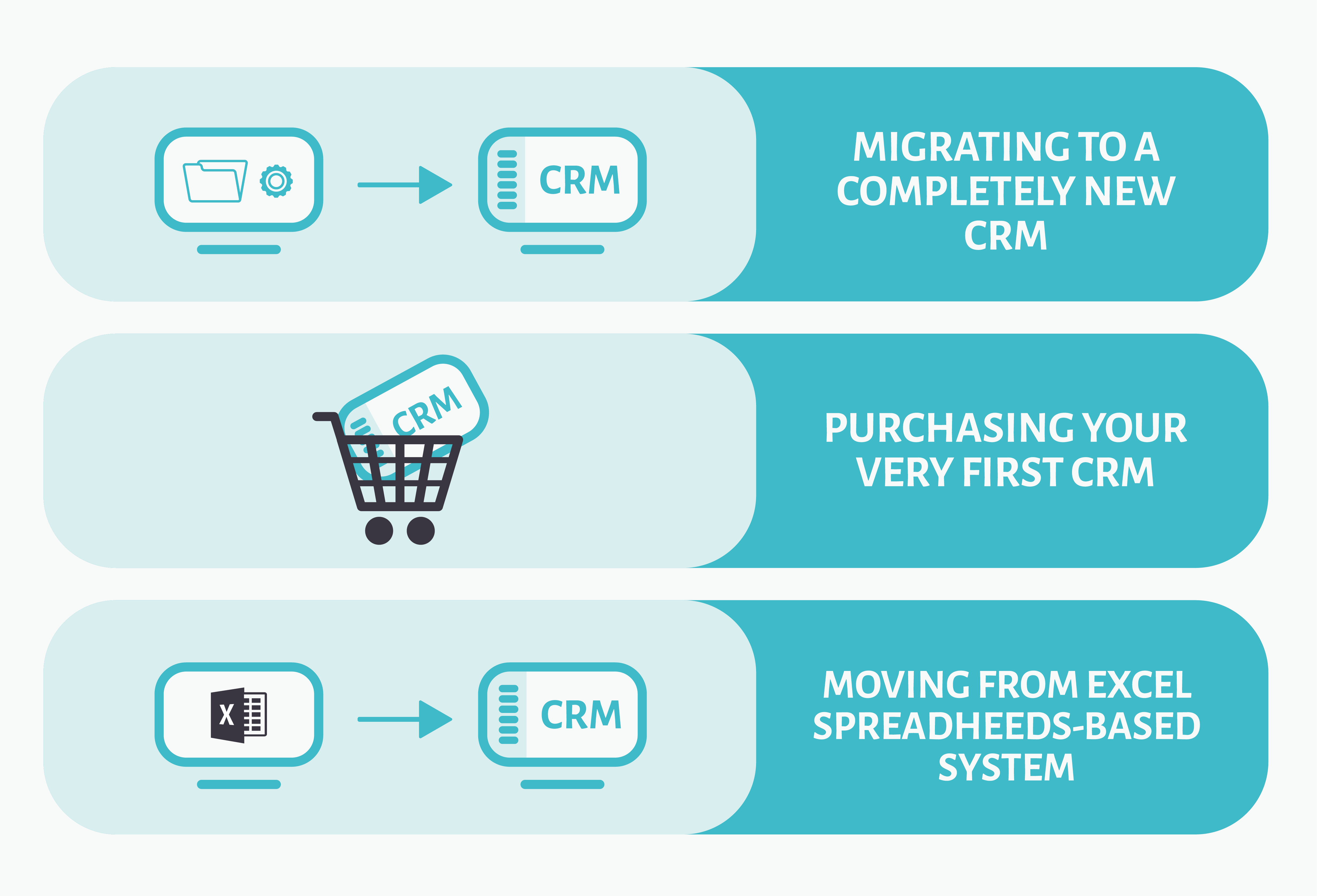
The decision you have to make may be simple, or, you may have to choose between migrating to a completely new CRM, taking the step of purchasing your very first CRM, or the process of moving from an Excel spreadsheets-based system. 

onboarding process

If your decision is one of migration it should be obvious that problems already exist within your present CRM. Following on naturally from that realisation you will need to look at a new CRM which will address your concerns and provide the appropriate solutions. Teamgate CRM has consistently led the way in providing these solutions for companies who have become dissatisfied with their old methods. By constantly liaising with clients Teamgate have been able to adapt and evolve and to design and provide appropriate solutions to problems, sometimes before you even realise a problem might exist within your sales pipeline.

However, no matter how smart your new CRM may appear the question remains; how difficult will your end-users find the whole onboarding programme? With Teamgate it couldn’t be easier. The product is intuitive, smart, simple to use, has a feel of familiarity and a customer care/support team there to help you through any teething-problems.

If your choice has been to migrate from Excel you’ll be happy to know that Teamgate simply imports all of your important, and hard-earned data, allowing you to continue your sales process almost seamlessly. You may also find an easy means of importing your data to Teamgate from an existing CRM.

No matter how simple any new system is to get used to, you will most likely have teething-problems. That’s why the Teamgate customer success management team are there you guide you through any queries or concerns you may have. Teamgate’s customer success management team are there to help you in a way which suits you best; via email, live chat, phone, or video call. Now that’s service.

The Teamgate attitude to onboarding

Teamgate has always had its focus set resolutely on the onboarding process, and its simplicity.

Looking at the front-end of a new CRM resolution can be off-putting, that’s why Teamgate have tried to simplify the process and offer you help through every easy step of the process. A thorough knowledge of the product and its functions are essential for success. Your sales depend on it. That’s why the subject has become such a fundamental concern for Teamgate.

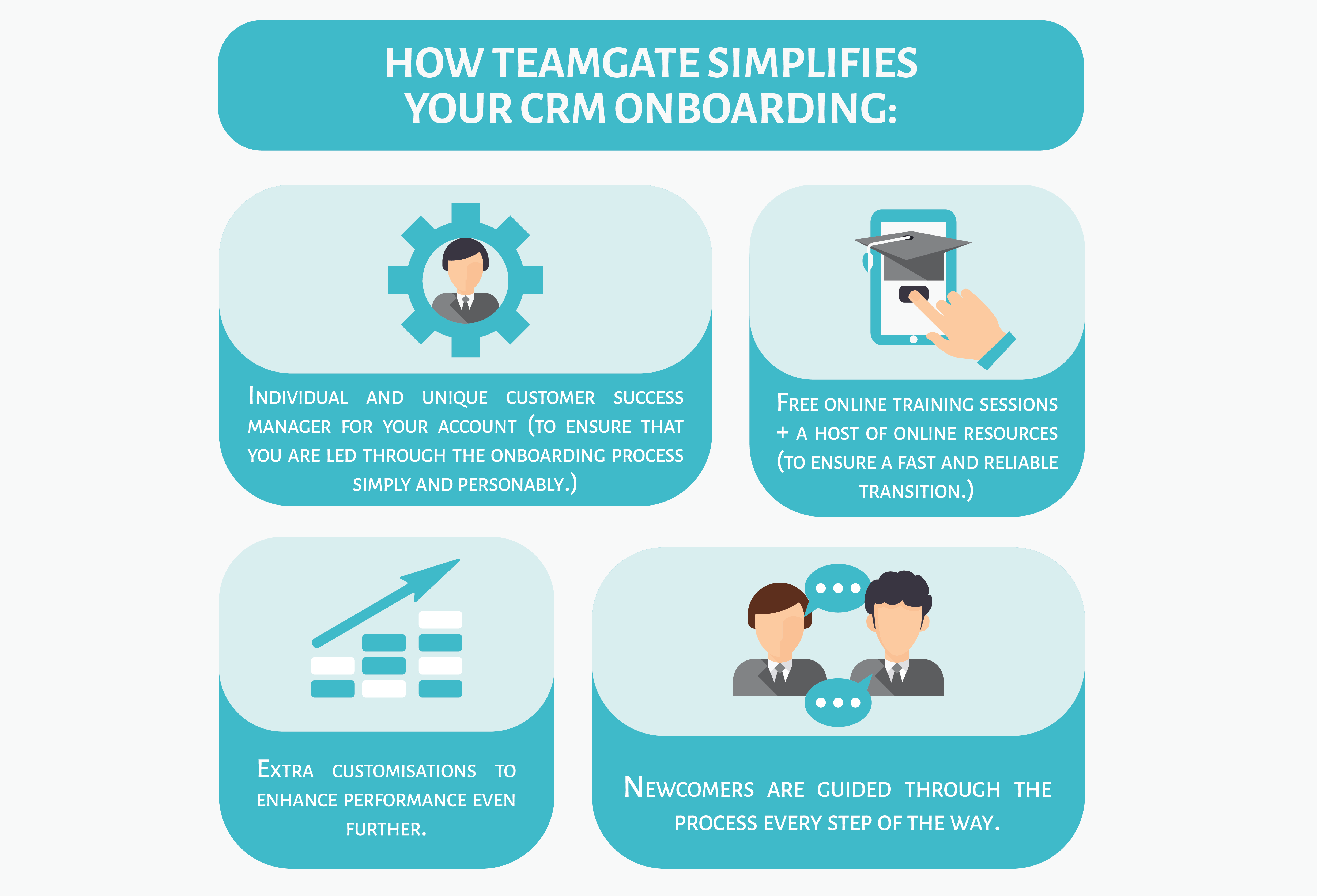
Here’s how we address the issue:

  • When starting out with Teamgate you are allocated a dedicated individual and unique customer success manager for your account, to ensure that you are led through the onboarding process simply and personably.
  • Teamgate will also provide you with free online training sessions, plus a host of online resources to ensure a fast and reliable transition for your success.
  • For advanced users certain extra customisations can be applied to enhance performance even further.
  • Newcomers will be guided through the process every step of the way.

crm implementation

The basic steps of onboarding with Teamgate

The first steps of onboarding with Teamgate is getting to know the terminology that you will use on a daily basis to make selling simpler and more effective. Don’t worry, it’s nothing to be scared of; in fact, we’ve simplified the process so much you won’t even realise that you’re learning. This is where you’ll learn the difference between leads, deals, people and companies. Sounds easy eh? You’re right.

In addition, you’ll also learn the best-practices and insider tips and tricks to get the best value from your CRM on a daily basis.

Next up you’ll learn how to import data from your existing files or database. The process has been simplified within Teamgate allowing you to recapture all your valuable information in a more organised space and also allowing you to use the data to start selling immediately.

You will learn how to integrate Teamgate – using WordPress forms – with your website to gather valuable new leads and generate potential new business.

From the outset you will already know the stages of your sales pipeline. Through the settings and customisations functions you can fine-tune all stages of the pipeline, creating and saving all the necessary information relevant to suit your particular needs. Through the roles management function you may allocate owners and collaborators of leads, and or deals, ensuring information is always available to the right hands when needed.

With every marketing campaign, contact, lead, or deal won or lost, a vast amount of valuable information is gathered. Teamgate provides sales managers with intelligent reports and analysis which decipher this information into extremely useful reports, charts and insights, allowing for better sales forecasting and projections, and analysis of past cycles and performance results. This in turn allows attention to be turned to areas of blockage in the pipeline and stages requiring tweaking or improvement.

By means of a multitude of multi-functional integrations – Mailchimp, Zendesk, Twilio, Quickbooks, and a host of others – your Teamgate CRM evolves to become more than just a sales tool, it becomes the workhorse of your whole sales process; allowing multiple, time-saving functions to simplify the complete sales process.

And, as always with Teamgate, our dedicated customer success managers are there to help you with any queries you may have about how to get the very best from your Teamgate CRM experience; from novice salesperson to CEO. Why not take a look today?

And we have the awards to prove it!

Do you have a CRM that keeps you organised?

The most user-friendly CRM on the market. 14-day free trial.

Start Free Trial

Painless setup, no credit card required
Think of your new sales pipeline as a map, complete with well-considered stages, and you won’t go wrong. 

Mapping the route

A sales pipeline can be imagined as being a road journey from one fixed point to another. On the road you must pass through a certain number of towns in order to reach your destination. There are many routes you can take, and many towns through which you can pass – it’s up to you to decide which route is best for you.

Creating your sales pipeline – or sales funnel – is akin to plotting that route. There are many factors you must take into account.

Firstly, planning too many stages to your pipeline (more than 6 is not advisable) is like having to navigate too many towns, with too much traffic; it makes your sales team’s life more arduous and with slower results – if indeed they don’t get lost along the way that is. Too few stages or towns (let’s say two or less) doesn’t allow you to fully analyse the journey for the next time you have to make it – or appreciate the view along the way.

Don’t plan too many stops on the way

The expert route-planners tend to agree that two stages are too few and more than six are too many.

This is where the real value of planning your sales pipeline management, using a CRM like Teamgate, really leads the race for results. The route becomes clear, the goals you set yourself and your team are easily read and understood, your communications become easy to manage and the results of each of your sales pipeline stages are there to be analysed in simple, understandable maps.

But, before you set off on your journey you must understand the problems you face and intuitively design and map the correct pipeline stages which you hope will resolve these problems.

These problems could entail:

  • Who are your potential customers and how do you contact them?
  • Arranging meetings and communicating with leads in the process of converting the lead to a deal.
  • Doing the sales work with the deal.
  • Closing the deal – win or lose.
  • Making payment.

The more you know the easier the route

It’s helpful to be aware of your customer’s buying habits in order to avoid too many, or too few, stages to your pipeline. Their decision-making process, their requirements regarding pricing, proposals, favoured communication methods, and more. All this information will allow you to map, more accurately, the route to the sale. The more information you possess (hence it’s not advisable to have less than three stages) the easier it is to analyse your results and to use these results wisely in accordance with predicting your targets and goals.

sales pipeline

Setting goals while moving your deals through the stages is vitally important. These goals will help you further understand the strengths and pain-points of your sales funnel stages and keep the deal moving.

A clear visual map of your sales pipeline stages – created in your CRM, and organised according to the needs of your sales team – will help you reach your destination quicker, more easily, and with less chance of getting lost along the way.

If you want to reach your destination, make sure to plan well in advance.

Do you have a CRM that keeps you organised?

The most user-friendly CRM on the market. 14-day free trial.

Start Free Trial

Painless setup, no credit card required
Sales pipelines can be tricky to design and implement, but with a smart CRM system your sales stages become clear and self-explanatory. 

What is a sales pipeline and why do you need one?

In the past salespeople were regarded as being preeminent note-takers. They were evident everywhere you went, sitting in their cars, coffee shops, airports and even by the side of the road, notebook and pen in hand, shuffling a sheaf of papers as they transferred vital sales information from one space to another. That was part of their sales pipeline, and theirs alone. They were the only ones with the key to unlock this magic kingdom.

But what is a sales pipeline?

In a nutshell a sales pipeline is an organised and highly visual means of tracking all your potential and existing clients as they progress through the varying sales pipeline stages.

Even if you don’t yet have access to a sales pipeline management system – a sales CRM – there’s a good chance that you’re already employing some version of a sales pipeline management system, even if you don’t realise it. 

Within the sales process stages already exist (perhaps you don’t call them stages, but that’s what they are). Of course these stages vary from company to company and client to client but they usually contain at least some of the following stages; contact a client, meet a client, call a client, email client, send proposal, agree deal, sign contract, secure payment, or on the negative side, deal lost.

However, having a defined and structured sales pipeline within your sales CRM software – when used correctly – brings a whole new edge to your sales process. From marketing your product or service, gathering leads, converting those leads to sales, to analysing and tracking your efforts through smart, current and informative visuals and sales forecasts, you’ll never get lost in your sales pipeline. Juggle multiple individuals or companies in customised stages, gain insights into time management, track communications and all associated files, and all from the comfort of a fully mobile system.

Best practices of CRM Sales Pipelines

Before you start organising your sales pipeline, you really need to understand the problems you need to solve. The major problems experienced by CRM users is over-complicating their sales process by creating too many stages. It’s true that some areas of sales – like the sale of high-value and custom goods or services – may require more sales stages and may need to be individually customised. But, on the whole, the mantra of keeping the number of stages to a minimum appears to be the best option.

When used in this simplistic, customised manner, your sales pipeline brings visibility and predictability to your workflow. Accurate time management, financial projection and revenue forecasting rids you of the feeling of confusion; a salesperson’s worst nightmare.

What are the sales pipeline stages and how many should you have?

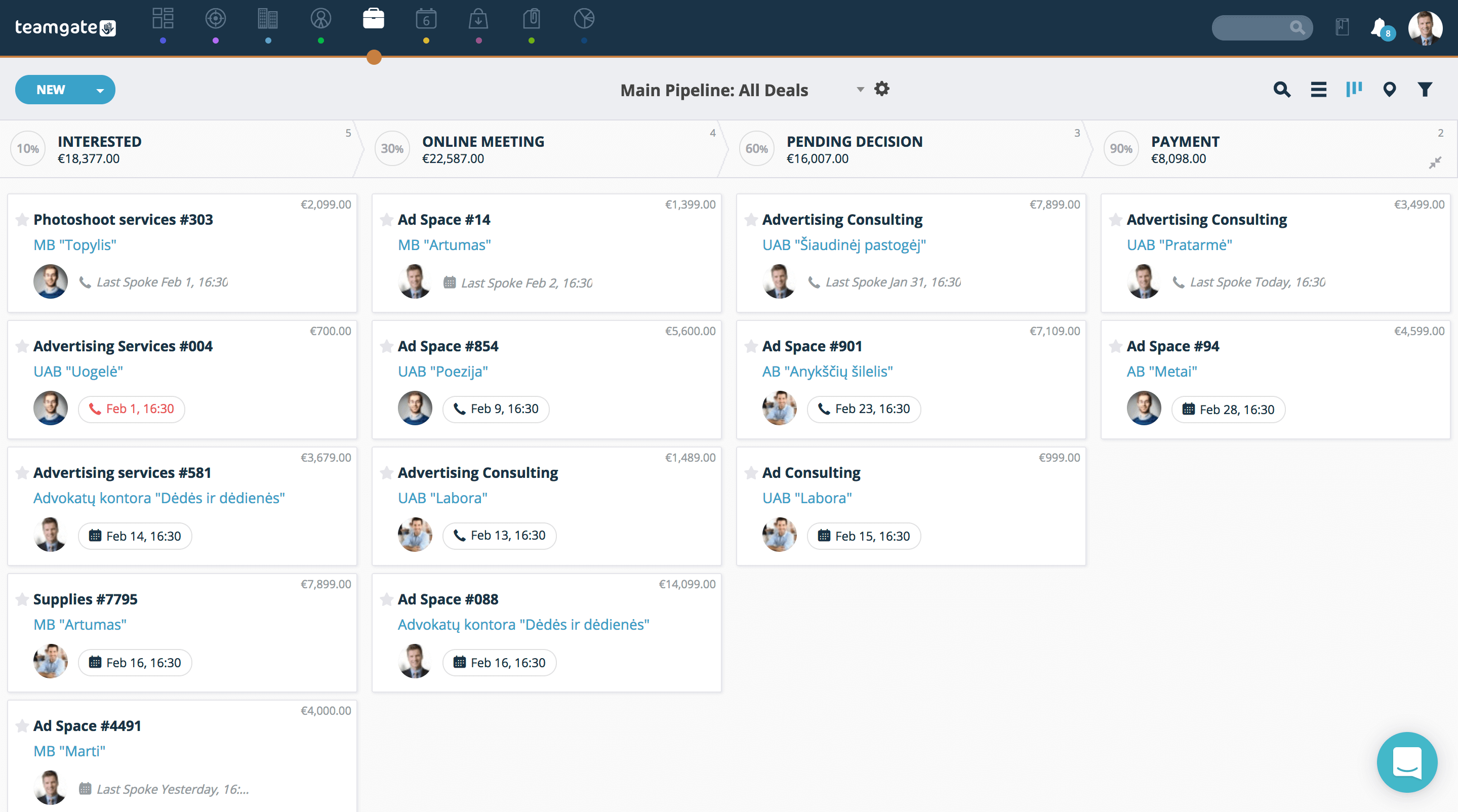
At Teamgate sales facility we use four stages in our pipeline – Interested, Online Meeting, Pending Decision, and Payment. Within these stages we can create all the actions which we need to aid moving the customer to the next stage. But, the number of stages you wish to use is totally up to you.

The stages may vary from industry to industry, but once you have clearly thought out the problems you wish to address, the design of your pipeline is simplified greatly. Additional stages may be added, or removed, depending on the analysis of results from the initial set-up of your pipeline management system.

What goals should you set for each stage of the pipeline?

Within the individual sales stages you’ve created, your goals and targets can be decided by you through continuing analysis of forecasts and results. Teamgate CRM allows you to set sales goals and success probability percentages over pre-designated time-frames. This really useful feature within each stage of your sales pipeline management plan lets you see how many days are left to fulfil – or loose – a particular deal. It also allows you to see the percentage probability of success or failure. This is invaluable when it comes to the analysis of your overall sales team’s performance and the performance of sales individuals.

The values which you set for these forecasts can be entered manually, based on history, expectations, or percentage of deals closed or lost. The results obtained from the parameters which you’ve set for your sales goals, or each individual stage of your sales funnel management, are invaluable for calculating your actual sales plan versus sales results.

However, it is once again important not to raise expectations through inaccurate forecasting. Problems which can occur, in different industries, and for different reasons, can and will affect overall scores. This needs to be taken into account in order to accurately analyse ‘real’ results.

What actions need to be taken to move forward through the pipeline?

In order to answer this important question we need to revert right back to the introduction of the sales pipeline, and the initial planning process. The owner of the sales pipeline needs to be fully aware of the questions and problems which need to be addressed in each stage of the pipeline. Once these have been answered satisfactorily, only then the stage can be moved forward through the pipeline, or marked as lost. These questions must be considered very carefully at the outset and may include actions like; if customer A does X then we need to do Y, how much time elapses before we follow up on a deal, how often do we follow up on a deal, at what point do we realise a deal is lost?

Pipeline Management
Sales Pipeline view on Teamgate CRM

The criteria for moving a deal forward through the sales stages, or being regarded as lost should be determined from the very beginning and/or adjusted as more information is gathered through pipeline analysis.

What if the sales process has multiple pipelines?

A sales CRM such as Teamgate is designed for, and allows easily for a multiple pipeline scenario to be handled with the greatest of ease. Individual pipelines can be created for differing products or ranges of products and the tasks, or individual requirements, associated with each task to be handled differently. These may include varying turn-around times, individual logistical problems, one-off productions, or bulk production, and the individual actions required to reach the sales goals of each one.

The Teamgate sales CRM allows for the creation of new pipelines with only a couple of mouse clicks. These pipelines are then customisable to match each individual processes, no matter how simple or complex they may be.

What are the main pipeline management reports available?

Wow! That’s a big question. To put it simply, the list of reports available cover just about everything you might need to analyse and forecast your whole sales process.

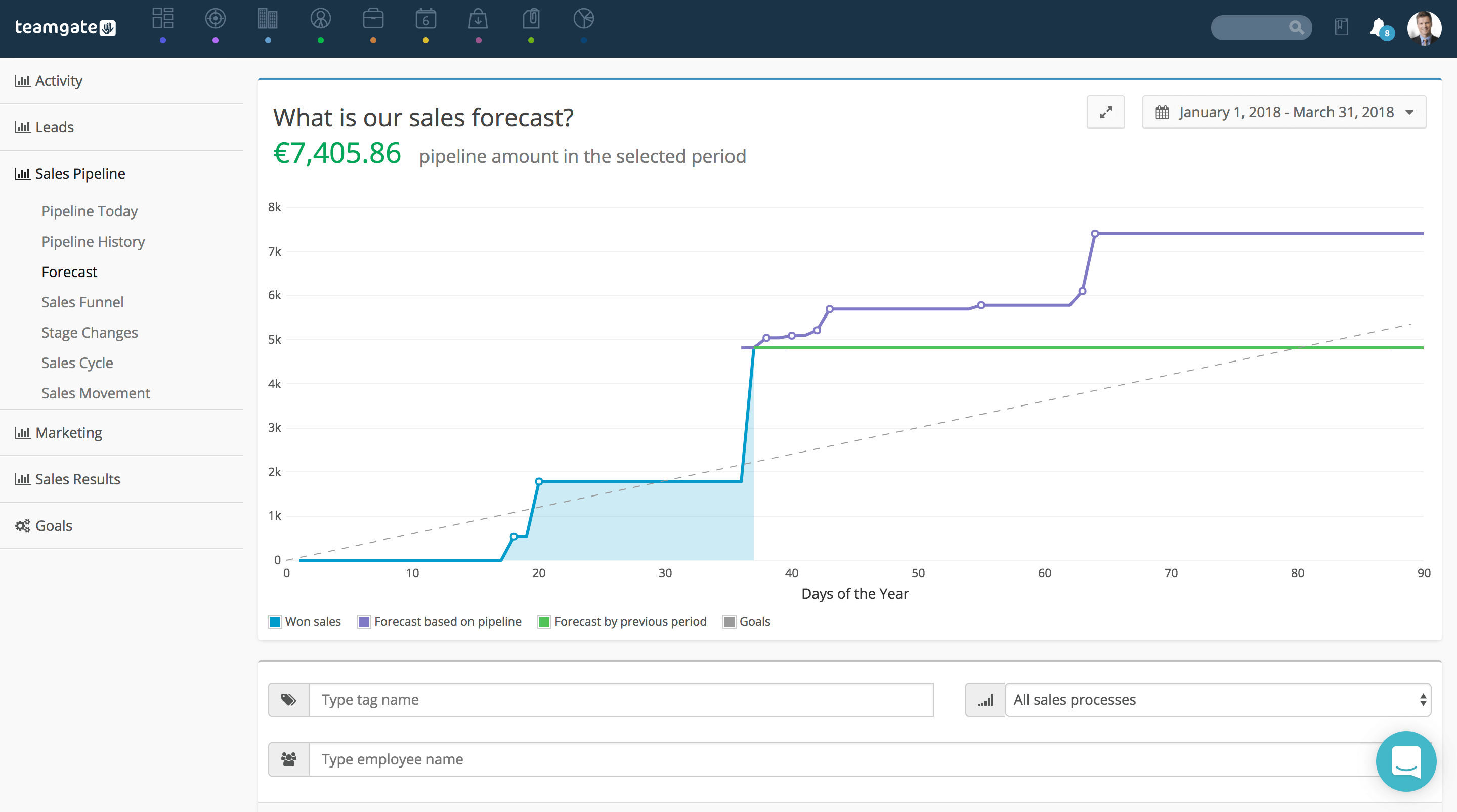
Sales Forecast
Sales forecast on Teamgate CRM

Teamgate CRM allows you access really insightful reports on everything from ‘How to set sales goals’ right up to the ‘Profitability of your sales results’. With these super-helpful, and easy to read reports you can learn the reasons why most sales were lost, the number of won deals over a defined time period, your marketing leads by region or country, or simply the best performers on your team.

These reports are really invaluable for analysis and future forecasting, evaluation of past performance, sectors underperforming and a host of other nuggets of information you can use to better manage and plan your whole sales pipeline.

Do you have a CRM that keeps you organised?

The most user-friendly CRM on the market. 14-day free trial.

Start Free Trial

Painless setup, no credit card required
According to HubSpot’s State of Inbound 2016 report, more than 70% of sales professionals questioned said that closing more sales is their top priority for 2018. It appears that everyone wants to know how to increase sales.

No surprises there, right?

However, the sales territory has become more complex than ever before due to big changes within the industry.

Changes that leave the majority of businesses expecting inbound marketing services to deliver value up front, allowing for an easier close.

So why is it that we didn’t see the results of these marketing efforts last year?

The answer is simple – inbound marketing is not enough.

Do you have a CRM that keeps you organised?

The most user-friendly CRM on the market. 14-day free trial.

Start Free Trial

Painless setup, no credit card required
At the end of the day, you need to have a deeply integrated sales and marketing process which merges both teams seamlessly. However, the first place is to start:

  1. Communicate Inbound Sales advantages to your team: However, make sure you’re familiar with the methodology yourself first.
  2. Don’t be afraid to experiment: you need to develop what we like to call “The Inbound Sales Mentality”. 


Let’s take a look at some actionable steps you can take towards creating the right approach to increasing sales in 2018!

Build An Inbound Sales Mindset

build-an-inbound-sales-mindset

As with marketing, the Internet has changed things. The buyer has more information at their fingertips than ever before, thus, the power to pick and choose from many different providers of products and services.

But it should be noted, where a good inbound marketing strategy will attract the best leads, effective inbound sales will actually close the deal and land money in the bank.

Read that last sentence again, because I think a lot of marketing guys forget this.

Remember – marketing guys crank it.  But salespeople bank it.

Focus on one particular actionable step at this stage:

You want to educate yourself first: The free hubspot Inbound Sales certification is one of the best places to start. If you don’t have time for that – find a professional or certified agency that can educate you.

Less Input, More Output

less-input-more-output

Let’s cut to the chase and acknowledge it for what it is; doing more doesn’t get you more.

Working more, doing the busy work does NOT guarantee bigger margins – in fact, much the opposite.

It’s almost 2018 and your sales team needs to be both time-savvy and smart.

Start with the classic 80/20 Pareto rule as this methodology will teach you how to increase sales.

In terms of increasing sales, focus on the 20% of prospects which produce 80% of your sales.

Actionable steps:

  1. Get your team implementing an 80/20 rule mindset: make sure to communicate it properly to ensure that your team is 100% on board with your vision.
  2. Prioritise your most active buyers: Do this instead of investing time and resources in re-engaging the less active customers in your database (using the 80/20 rule you’ll find this type of segmentation execution easier than ever).
  3. Develop trust with those buyers: Provide personalised messaging throughout all cycles of communication.

Don’t Sell (yet) – Help Instead

dont-sell-help-instead

One of the biggest mistakes sales teams make – when they think how to increase sales they think directly about what they want to do – SELL as soon as possible and SELL more.

Don’t Rush! This type of mindset creates long-term problems with today’s buyer who are not always interested in buying something instantly unless your product is hands-down the best in the market – which is pretty rare in today’s highly competitive business environment!

With Inbound sales you’re not running a sprint but a marathon, which I can assure you, is worth all the upfront hard work.

Actionable steps:

  1. Review your current assets and knowledge library: there is always something you can help with first and sell later (e.g. free consultation)
  2. Make sure you are helping in a personalised way for a client that finds your help relevant and making him easier to close
  3. Work directly with your Inbound Marketing team to provide creative solutions that would be helpful to the client (e.g. content creation tailored to specific business)

Choose A CRM That Saves You Time

Take a look around…

Your team is inspired with the new Inbound Sales methodology you’ve introduced.

More deals are being closed than ever before when you focus on your best buyers.

Everything seems to be working. Yet, when the business cycle closes we will need new leads again to reach sales quotas.

At this point, you are already asking yourself and your team, how to increase sales again so we can stay on top?

In order to achieve continuous momentum where leads are generated automatically, you need the right tools to manage, analyse, and improve your Inbound Sales.

First and foremost every business needs CRM.

But does your current CRM live up to 2018 standards to support Inbound Sales?

If you don’t have a CRM you should be worried; 2018 might not live up to your high hopes.

Actionable steps:

  1. Review your current CRM features: Does it support Inbound Sales?
  2. Calculate where your team is spending the most time: Is it inputting, importing and exporting data on daily/weekly/monthly basis, or are you focussed on communicating with the 20% of prospects who bring you 80% of the results?
  3. Calculate time taken on generating reports: Measure the time you and your team currently take to prepare reports for management and internal team meetings.

Related: Reasons Why Sales Stack is Non-Optional for Startups

Give Value For Free.  Expect Nothing in Return.

give-value-for-free-expect-nothing-in-return

Depending on your business, think of something you could provide that would be seen as “going the extra mile” when providing help.

Prospects will be blown away by free premium products or services your business commits to provide without any fluffy commitments.

This will show that you believe in the value you’re providing, but more importantly, you’re ready to invest in the prospect up front.

Actionable Steps:

  1. Review your current offerings: Could some of them be turned into a premium content that you could give away for free?
  2. Calculate (if you haven’t already) Customer Lifetime Value: If it exceeds your long-term expectations for selected buyers, make sure to award them with free premium content they can use to their advantage.
  3. Plan and create future premium content: What could you create that would work alongside highly tailored future offers?

Personalize The Whole Sales Experience

personalisation

I cannot stress this enough.

If inbound marketing provides value, inbound sales should provide a distinct sales experience from introduction and connection calls, right through to closing, and monthly reviews.

Actionable steps:

  1. Review your most active buyers: What do they like? What are their needs? Start with simple things like general communication, before adopting this throughout all your marketing and sales collateral.
  2. Arrange meetings that prospects actually enjoy attending: Convert those boring office meetings into something more imaginative; lunch, dinner or a major sporting event.
  3. Allocate additional resources: Hire additional resources to help make your prospects feel special and understood (e.g. personal account / VIP manager).

Close by advising not selling

close-by-advising-not-selling

Most sales managers think of closing as the finish line, the point where most sales teams pop open the champagne bottle, often before a prospect has signed on the dotted line.

With Inbound sales, think of the close as the starting line where and an even bigger opportunity may be waiting just around the next bend.

As experienced inbound sales professionals you are not selling, but advising right through to the point of a final decision.

And even then your main focus should be to keep supporting your buyers 100% after the deal is closed – this is how you increase sales at the end of the day.

This way you’ll not only build trust (with the opportunity to upsell), you’ll also build a reputation. This will undoubtedly convert the buyer into an advocate of your products and services, bringing new leads into your sales funnel without you having to lift a finger.

Actionable steps:

  1. Review your current closing techniques: Think about how you can continue down the sales path with extended lifetime support.
  2. Improvise with your closing phase vocabulary: Shift your focus to “advising” rather than “selling” or “closing”.
  3. Make a list of offers you can upsell or even give away: Preferably free things you could offer to buyers after they become a customer, as a piece of unexpected additional value.

Summary

In a nutshell, to really crush your 2018 sales quota you’ll need a team of devoted sales managers who will:

  1. Have an Inbound driven mindset
  2. Focus only on the biggest, most impactful areas
  3. Invest in the right, most up-to-date tools
  4. Be ready to help first, sell later
  5. Be comfortable with over-delivering through gifting premium content
  6. Adjust suitably throughout the buyer’s journey
  7. Close, but continue to advise with a focus on building loyalty and respect.

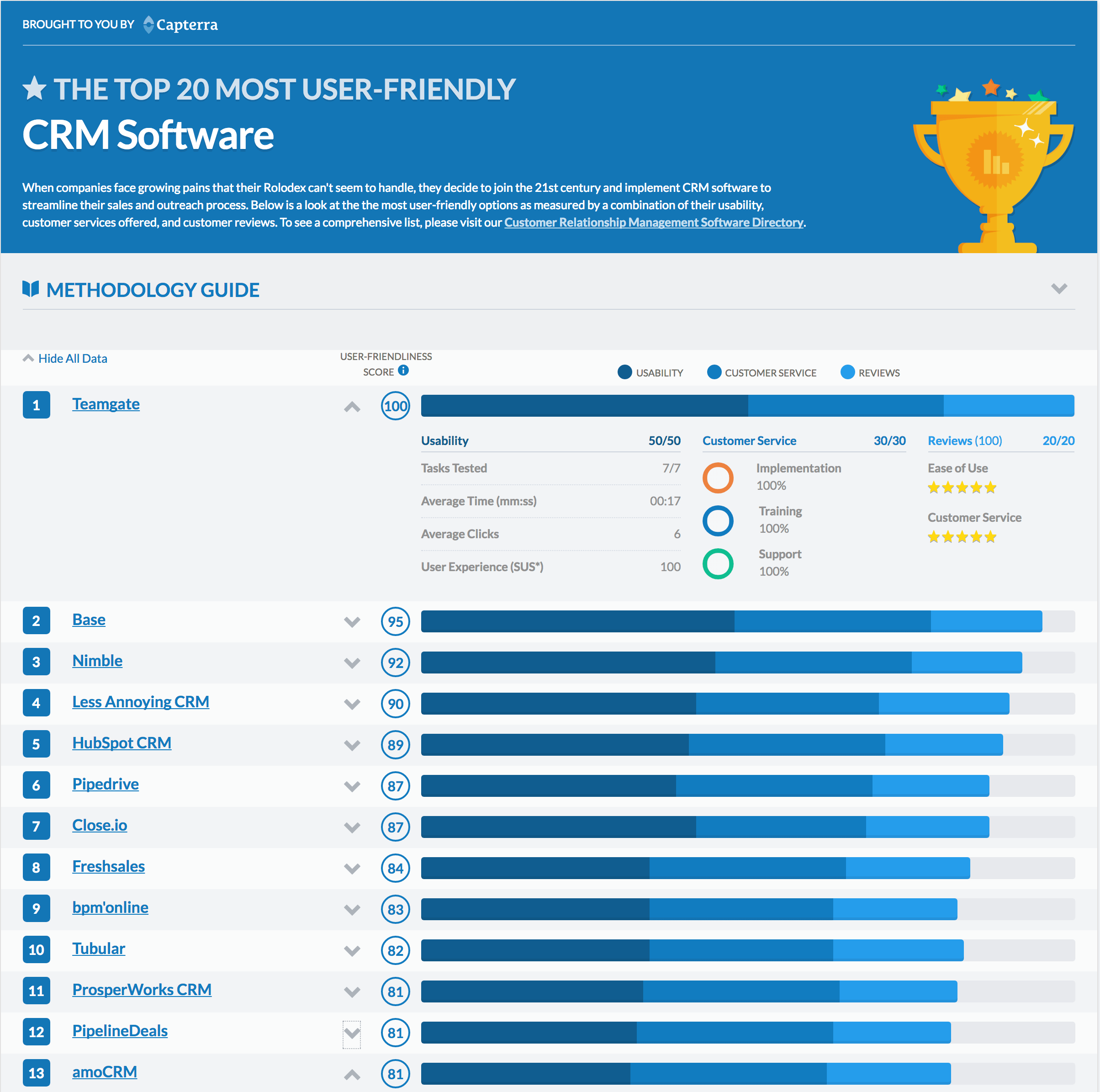
Good News! The well-known software marketplace, Capterra.com which helps businesses to find and connect with the best software worldwide has just announced that Teamgate (that’s us) has earned NUMBER 1 spot on the Top 20 Most User-Friendly CRM Software report.

And, it was no fluke.

All of the options are measured by a combination of their usability, customer services offered, and customer reviews.

Here are some of the reasons why Teamgate Sales CRM was voted most user-friendly, here’s just a small piece of our improvements:

  1. Data import. Having your contacts in Teamgate is vital and profitable, so an easy import function is essential. Once you import your initial contact list our system will match the fields in Teamgate automatically, remembering the selections you made in your previous import session.
  2. Custom fields and filters. In Teamgate, you can create your own fields; the ones that work best for you and you. Also, you can customize tags, and even create custom search filters. These features make it so easy to use and adapt Teamgate for your business.
  3. Quick and easy editing. We’ve also developed a new feature which gives you the ability to edit your contact cards more efficiently. Now, you can edit contact information such as phone, email, address, or website data with just a click, there’s no need to modify the entire contact card.
  4. Global search. You can search for Leads, Contacts, Deals, and Files from one search bar. It works even if all you have is an email address or telephone number and you’re not sure whether the person is a Lead or Contact. The choice is all yours.
  5. SmartDialer. What could be better than the ability to call straight from your Sales CRM? This powerful integration lets you call your prospects and clients with just one click. After you end the call you can leave a note and save it to the customer file. This feature is not only easy to use, but it also keeps you organized and saves you plenty of time.

Teamgate’s CEO, Marijus Andrijauskas, shares his views about the importance of usability:

“The terms user-friendly or UX refer to the complete user-experience of design and interaction with a product. It includes the overall experience with which a user is presented as they interact with that product. After Steve Jobs introduced his first-generation iPhone to the world, the manner in how we understand UX has changed completely. Today, after 10 years, users become not only more experienced but more spoiled, in a positive manner. We believe that you can have a really great product, but only great UX design can make your product amazing.”

Katie Connolly of Capterra explains:

Our product report team revisited and updated our Top 20 Most User-Friendly CRM report,” said Katie Connolly of Capterra,  a CRM software reviews company. “Our latest update looks at the same criteria as last year when determining the ease of use of each CRM product. Teamgate almost doubled their number of user reviews on Capterra and after testing the product again for the second time, it was clear that Teamgate should be listed as the most user-friendly CRM software for the second year in a row.

The Ranking

The top 20 most user-friendly CRM Software

The Ranking Methodology Guide

Capterra tested these tasks:

  1. Create a lead
  2. Add a task
  3. Add interaction/note
  4. Set reminder to follow up
  5. Change lead status to “qualified”
  6. Attach a document
  7. Generate a report

*These 7 common tasks were the criteria for usability testing.

Also,  usability, customer service, and reviews were measured.

Usability:

  • Task completion time
  • Clicks to complete task
  • System Usability Score (SUS)*

*SUS – a questionnaire that measures perceived ease of use.

Customer service:

  • Implementation (configuration options offered)
  • Training (resources offered)
  • Support (services offered)

Reviews:

  • Ease of Use
  • Customer Service

***

For a full report on Capterra, click here.

Visi žino, kam darbo vietoje naudojamos naršyklės, teksto redagavimo įrankiai, elektroninis paštas ar susirašinėjimo programėlės. Galbūt kažkada viso to ir atrodė šiek tiek per daug, ar net dabar yra bumbančių „man viso to nereikia“, tačiau šiandieną didžioji dalis kompanijų be patogių naujausios kartos įrankių jau nebeįsivaizduoja savo darbo dienos. Ir jei didžiosios dalies jų reikalingumą galima suprasti iš karto, yra dar viena kategorija įrankių, kurių naudą ir būtinumą įvertinti prireikia laiko.

CRM, ERM, CMS, SCM. Girdėta, bet..? Daugeliui šių trijų raidžių programų pavadinimai sako tiek pat kiek institucijų trumpinimai ar tri-raidės agentūrų iškabos. Todėl prieš pradedant rinktis tarp daugybės, ir pasak jų gamintojų – geriausių, programų, pirma išsiaiškinkime kas tos pardavimo procesams valdyti skirtos programos yra. Tikriausiai populiariausia abreviatūra – CRM (angl. Customer Relationship Management) – tai klientų duomenų bazių valdymo programos. Jos tarsi didesnės, greitesnės, brangesnės, užrašų knygutės ir elektroninio pašto versijos. Pastarieji tavo turimi įrankiai iš dalies jau vykdo tam tikras CRM funkcijas – kaupia klientų duomenų bazę, tavo susirašinėjimą su klientu, bendravimą su kolegomis, o tavo užrašų knygutė pilna pokalbio metu padarytų pastabų. Visa tai – informacija, kuri tau būtina pardavimo metu.

Tačiau tikroji CRM užduotis – ne tik saugoti ir padėti patogiau naudotis šia informacija, tačiau ir padėti tau lengviau atrasti jungtis tarp skirtingų informacijos dalių ir taip pagerinti pardavimų kokybę. Tikroji paslaptis slepiasi po „R“ raide pažymėtu žodžiu – relationship – CRM turi ir gali tau parodyti santykius tarp visų tavo duomenų bazės dalyvių. Sujungti žmones iš tos pačios kompanijos, su kuriais kalbėjo keli darbuotojai, parodyti tau žmogų iš tavo komandos, kuris kažką pažįsta iš tavo kliento pusės, lengvai sugrupuoti visą tavo ar tavo kolegos bendravimo istoriją su konkrečiu asmeniu – tai tik kelios CRM užduotys, kurios padeda pamatyti bendrą vaizdą, the big picture.

Žymi rinkodaros komunikacijos specialistė Jennifer Burnham, dirbusi tokiose kompanijose kaip Adobe Systems ir Apple – relationship – svarbą yra nusakiusi taip: „(…) galbūt CRM ir nesulaukia tokio didžiulio darbuotojų susižavėjimo ar nesukuria tokio bendrystės jausmo kaip socialiniai tinklai – Facebook ar Twitter – tačiau savo prasme ir galimybėmis bet kuri CRM sistema yra pagrįsta žmonėmis ir jų santykiais, tereikia mokėti tą išnaudoti“. Tad tokia ilgoka įžanga. O dabar pereikime į antrą dalį.

Tad kada ateina metas išmėginti savo pirmąjį CRM?

Atsakyk į šiuos klausimus „TAIP“ arba „NE“:

  • Tau reikia, kad tavo kontaktai būtų organizuoti pagal rinkas, grupes, kompanijas, veiklos sritis.. etc.?
  • „Paieškos“ funkcija Excel dokumente tau nepateikia pakankamai informacijos?
  • Tavo duomenų bazė atnaujinama nuolatos?
  • Neturi įrankio, kuris kokybiškai ir kiekybiškai įvertintų tavo vykdomus marketingo kampanijų rezultatus?
  • Pradėjote naują rinkodaros programą, kurios tikslas – susirinkti kuo daugiau būsimų klientų?
  • Norite matyti savo ir kolegų suplanuotus susitikimus, naujus “šaltus kontaktus”?
  • Norite analizuoti ir ekstrapoliuoti pardavimus?
  • Suvokiate, kad galite įvertinti efektyviausias savo pardavėjų sritis, bet nežinote kaip?
  • Norite lengvai numatyti ateities pajamas ir suvokti, kas jų sugeneruoja daugiausiai?

Jei į bent vieną iš šių klausimų atsakei teigiamai, CRM tau reikėjo jau vakar. Tokio, kuriame valdytum kontaktus, stebėtum ir lengvai atnaujintum pardavimų procesą, turėtum pardavimų istoriją, visuomet matytum išsikeltus tikslus, o pardavimų analizė taptų tavo nauju mėgstamiausiu skaitiniu. Kaip žinia, rinkoje pasiūlymų yra daugiau nei nemažai, tad štai pora esminių patarimų, nuo kurių reikėtų pradėti, renkantis savo pirmąjį CRM.

Pirma, įsivertinki visas alternatyvas. Iš jau anksčiau atsakytų klausimų, akivaizdu, kad tau reikia kažkokio sprendimo, tačiau nepasiduok madoms ir reklamoms – išsirink sprendimą, kuris geriausiai atitiks tavo lūkesčius. Pasikliauk asmeninėmis patirtimis ir būtinai išmėgink bandomąją versiją ne tik vienas, bet ir su visa komanda. Vis daugiau gamintojų siūlo kelių dienų ar savaičių bandomąsias programos, kurios padeda geriau suprasti, ko tikrai reikia, kas veikia ir kas patogu.

Taip prieiname ir prie antrosios dalies – CRM įsigijimas yra komandinis sprendimas. Tai negali būti tiesiog dar vienas pirkinys, po kuriuos pasirašė vadovas ar buhalterija. Tai turi būti nauja darbo sistema ir naujoviškas darbo proceso organizavimas, aktualus visiems – nuo aukščiausiojo iki žemiausiojo lygio specialistų. Tik tuomet CRM atsiskleis visame savo gražume. Juk kas iš to, jei juo naudosis tik vienas pardavėjas, net ir toks protingas kaip tu, tiesa?

Customer relationship management (CRM) is at the heart of every business and often is the primary determinant of success. Superior customer experience sets the ground for brand loyalty and these days companies cannot afford to take it for granted.

That is why CRM usage has exploded in recent years. What started out as a fledgling software service is now jetting to become a $145.79 billion industry by 2029.

Investment in CRM is perceived as a necessity by many businesses. 91% of companies with more than 11 employees already use CRM software. The same goes for 50% of enterprises with less than 10 workers.

The name of the game seems to be the technological investment: companies want to deliver the best service to their customers and stay in tune with fast-changing digital technologies to maintain the competitive edge. However, according to Tim Kippley, CRM practice lead at Rightpoint Consulting, the companies are also driven by more internal issues.

“A lot of them [CRM implementation requests] will come surround some form around revenue. They’ve either acquired a company or they’ve changed their revenue model in some way. So they want to see what they can do to improve sales in that area. Also when there’s internal turmoil. They may be unable to get an accurate view of things. Everybody has their own version of the truth and [these organizations] want to get to one consolidated version of the truth. Another one is pipeline issues—less now but more so early on. They say “I can’t forecast my business. I need to be able to run my business effectively.” That’s fundamental.”

So if you are tired of dealing with mathematical formulas and spreadsheets and consider adopting CRM solutions to improve your sales and marketing functioning, you are on the right track.

However, finding the right sales CRM for your business is not easy. As you may already be aware, there is no one size fits all option for every company. You must be able to separate the wheat and the chaff to find your ideal CRM solution.

What is wheat and what is chaff, of course, depends on the nature of your business and that can be very subjective. According to Seth Kinnett, author of the book “How to Win at CRM,” companies that do it successfully manage to find a good mix of functional, technical and psychological factors and requires many fundamental considerations. Here is how they do it in 2017.

What are companies looking for in a CRM solution in 2017?

When thinking about CRM functionality in 2017, a simple Google search shows that this year CRM hype circles around the following functions:

  •        Artificial intelligence-based CRM tools and insights
  •        Improved sales automation
  •        Simpler CRM interface
  •        Social CRM integrations
  •         A vast variety of well-integrated external applications
  •        User collaboration
  •        Mobile CRM
  •        Omnichannel CRM

However, does that mean companies make their CRM choices based on these functions? Well,  yes and no.

Research by Software Advice shows that while most companies do want new features and applications, only a small portion of buyers chase industry-specific traits, while the rest of the businesses seek general-purpose CRM solutions.

Further research by GetApp Lab confirms it. Around 47% of small and medium businesses search for CRM SaaS that will help them to improve their existing manual methods and ease the organization of customer information.

Other respondents also indicated that they want to add extra applications to their current CRM SaaS, stressing the need for better contact management, lead follow-up and marketing automation tools. The user interface is also a notable pain point, as  9% of the SMEs also look for improvements in the user interface, as some CRM services are simply too complicated to use.  

In the same study, respondents also named the most desirable features for a CRM solution. So, in 2017, the most required features and applications are as follows:

  •        Lead management
  •        Contact management
  •        Task management
  •        Reporting and analytics
  •        Email integration
  •        Accounting and inventory
  •        Marketing
  •        Customization
  •        Permissions and security

It shows that most businesses do not chase the latest trends and developments and take a more practical approach, considering their business needs first and starting with the basics.

So, before moving forward, companies and startups should figure out their preferences. You can do it by answering these questions.

CRM Solutions Features

  1.     What is your business model and what are your growth perspectives?
  2.     How many customers do you expect to serve? Will you build your relationships with every client or reach out to the agents of large groups?
  3.     What will be your main marketing tools? Is there a need for emails and if so, how many? Do you have a better tool than CRM to manage that?
  4.     How do your sales funnel look? Where will your prospects find you and how will you lure them?

Finding answers to these questions will let you to better visualize which needs should be covered first and look for a CRM solution that will align well with your business objectives.

Once that is clear, businesses can start considering the available CRM solutions and their features that will bring the best return on investment.

Are they looking for an in-house or a SaaS product?

The primary reason for developing an internal CRM system would be the exclusive business requirements. If they are hardly met with a commercial package, building an in-house CRM might be a reasonable solution.

Nevertheless, most of SaaS CRMs are quite flexible. They provide many vertical integration options and can hold up to even the most sensitive SME needs.

In recent years, many firms have shown an increasing appetite for packaged CRM solutions with a particular focus on cloud computing services (SaaS).

CRM Solutions On Premise

The primary driving forces of such dramatic change have been improved bandwidth infrastructure, lower costs, growing trust and integration of extra apps in cloud services.

CRM Solutions Cloud-Based

In the past, the main considerations when choosing an in-house CRM used to be quick response time, local security and hardware investments.

SaaS CRM is of particular importance for small and medium businesses as many of them cannot justify substantial costs imposed by on-premise IT infrastructure. For them, it would be too expensive and underutilized resource, which also requires maintenance and extra attention.

Therefore, outsourcing CRM to an external team of experts who regularly take care and update the system is an attractive option for SME’s and startups. On-premise CRM service is still being used and provides many benefits, but it is is more of a luxury choice for medium and large corporations with specific needs.  

Overall, the preference for cloud-based CRM has radically shifted, as external service providers can offer valuable benefits such as speed to market reduced operational overhead costs and simpler customization.

What kind of integrations are needed?

The ability to adjust CRM solutions in many different ways according to business wishes is a trademark of a robust CRM provider. For most of firms, integrating CRM with other systems is not a comfort, but a necessity.

Therefore, CRM vendors work with many integrations that can be classified into four broad categories:

  1.     Marketing Features
  2.     Analytics and reporting options
  3.     Email service integration
  4.     Accounting tools

A standalone CRM without access to other features is as useful as an elephant in a minefield.

Imagine the possibilities and the data if you connect your CRM with a bunch of the following:

  1.     Enterprise resource planning system (ERP)
  2.     Marketing System
  3.     Public website
  4.     Intranet
  5.     Consumer price quote
  6.     Mobile CRM
  7.     Legacy CRM
  8.     Product repository
  9.     Accounting and finance system
  10.  Data warehouse
  11.  Knowledge management
  12.  Market research tools

As you can see, integrations can enormously improve your CRM functionality. According to another study by GetApp, the most demanded CRM integrations are as follows:

  1. Google Apps – 62.3%
  2. Accounting apps (such as Xero, Quickbooks) – 39.3%
  3. Time tracking apps  – 36.1%
  4. Office 365 – 35.3%
  5. Project management apps 33.7%
  6. General email – 28.3%

CRM Solutions Integrations

How much of the company’s processes should a CRM cover?

By definition, CRM system encompasses all or most of the firm’s information systems which digitize business processes at the consumer end of the value chain. It includes CRM and marketing, sales, sales and marketing managment, and post-sales support.

However, a common CRM myth is that it revolves only around customers. Contemporary CRM SaaS can do so much more.

As mentioned previously, CRM can cover such areas as:

  •        CRM marketing needs (websites, social media, email)
  •        Team collaboration
  •        Customer support
  •        Team management platform
  •        Data collecting and analytics
  •        Inventory
  •        Accounting

When it comes to the selection of which data to integrate into the CRM solution, the answer again relies on your business model and needs. For instance, if your sales and accounting need to communicate about the status of individual orders, then the components of client profile will need to communicate between accounting and sales systems.

Even though CRM started out as a sales tool, used by sales and marketing talent, today’s sales and marketing CRM functions are at the heart of the business, connecting various departments and reducing gaps in communication.

What else is expected from a CRM solution?

By now, it is obvious that CRM brings in a multitude of benefits. Investments in CRM solutions will continue to increase as it not only improves operational performance and results but also helps to obtain a competitive edge against the competitors and contributes a great deal to a superior customer experience.

However, besides already discussed CRM functions, there are a few additional things CRM does for the benefit of your business. These features are the standard for the general purpose CRM services.

  •        Cloud service. Having your data in the cloud allows to access it from any device with internet connection. Such flexibility is a huge advantage. An investigation by Software Advice shows that 87% of CRM service providers offer cloud-based service, while in 2008 the number was only 12%. It indicates that cloud-based services already occupy the majority of the market, and, vendors who are “on-premise” are the dinosaurs. They better be avoided.  
  •        Mobile access. Another function which stems from cloud storage is mobile services. Mobile CRM solutions do not only increase its usage but also lift productivity. According to the report by Nucleus Research, adoption of a smartphone app leads to up to 15% gain in productivity. Also, a staggering 65% of sales reps from mobile CRM enabled companies have reached their sales quotas, in contrast to only 22% reps who did the same for companies without mobile access to the software. Therefore, ability to access and edit data from the smartphone or tablet should not be overlooked.
  •        Ease of use. Straightforward and easy to use user interface goes a long way. Your employees have to learn how to use it because there is little pleasure in it if the interface is terrible. In fact,9% of SME’s considers it as a major point of pain. Also, 65% of sales CRM users claim that ease of use is their top priority, and for all the right reasons. Some CRM software’s are so complicated that they are not worth the investment and training time. Clean, simple and easy to use are the main marketing buzzwords with the most services, however, testing the demo to get the feel of it might help you to find the right platform for your taste.
  •        Third-party integrations. CRM systems work with all types of external programs, so it becomes almost effortless to have all the data you need in one place. This means automatic synchronization between your favorite business tools, saving you loads of time. However, if you get there you have to make sure that your CRM software supports the apps which you already use.
  •        Customization. There is no one-size-fits-all CRM solution for everyone. CRM for small or medium businesses can cover many business areas, so customization is a must. Companies look for software that aligns well with their primary and support activities.
  •        Niche specialization. As you know, there is a variety of CRM options. Companies lean towards solutions that are tailored to their business. For example, real estate dealers look for solutions designed for property and buildings sale. Finance services favor programs that comply with financial regulations and transparency.
  •        Clear big picture. Ability to see a big picture quickly and without much friction is also amongst the top demands for sales CRM. Whichever stage of sales pipeline you are in, a good CRM will display the current stage of events and even suggests a course of action.

Why is it not a good choice to develop your own CRM?

Developing your own in-house CRM application may be advantageous for larger companies with unique business models that have exclusive business requirements. Other than that, most of the commercial CRM packages are flexible enough and were designed with a specific industry needs in mind. It means that your perfect CRM solution has already been made and most of the time you just need to find it.

Businesses who decide to build their own CRM often want to allocate their spare development resources to create a cost-effective alternative. However, too often it happens so that they just simply underestimate the required effort and investments that go into such projects. Here are some of the most common mistakes that happen with the in-house CRM’s.

  • People tend to underestimate the workload and effort required to create and maintain a quality platform which results in wasting too much valuable time and resources.
  • The developers get into other projects as well, so the new in-house CRM is delayed.
  • Most companies do not realize the effort that goes into such project. If they dedicate development resources to one project, they may miss out on other activities.
  • In-house CRM applications are not that easy to use, lack functionality or commercial applications which also affect user adoption rates.
  • If developers decide to leave the company, it will be harder to find a replacement.
  • The management team can get attached to the built system which will affect their decision-making regarding the system related issues.
  • Built-in CRM systems often are sturdy and lack flexibility. When management or developers realize a mistake, there must be changes to work effectively and you can find yourself cornered.

Overall, the in-house route is a good choice if there are specific business needs that are hard to meet with the standard packages. However, it requires careful planning and estimation as well as financial considerations. A good option might be to look for open source CRM applications as your foundation.

If building your own CRM is avoidable, a commercial package is a reasonable solution for the most startups and SME’s. However, this comparison would not be complete if we do not overview the advantages and disadvantages of both system types.

Advantages and disadvantages of in-house and cloud-based CRM?

SaaS CRM can bring many benefits. Most prominent ones are:

  1. Customer data management. Organization of all sales funnel information in a single place with automated data entries. CRM system eases the process and saves time.
  2. Advanced sales forecasting. Instead of using complicated formulas a CRM sales and marketing software system generates an accurate sales pipeline, making it easier to predict future sales and effectively control the sales funnel.
  3. Sales reports. Sales CRM keeps tabs on many far-reaching metrics, including sales quotas, sent emails, conducted calls, meetings, created opportunities and closed deals.
  4. Process scaling. A repetitive sales cycle helps to implement and test new sales strategies and tactics. A CRM system with smart insights helps to recognize effective and ineffective approaches by tracking client activity and identifying behavioral patterns and trends. Essentially, most successful CRM integrations become the backbone of firms growth.
  5. Customer segmentation. Prospect differentiation by deal size, closing date or whereabouts along with other categories makes it easier to recognize and sell to particular industries, areas or business types. Also, it makes it simpler to find the average deal price as well as sales cycle.  
  6. Scaling the sales funnel. Ever-repeating sales cycle delivers many opportunities to test new sales tactics and strategies, which is the key to your business growth. The collected data help to identify consumer behavior patterns, distinguishing between what works and what does not. Enabling data-driven decisions can be the main difference between staying competitive in the market.
  7. Streamlined costs. All the costs are summarized into a single monthly payment and in most cases, economies of scale apply.
  8. Better utilization of business resources. SaaS CRM allows all staff to focus on achieving their strategic goals rather than daily activities.
  9. Flexibility and scalability. Cloud systems are very flexible and serve the ability to scale processes up and down as needed.

However, wherever there are advantages, there are also disadvantages. Some of the drawbacks posed by external CRM systems are:

  1. Security. Hosted solutions can be more prone to hacker attacks and as a result, more companies may feel uncomfortable storing important data and financial records within an external storage.
  2. Training and adoption. Training is a vital part of CRM adoption and can have a significant impact on company’s culture. The internal challenges always follow the transition from manual to automatic CRM.
  3. Not invented here (NIH). Managers must be aware that very often external CRM packages are met with resistance. It is called NIH syndrome. NIH is a natural psychological reaction which takes form in the organizational phenomenon when groups tend to resist inputs and ideas from external sources, often resulting in a bad performance and underutilization. The underlying reason for NIH is the false perception that external vendors are mainly profit-driven instead of consumer-driven and they do not understand the complexity of the business and just try to push their “one-size-fits-all” package.
  4. Risk of going out of business. Some of the newer players are in danger of bankruptcy, especially during their first years, which could lead to stressful consequences for business continuity and even poses a threat of data loss.
  5. Recurring costs. The monthly bill never goes away.
  6. Less configuration. Obviously, it depends on cloud CRM service, but it is harder to make customized changes, or they happen slower.
  7. Performance issues. Sometimes, latency can be a factor with some of the cloud-hosted CRM.

Although tailored and expensive, on-premise CRM systems also have its pros, such as:

  1.     Little to no hosting and management fees. On-premise systems rarely pose additional costs for hosting or maintaining the system.
  2.     Performance. Well designed and fully functional internal CRM’s can perform better than cloud-hosted platforms.
  3.     Management control. In-house CRM allows businesses to decide everything within the hosted environment and thus serve a greater level of control.
  4.     Change control. Internal solutions allow for easy CRM environment customization according to every organization’s need.

However, on the other hand, it brings out the following cons:

  1.     Management responsibility. Internal systems need an extra careful full-time monitoring and administration and very often it is the manager’s responsibility.
  2.     Maintenance costs. All the hardware, software and upgrade costs fall on the firm’s shoulders.
  3.     System support costs. Additional costs derive from hosting, cooling, power and space costs which also are firms responsibility.
  4.     Additional resources. Developing, managing and maintaining infrastructure will require extra attention as well. Therefore, the company has to either allocate someone or hire new personnel.

How to choose CRM software, which is right for you, is never easy, and it should not be. It is a critical task for a growing business. Before examining available solutions, companies put great emphasis on considering technical, psychological and financial considerations, because the decision to purchase externally hosted software can have a significant impact on company’s performance and culture.

SaaS CRM packages seem to rapidly improve and bring great and cost-friendly solutions to small and medium enterprises. However, for large corporations, on-premise CRM solution is also not completely out of the picture just yet, even though its influence and market dominance is vanishing as growing cloud-service niche replaces them. Thus, it is safe to say that cloud-based systems are here to stay as they are innovative, robust and customer responsive players.

As for now, SME’s have a variety of options to choose from. With so many sales and marketing CRM software choices on the market, the main considerations seem to be financial implications, business model nature, list of requirements, features, expectations, future ambitions and current business strategy.

No matter what vendor suits your business needs the best, one thing remains clear – the sooner your business will jump in on the CRM bandwagon, the faster it will reap its benefits.

It’s fine to celebrate success, but it is more important to heed the lessons of failure. (Bill Gates)

At Teamgate we believe that without darkness there is no light, without pain there is no wellness, and without the trials and tribulations of life, there is no measure of success.

Every hurdle we navigate brings us closer to our goal; the goal in the journey towards excellence. Each member of our highly committed team remains focused on that journey, day after day. Sometimes we succeed, and sometimes we fail. But it is that commitment which drives us forward.

We believe that there should be no fear in that constant striving to be the best. Every trip and fall also brings with it the reward of lessons learned, of knowledge gained, and that reassuring feeling of getting up, dusting yourself off, and carrying on towards the finish line.

That‘s why when something good comes along we want to share it with you. This is our applause.

The industry‘s  preeminent business app discovery platform GetApp.com ranked Teamgate as the #4 best CRM in the marketplace in their Q4 2017 rankings!

GetApp CRM Researcher Suzie Blaszkiewicz says:

Teamgate remains in the top ten for a tenth quarter in GetApp’s Category Leader ranking for CRM, coming in at #4 in Q4 2017. Strong scores of 19 for its security features, 16 for its media presence, and a 14 for its user reviews contributed to its overall score of 77, solidifying Teamgate’s spot as one of the leading CRM solutions in the cloud.

GetRank is GetApp’s quarterly ranking of the top 25 CRM cloud-based apps. The rankings are calculated on the basis of each app being scored using five differing criteria, each worth 20 points, from a total possible score of 100. The criteria are as follows:

  1. User Reviews,
  2. Integrations,
  3. Mobile Apps availability,  
  4. Media Presence and
  5. Security.

Each app’s score is independent of commercial interests and existing relationships which GetApp has with individual app vendors.

Scroll down for more details about how we calculate scores.

The Ranking

Top CRM Software 2016 | GetApp

Related: Teamgate Is #3 Best CRM In The Market, According to GetApp’s 2017 Q3 Report (Q3 2017)

The five data points employed to rank each app are:

User reviews – The score for user reviews is calculated using a Bayesian estimate, which is a weighted average including the number of reviews and the rating of an app benchmarked against other apps in the category.

Integrations – Based on the number of integrations with other apps listed on GetApp.

Mobile Platforms – Based on the availability of an Android and iOS app and its rating in Google Play and the App Store, respectively.

Media Presence – Based on the number of followers and fans on Twitter and Facebook, respectively.

Security – Based on a security survey developed by GetApp in collaboration with Microsoft, modeled on the Cloud Security Alliance self-assessment form.

With a maximum high score of 100 up for grabs, each data point is scored out of 20 and weighted equally. If two or more apps have the same score, higher security scores take precedence, followed by reviews, integrations, mobile, and media scores.

This scoring system ensures that the ranking is completely independent of any commercial relationship which GetApp has with software vendors. High user opinion, the ability to function well with other software solutions, availability on mobile, a strong online presence, and a high level of security reflect applications which are reliable and well-respected in the market.

Using this list as a point of reference, software buyers and small business owners can get a good sense of the market landscape for whichever software they are looking for.

Here at Teamgate, we think that it is very important to be consistent in this industry.

How to master consistency? Through mastering your habits. That’s why we split a year into 365 small pieces and try to develop our habit to become better every single day.

It can be becoming better at product development, customer support or sales. There are some very good days when we as a company become better at all of these categories.

We are happy that this tactic looks to pay off big time. Since great results are one of the biggest motivators, we are excited to share some amazing news again!

The leading Premium business app discovery platform GetApp.com placed Teamgate as #3 best CRM in the market in their Q3 2017 rankings!

GetApp’s CRM researcher Rhiân Davies says:

“TEAMGATE came in at #3 in this quarter’s Category Leader ranking of CRM solutions, climbing three spots since Q2 2017. Strong scores of 19 for its security features and 16 for its media presence helped contribute to an overall score of 77, solidifying TEAMGATE’s spot as one of the leading CRM solutions in the cloud”

GetRank is GetApp’s quarterly ranking of the top 25 CRM apps based in the cloud. Each app is scored using five criteria, each worth 20 points, for a total possible score out of 100:

  1. User Reviews, 
  2. Integrations, 
  3. Mobile Apps availability,  
  4. Media Presence and 
  5. Security.

On July 1 of 2015, GetApp was acquired by Gartner Inc.  (NYSE: IT)

[optin-monster-shortcode id=”cvfuxuhchvywm9wl2q6w”]

The Ranking

Top CRM Software 2016 | GetApp

Related: GetApp CRM Rankings: New Quarter – Same Leadership for Teamgate (Q2 2017)

GetApp’s Category Leader rankings highlight the top 25 cloud-based business applications for every essential business operation, from CRM to HR and marketing. The ranking uses five unique data points to assess apps, giving software buyers a short list of some of the top cloud-based solutions for their growing business.

The five data points used to rank each app are:

User reviews– The score for user reviews is calculated using a Bayesian estimate, which is a weighted average that includes the number of reviews and the rating of an app, benchmarked against other apps in the category.

Integrations– based on the number of integrations with other apps listed on GetApp.

Mobile Platforms– based on the availability of an Android and iOS app and its rating in Google Play and the App Store, respectively.

Media Presence– based on the number of followers and fans on Twitter and Facebook, respectively.

Security– based on a security survey developed by GetApp in collaboration with Microsoft, modeled on the Cloud Security Alliance self-assessment form.

With a maximum high score of 100 up for grabs, each data point is scored out of 20 and weighted equally. If two or more apps have the same score, higher security scores take precedence, followed by reviews, integrations, mobile, and media scores.

This scoring system ensures that the ranking is completely independent of any commercial relationship that GetApp has with software vendors. High user opinion, the ability to function well with other software solutions, availability on mobile, a strong online presence, and a high level of security reflect applications that are reliable and well-respected in the market.

Using this list as a point of reference, software buyers and small business owners can get a good sense of the market landscape for whichever software they are looking for.

Click here for a full report on GetRank.