Designed for Growth: Scale your recurring revenue with the new Teamgate SaaS CRM. Explore SaaS Features →

Book a demo today and save 50% off your first month, or 20% off your first year.

Get a free sales audit to uncover hidden revenue opportunities!

Collaborative forecasting transforms revenue predictions by combining insights from sales reps, managers, and executives. It replaces outdated, intuition-driven methods with data-backed, transparent processes. Why does this matter? Poor forecasting can cost companies up to 11% of annual revenue – equivalent to $16.5M for a $150M business. Yet, only 24% of leaders trust their current forecasts.

Key takeaways for accurate forecasting:

  • Use clean data: Regularly audit CRM entries to avoid inflated pipeline values.
  • Establish clear roles: Define responsibilities for sales reps, managers, and leadership to ensure accountability.
  • Automate updates: Sync CRM with email and calendars to reduce manual errors.
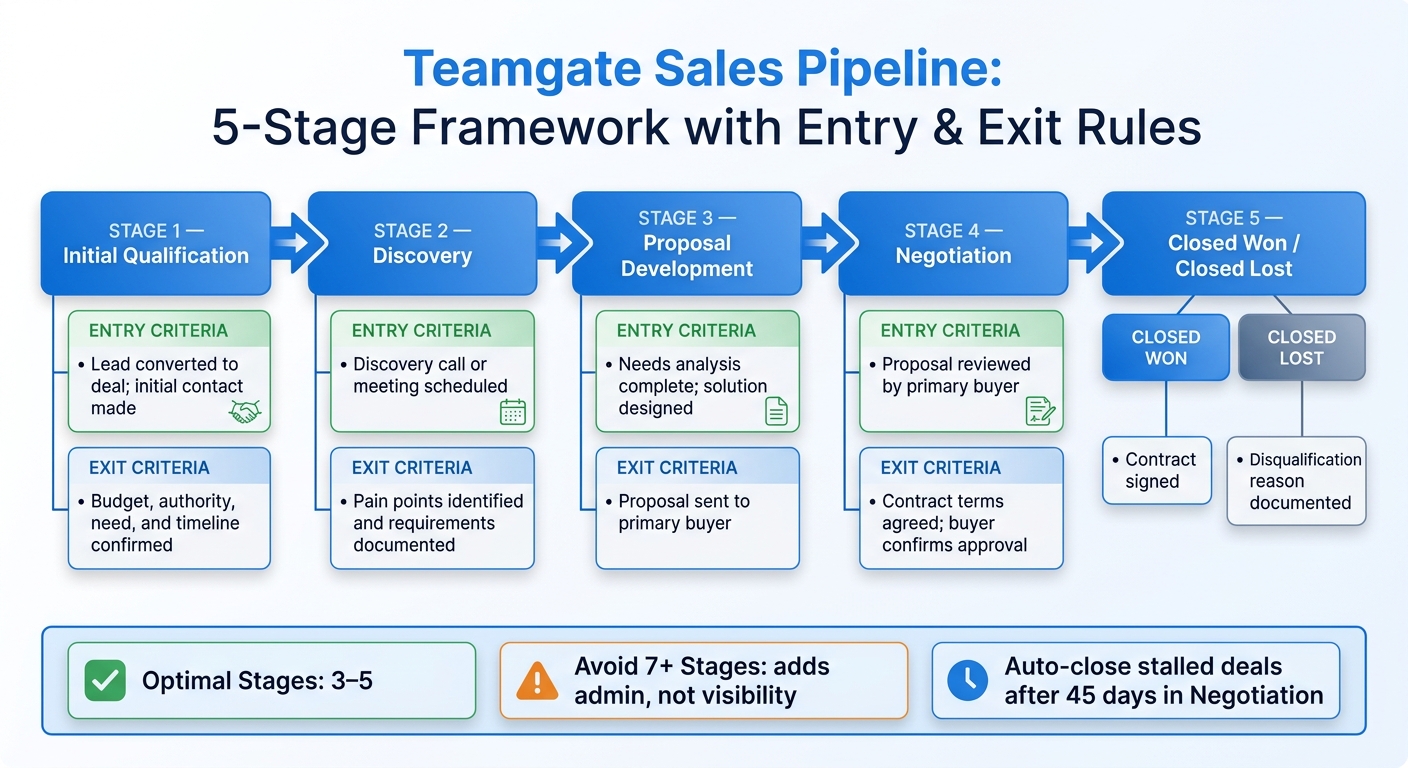
  • Standardize pipeline stages and sales processes: Base progress on buyer actions, not seller tasks, with clear entry and exit criteria.
  • Track metrics: Metrics like forecast bias and stage velocity help refine predictions and improve accuracy.

Companies using automated tools report forecast accuracies as high as 96%. Teamgate supports this approach by ensuring a disciplined sales process, reliable pipelines, and high user adoption – without the complexity of bloated enterprise CRMs. With these steps, you can create forecasts that drive confident decision-making and protect revenue.

Collaborative Forecasting Statistics and Impact on Revenue Accuracy

Collaborative Forecasting Statistics and Impact on Revenue Accuracy

Sales Forecasting Essentials: Methods, Tools, and Best Practices

Choosing the right sales forecasting software is a critical first step in establishing these essentials.

Core Principles of Collaborative Forecasting

Successful collaborative forecasting relies on three key principles: clean data, clear accountability, and continuous updates. Without these, even the most advanced tools won’t deliver reliable results. For sales and finance teams to work effectively, they must agree on consistent definitions for terms like "booked revenue" and "recognized revenue", creating a unified source of truth. When departments interpret these metrics differently, forecasts become fragmented and unreliable.

Accountability is crucial, and a tiered review process can help enforce it. For instance, one enterprise software company improved its forecast accuracy from 67% to 94% in just six months by adopting tiered reviews and prioritizing data quality. This process involves individual reps reviewing deals with their managers, managers consolidating insights with department heads, and leadership ensuring that final figures align with business goals. Each level questions assumptions, reducing the risk of overly optimistic projections.

Viewing forecast variances as learning opportunities rather than failures is equally important. TimeTackle’s editorial staff explains:

"A forecast variance isn’t a mistake to be punished; it’s a signal that one of your underlying assumptions was incorrect."

This approach fosters honest reporting and discourages practices like sandbagging. Conducting regular variance analyses – comparing forecasts to actual outcomes – helps identify flawed assumptions and refine future forecasting cycles. These principles lay the groundwork for the practical steps that follow.

Maintaining Clean and Reliable Data

Accurate forecasting starts with clean pipeline data. Regularly auditing your CRM for "stale" deals – such as opportunities stuck in the "Negotiation" stage for too long – can prevent inflated pipeline values and false confidence. Automating activity capture reduces admin work by 30% while ensuring consistent logging of customer interactions.

Involving multiple stakeholders in each deal also increases data accuracy. Additionally, establishing clear entry and exit criteria for every pipeline stage eliminates ambiguity, ensuring deals only move forward when specific buyer actions are completed.

Defining Roles and Responsibilities

Clear roles are essential for maintaining forecast accuracy. A structured forecast hierarchy – from sales reps to leadership – ensures that forecasts reflect collective judgment rather than isolated guesses. Each role has defined responsibilities that contribute to overall accuracy:

Role Responsibility in Forecasting Impact on Accuracy
Sales Representative Entering accurate data, maintaining deal stages, and logging activities Provides a solid pipeline foundation
Sales Manager Reviewing reps’ data, adjusting forecasts, and coaching the team Filters out individual biases
Sales Leadership Consolidating forecasts and aligning them with company goals Offers a strategic, high-level perspective
Sales Ops/Finance Setting quotas and maintaining systems and definitions Ensures data consistency and technical integrity

As Gong emphasizes:

"As a frontline manager, you’re responsible for the accuracy of your forecast."

Defining roles not only ensures accountability but also supports the actionable improvements discussed later.

Regular Updates and Forecast Adjustments

With clear roles and clean data in place, regular updates keep forecasts accurate. Establishing a fixed schedule – weekly or monthly – helps integrate forecasting into daily operations. Companies using automated activity capture and signal-based tools have reported forecast accuracy as high as 96%.

Real-time dashboards can replace manual spreadsheets, making forecasts accessible to all stakeholders. Integrating your CRM with calendars and inboxes automates the logging of meetings and emails, reducing inconsistencies in manual data entry. Advanced analytics and machine learning can further enhance accuracy by 15% to 30% compared to traditional methods.

The aim isn’t perfection from the start. As TimeTackle’s editorial staff notes:

"The goal isn’t just to predict the future; it’s to create a system so reliable that it helps shape a more predictable future."

Best Practices for Improving Forecast Accuracy

Improving forecast accuracy isn’t just about avoiding revenue loss – it’s about building trust in your sales process. Outdated methods often lead to unreliable forecasts and missed opportunities. By focusing on operational discipline – clear pipeline stages, automated tracking, and data-driven decisions – you can create forecasts that truly guide your business.

Standardizing Pipeline Stages and Next Steps

The first step to accurate forecasts is redefining pipeline stages to reflect buyer actions, not seller tasks. Instead of using internal milestones like "Demo Done" or "Proposal Sent", align stages with buyer behavior, such as "Buyer engaged economic decision-maker" or "Buyer validated solution with technical team". This approach eliminates ambiguity and prevents deals from lingering in stages like "Negotiation" without progress.

Each stage should have clear, objective entry and exit criteria. For example, a deal should only move to "Commit" when specific conditions are met, such as receiving written confirmation from the buyer or scheduling an implementation kickoff. Without these criteria, forecasts risk being inflated by overly optimistic deals.

Assign probability percentages to each stage based on historical data rather than gut instincts. For instance, if 50% of deals in "Proposal" close, use that number consistently for weighted forecasts. Similarly, apply historical conversion rates to stages like "Negotiation" to remove bias and ensure accuracy.

Set time limits for each stage to flag deals that are becoming "stale." For example, a deal stuck in "Proposal" for over 45 days might signal issues like a disengaged buyer or shifting priorities. Identifying these at-risk deals early allows managers to step in, coach reps, or shift focus to healthier opportunities before the quarter ends.

Once stages are standardized, the next step is automating updates to ensure no critical action is overlooked.

Using Activity Tracking and Automations

Manual data entry is a common weak point in forecasting. Reps might forget to log calls, lose track of meetings, or misplace important email threads, leaving managers with incomplete information. Automating activity capture solves this by syncing emails, calls, and meetings directly from tools like Gmail, Outlook, and calendars into your CRM. This creates a real-time, accurate record of deal activity.

Automation also highlights deal health signals that manual updates might miss. For instance, a deal marked as "Commit" is meaningless if the buyer hasn’t responded in two weeks. Automated alerts can flag such stalled deals, enabling timely intervention. Similarly, tracking whether a rep is "multi-threaded" – engaging multiple decision-makers – helps reveal whether the deal has organizational buy-in or is at risk if a single stakeholder drops out.

Automated reminders and follow-ups ensure that reps don’t forget to re-engage with prospects. This proactive approach reduces the loss of opportunities caused by delayed follow-ups or forgotten tasks, addressing what is often referred to as a "silent revenue leak."

By reducing administrative burdens, automation allows reps to focus on selling. More importantly, using behavioral data instead of subjective updates has helped some organizations achieve forecast accuracy rates as high as 96%.

Making Data-Driven Decisions

Beyond automation, improving forecasts requires a commitment to learning from your data. Start with variance analysis – compare past forecasts to actual results to identify inaccurate assumptions. For example, if deals in "Proposal" consistently underperform, your entry criteria for that stage may need tightening. Similarly, if "Commit" deals frequently fall through, you might be missing a key buyer approval step.

As TimeTackle’s editorial team notes:

"A forecast variance isn’t a mistake to be punished; it’s a signal that one of your underlying assumptions was incorrect."

This mindset encourages honest reporting and reduces the temptation to "sandbag" numbers. Back-testing your current model against historical data can also uncover hidden biases. Use past quarters to "predict" results with your current stage criteria and probabilities, then compare those predictions to actual outcomes. If your model misses the mark, adjust definitions, probabilities, or time limits until your forecasts align with reality.

Track leading indicators like deal age, activity frequency, and next-step coverage to catch at-risk deals early. For example, a deal in "Negotiation" with no activity in 10 days, no scheduled follow-up, and only one engaged contact is a red flag – even if the rep marks it as "Commit." Acting on these signals allows managers to step in and either save the deal or redirect resources effectively.

While advanced analytics and machine learning can further improve forecast accuracy by up to 30%, the foundation lies in clean data, consistent definitions, and objective criteria. These basics transform your pipeline into a reliable tool for predicting future revenue.

Key Metrics to Measure Forecast Accuracy

The right metrics can shine a light on where your sales forecasting process needs improvement. Are your estimates overly optimistic? Are deals stalling at certain stages? Are your stage definitions misaligned with how deals actually progress? Tracking these metrics by individual contributor and over specific time periods turns vague notions of "accuracy" into actionable insights you can address through coaching and process adjustments.

Shared frameworks for measurement also help teams work together more effectively and refine forecasts in real time.

Understanding Forecast Accuracy Metrics

Here are some key metrics to evaluate and improve forecast accuracy:

  • Mean Absolute Percentage Error (MAPE): This widely used metric calculates the average percentage error between forecasted and actual results. It’s particularly useful for comparing performance across teams or time periods. For instance, a MAPE of 15% means your forecasts are off by an average of 15%.
  • Weighted Mean Absolute Percentage Error (WMAPE): A variation of MAPE that better handles zero-demand scenarios and irregular patterns.
  • Forecast Bias: This metric reveals whether your team tends to over-forecast (positive bias) or under-forecast (negative bias) consistently.
  • Stage Velocity: This measures how long deals spend in each stage compared to historical averages. For example, if a typical deal closes in 90 days but one is still open after 110 days, that’s a warning sign.

Modern forecasting tools also analyze behavioral signals – like the number of stakeholders involved, attendance at key meetings, and engagement with pricing documents – to provide objective indicators of deal health.

Tracking Metrics by Contributor and Time Period

Breaking down forecast accuracy by individual contributor can reveal patterns that overall numbers might hide. For example, one rep might overestimate deals in the "Proposal" stage, while another might be overly cautious during "Negotiation." Identifying these trends allows for tailored coaching instead of generic training sessions.

Tracking metrics over time – whether weekly or monthly – can help you spot issues like "late-stage slippage" or "pipeline bloat" before they derail your quarterly goals. This time-based tracking also provides valuable insights for other departments, such as finance (budgeting), HR (hiring), and customer success (onboarding). Regularly scheduled forecast reviews ensure updates are routine and not rushed at the last minute.

Using Metrics to Improve Performance

Forecast metrics should be tools for improvement, not just performance trackers. Segmenting results by contributor can highlight team members with consistently high error rates, enabling targeted coaching. If deals frequently exceed average stage durations, set up stall alerts to flag them as at-risk and adjust their closing probabilities.

Variance analysis can also help refine your process. Compare forecasted outcomes to actual results, then adjust stage entry criteria or probabilities if trends show consistent underperformance. Back-testing your current model against historical data can uncover hidden biases. For example, use past quarters to "predict" outcomes using current criteria, then refine your approach until forecasts align better with reality. Additionally, account for historical forecast errors when planning future inventory or resource needs.

The reality is stark: fewer than 20% of B2B sales organizations forecast within 5% of actual revenue. However, companies using automated activity capture and signal-based intelligence have achieved accuracy rates as high as 96%. Clean data, consistent stage definitions, and timely metrics are the cornerstones of a forecasting system that truly reflects your sales performance.

How Teamgate CRM Supports Collaborative Forecasting

Teamgate

Collaborative forecasting only works when your pipeline reflects reality, not wishful thinking. Teamgate CRM is designed around three core principles: disciplined selling, a reliable pipeline, and high adoption by sales reps. Instead of being just a passive database, Teamgate actively ensures clean data and consistent follow-ups. This makes revenue predictions more accurate by grounding them in real-time, objective data.

Pipeline Management for Clean Data

Accurate forecasting starts with clean and consistent data. Teamgate CRM enhances pipeline management through its Visual Deal Pipeline, which uses structured stages with clear entry and exit criteria. This eliminates confusion caused by inconsistent labeling, such as one rep calling a deal "Proposal" while another labels it "Negotiation." With standardized criteria, everyone on the team categorizes deals the same way, ensuring consistency across the board.

To further refine accuracy, Teamgate uses automated lead scoring based on your Ideal Customer Profile (ICP). This removes emotional bias and keeps the focus on high-probability deals, avoiding pipeline clutter from unrealistic opportunities. Manual data entry, often prone to errors, is minimized through automated data capture, ensuring information is recorded accurately and in real time. This leads to consistent probability weighting across the pipeline, resulting in forecasts you can rely on.

Activity and Task Automation

Capturing every sales interaction is just as important. Teamgate automates tasks, reminders, and follow-ups to ensure consistent engagement, preventing deals from going stale. Real-time tracking of activities – like calls, emails, and meetings – means your forecast reflects actual sales efforts, not outdated manual updates.

The system also flags at-risk deals by identifying opportunities that exceed the average stage duration based on historical data. These alerts allow teams to adjust closing probabilities before it’s too late. With advanced analytics and machine learning, this approach can improve forecast accuracy by 15–30% compared to traditional manual methods.

Real-Time Dashboards and Reporting

Teamgate’s real-time dashboards provide instant visibility into key metrics like deal age, activity levels, and next-step coverage. Managers can use these insights to make proactive adjustments before deals stall. The Visual Sales Funnel Analysis shows exactly how prospects move through each stage, highlighting conversion rates and pinpointing where deals are getting stuck.

Sales velocity metrics further enhance decision-making by measuring how quickly leads, deals, and revenue progress. This allows teams to adjust strategies in real time to meet their forecasted goals. Instead of waiting until the end of the month to discover forecasting errors, Teamgate enables data-driven pipeline reviews throughout the quarter. By focusing on at-risk deals early, your team can stay on track. With dashboards that require no setup, these insights are easily accessible to everyone on the team.

Conclusion

Collaborative forecasting creates a structured approach that transforms revenue prediction into a reliable process. The core principles are simple: define your pipeline stages clearly, base forecasts on real-time activity data rather than intuition, and stick to a consistent review schedule. When these practices become routine instead of last-minute efforts, forecasting accuracy becomes a dependable part of your operations.

Using outdated methods can cost companies up to 11% of their annual revenue due to outdated data and inaccurate predictions. For a business generating $150M in annual recurring revenue, that’s a staggering $16.5M lost. Meanwhile, only 24% of executives trust the forecasts they receive, leaving most organizations to make big decisions – like hiring, budgeting, or product launches – based on unreliable numbers.

Modern forecasting systems solve these issues. Tools with automated data capture and signal-based intelligence can push accuracy as high as 96%. But achieving this level of precision isn’t about working harder; it’s about using tools that enforce consistency and discipline. For example, Teamgate CRM ensures no deal is left without a next step, flags inactive deals before they stall, and gives managers instant visibility into deal progress and activity metrics.

"Forecasting isn’t a reporting task. It dictates headcount, spend, product timing, and executive confidence." – Grace Sweeney, Revenue Grid

When your CRM enforces follow-ups and builds an evidence-based pipeline, forecasting becomes the backbone of revenue protection. This leads to a pipeline leaders can trust – one that drives growth by design, not by chance.

FAQs

How do we define pipeline stages so everyone uses them consistently?

To keep your pipeline stages consistent, start by defining clear and measurable criteria for each stage, such as qualification, proposal, negotiation, and closing. Make sure these definitions are well-documented and shared with your team so everyone is aligned and understands the process.

A CRM like Teamgate can simplify this by providing visual dashboards and metrics to enforce these standards. Regular training sessions and periodic pipeline reviews are also crucial to avoid misclassified deals and to ensure your forecasting stays reliable.

What signs indicate a ‘Commit’ deal might be at risk?

A ‘Commit’ deal might be in trouble if you notice any of these red flags: deals that have been sitting untouched for too long, no clearly defined next steps, or if progress has stalled with little to no engagement. Keeping your pipeline clean and using up-to-date data can help you spot these risks early.

How often should we run forecast reviews and variance analysis?

Forecast reviews and variance analysis should happen regularly – ideally, every month. Doing this ensures your pipeline stays accurate, helps you spot potential risks early, and keeps your forecast trustworthy.

Related Blog Posts

Sales teams often struggle with outdated insights that lead to missed opportunities. Real-time feedback solves this by providing instant updates on deal progress, helping teams act before issues grow. It highlights stalled deals, missed follow-ups, and buyer concerns, enabling proactive decisions that boost efficiency and revenue.

Key benefits include:

  • Faster responses: Flag issues like pricing objections or competitor mentions during calls.
  • Improved communication: Keep everyone aligned with real-time updates and shared dashboards.
  • Stronger accountability: Transparent records ensure tasks aren’t overlooked.

Teamgate simplifies this process by offering tools like automated updates, activity tracking, and pipeline reports, helping teams follow clear steps and trust their data – without the complexity of bloated CRMs.

How to Build an Infinite Feedback Loop with Your Prospecting Team & Department

How Real-Time Feedback Improves Sales Collaboration

Real-time feedback reshapes how sales teams operate by replacing guesswork with immediate, actionable insights. For instance, if a buyer raises concerns about pricing or mentions a competitor during a call, these signals can instantly alert the right team member through tools like Slack, enabling quick responses while the deal is still active. This transition from delayed updates to instant clarity empowers teams to act decisively and salvage opportunities.

Better Communication and Transparency

Traditional sales updates often rely on incomplete call summaries, leaving teams in the dark about critical deal details. Real-time feedback platforms solve this by tracking specific buyer behaviors – such as how often a prospect views a proposal, shares it internally, or revisits key sections.

“Visibility is clarity plus timing. You see what’s real, and you see it soon enough to act”.

With real-time updates, everyone has access to the latest data without waiting for manual input. This transparency ensures that when warning signs appear – like reduced engagement with a proposal – the team is notified immediately. The result is better communication, faster decision-making, and stronger accountability across the board.

Faster Problem Solving

Traditional sales metrics often delay the identification of issues, leaving teams reactive instead of proactive. Real-time feedback changes this by highlighting potential blockers as they occur. For example, conversation intelligence tools can flag objections or competitor mentions during calls, enabling managers to step in with coaching or resource adjustments right away. Instead of focusing solely on seller activities, these tools track buyer commitments, such as engaging decision-makers or validating solutions. This approach pinpoints the pipeline stages where deals commonly stall, allowing teams to make targeted improvements and avoid revenue loss.

Increased Team Accountability

Real-time feedback also strengthens team accountability by providing a transparent record of actions. Many modern CRM and collaboration tools link conversation threads directly to opportunity records, eliminating the risk of tasks getting lost in endless email chains. Activity logs make next steps clear, and when critical events occur – like a customer leaving a low rating or a deal being flagged as “at risk” – real-time alerts ensure immediate follow-up. Research shows that high-performing teams are twice as likely to prioritize trust and collaboration as key to their success. Shared dashboards further enhance this by offering a unified view of revenue projections, keeping everyone aligned on progress and expectations, and supporting consistent growth.

How to Implement Real-Time Feedback in Your Sales Process

How to Implement Real-Time Feedback in Sales: 3-Step Process

How to Implement Real-Time Feedback in Sales: 3-Step Process

Real-time feedback can transform your sales process by combining the right tools, structured workflows, and a team culture that values immediate insights. Here’s how technology, daily routines, and culture work together to make this happen.

Using Technology for Instant Feedback

Technology plays a crucial role in identifying and addressing issues as they arise. For example, Sales Pipeline Movement reports track changes in opportunities in real time, helping you spot stalled deals or delays before they lead to lost revenue. Integrating tools like Slack can also enhance responsiveness. Slack notifications can deliver immediate updates on critical deal changes, enabling your team to act quickly. As Teamgate highlights, “Teamgate-Slack integration lets you inform third parties, instantly, about won deals, even if they don’t have a Teamgate sales CRM account”.

Another way to keep everyone informed is through automated daily summaries. Tools like the “Morning Muffin” newsletter provide a recap of lead updates, pipeline shifts, and the day’s agenda, ensuring your team stays aligned and prepared. Once these systems are in place, feedback becomes part of the daily rhythm.

Building Feedback into Daily Sales Work

Incorporating feedback into everyday activities ensures it becomes actionable and relevant. Automated meeting and call tracking, for instance, lets managers compare logged activities against goals, enabling precise and timely coaching based on actual performance.

Real-time dashboards also offer immediate visibility into potential risks. By automatically logging next steps and triggering reminders for aging deals or activity gaps, these tools help ensure consistent follow-ups. This proactive approach keeps deals moving forward and reduces the chances of missed opportunities.

Building a Feedback-Focused Team Culture

The right tools only work if your team uses them. Prioritize platforms that are intuitive and easy to adopt.

“The most powerful features are worthless if no one uses them. Choose platforms that reps describe as ‘easy to use,’ not just powerful.” – Jonathan M Kvarfordt, Momentum

Deliver feedback through channels your team already relies on, such as Slack or mobile apps, rather than adding extra steps to their workflow. When coaching becomes part of the natural flow of work rather than a separate task, your team starts to see real-time feedback as a strategic advantage. This shift allows you to move from reviewing past mistakes to making immediate adjustments while deals are still in play.

How Teamgate CRM Supports Real-Time Feedback

Teamgate

Teamgate CRM seamlessly integrates real-time feedback into your sales process. By unifying communication, automating updates, and surfacing critical deal insights, it equips managers to deliver data-backed coaching while allowing sales reps to stay focused on closing deals.

Instant Notifications and Pipeline Updates

Teamgate’s Slack integration ensures team members and external stakeholders are instantly notified about key updates, like a won deal, even if they don’t have a CRM account. This keeps everyone aligned and ready to act on next steps. Additionally, the automated Morning Muffin newsletter provides daily summaries of lead and pipeline changes alongside the day’s agenda. The Sales Pipeline Movement report tracks every opportunity in real time, helping managers spot stalled deals and areas needing follow-up. These tools create a feedback loop that enables immediate coaching and action.

Activity Tracking for Data-Driven Feedback

Teamgate’s dashboards offer detailed metrics for coaching based on facts, not guesswork. The platform tracks activities like meetings and calls against targets, offering a clear picture of performance. As Teamgate explains:

“The sales pipeline movement report is designed to illustrate the actual movement – or lack of movement – of each opportunity within a specified time range, in order to accelerate sales cycle performance.” – Teamgate

This level of visibility helps managers identify bottlenecks, such as inconsistent outreach or stalled deals, and collaborate with reps to address them. It reinforces the discipline needed to maintain a healthy, predictable pipeline.

Team Collaboration Through Built-In Communication Features

Teamgate enhances collaboration by integrating emails, calls, meetings, and notes directly into the CRM. Automated email syncing ensures every communication is tied to the right contact or deal, giving managers a complete view of interactions. This allows feedback to be specific and actionable. For instance, a manager might say, “I noticed the prospect asked about pricing on Tuesday – let’s refine your approach to handling that objection.” With the mobile app, reps can access vital data and receive feedback on the go, ensuring no opportunity slips through the cracks. By centralizing all communication, Teamgate ensures next steps are always clear and actionable, keeping deals moving forward efficiently.

Measuring the Impact of Real-Time Feedback

Introducing real-time feedback tools is only the first step; measuring their effectiveness is what ensures they lead to meaningful sales improvements. Without tracking the right metrics, coaching becomes guesswork. These measurements help you identify where feedback speeds up deals, prevents revenue losses, and uncovers process inefficiencies. The result? A well-oiled feedback loop that drives better sales outcomes.

Key Metrics to Track

To gauge the impact of real-time feedback, focus on these critical metrics:

  • Deal velocity: Track how quickly opportunities move through each stage in your pipeline. Effective feedback should result in faster deal progression.
  • Follow-up consistency: Ensure every active deal has a clear next step and due date. Deals without defined next steps are at risk of stalling, highlighting the importance of sales pipeline hygiene.
  • Forecast accuracy: Reliable feedback keeps your pipeline honest, turning revenue predictions into dependable numbers rather than hopeful guesses.
  • Activity metrics: Monitor actions like meetings held and calls made to confirm that reps are hitting targets and driving deals forward.
  • Deal aging and stalling: Identify stages where deals consistently slow down so you can focus your coaching efforts where they’re needed most.

Using Teamgate Analytics to Measure Results

Teamgate’s analytics provide the tools you need to track these metrics and turn insights into actionable improvements. The Sales Pipeline Movement report highlights where deals are progressing or getting stuck, helping you pinpoint bottlenecks. The Insights dashboard compares goals against actual performance, giving you data-driven evidence for coaching instead of relying on intuition. Dive into the loss reasons analysis to uncover why deals fall through – whether it’s pricing, timing, or competitors – so you can tailor feedback to address real issues. Plus, the Morning Muffin daily summary keeps your team aligned by summarizing pipeline changes from the previous day, making daily stand-ups more focused and productive.

Refining Your Feedback Process with Data

Once you’re tracking the right metrics, use them to sharpen your coaching strategy. For example, apply CRM filters to find deals missing next steps or late-stage opportunities that have been inactive for over 10 days – these should be your immediate coaching priorities. Set up automated alerts for risk signals like pricing objections or mentions of competitors, allowing managers to step in before deals are lost. Regularly compare your sales goals with actual results to identify potential risks before they derail your targets. As Jonathan M Kvarfordt from Momentum puts it:

“Modern sales organizations don’t suffer from a lack of data. They suffer from a lack of timely insight.”

The goal is to transform CRM data into actionable coaching moments, ensuring no revenue leaks away unnoticed.

Conclusion

Real-time feedback transforms sales collaboration by addressing problems before they escalate, effectively stopping revenue loss. When your team has immediate visibility into deal movement, activity gaps, and buyer signals as they happen – not weeks later – you can tackle the biggest threats to your sales pipeline management: stalled conversations, missed follow-ups, and deals that quietly fade away.

This instant clarity allows reps to adjust their approach while deals are still salvageable. Managers can coach with precision, using real metrics like deal age, next-step coverage, and activity trends. The team stays aligned through shared communication histories and automated updates that highlight what truly matters.

A reliable CRM makes this process even smoother. Teamgate CRM reduces admin work with tools like the Sales Inbox that syncs emails automatically, a mobile app for quick note logging, and features like Morning Muffin to kick off each day with a clear, shared agenda. Real-time pipeline reports identify exactly where deals are stalling, enabling managers to provide focused, effective coaching.

The end result? A pipeline you can trust, leading to predictable growth. Say goodbye to vague forecasts and lingering deals. With clean data, consistent follow-ups, and a structured approach, your team can turn opportunities into revenue – without drowning in admin work – all powered by actionable, real-time insights.

FAQs

What counts as real-time feedback in sales?

Real-time feedback in sales means providing immediate, actionable insights to sales reps as they work. This could include live alerts about changes in deal status, reminders for follow-ups, or updates to the pipeline as they happen.

It also involves using dashboards and automated signals to transform activity data – like emails, calls, and meetings – into instant insights. This helps sales teams stay focused, keep deals progressing, and make better decisions in the moment.

How can we prevent alert fatigue from real-time updates?

To avoid overwhelming your team with constant notifications, focus on delivering updates that are both urgent and relevant. Ensure that team members only receive alerts for critical actions that require their immediate attention. Automating notifications for issues like aging deals or missed follow-ups can help direct focus toward tasks that drive results. Additionally, customizable dashboards offer a clear, visual way to monitor pipeline health and spot trends instantly, cutting down on unnecessary disruptions. By combining automation, smart filtering, and intuitive visualization, you can keep your team informed without overloading them.

What’s the fastest way to roll this out in Teamgate CRM?

The fastest way to set up real-time feedback in Teamgate CRM is by taking advantage of its built-in features for managing pipelines, tracking activities, and monitoring dashboards. Begin by clearly defining your deal stages and specifying mandatory next steps. Then, configure automated reminders to keep follow-ups on schedule. Use the dashboards to keep an eye on pipeline health and spot aging deals instantly. Automation can also help by flagging stalled deals, making it easier to drive quicker adoption and foster better teamwork. Teamgate helps reps follow a clear sales process and gives managers reliable insights – without turning CRM into a full-time admin job.

Related Blog Posts

The most effective method to grow your business — and make it more resilient — isn’t necessarily to invest in advertising. Instead, establishing trust offers exceptionally valuable benefits in multiple ways.

But how do you position your organization as a competent and experienced entity that customers can rely on for high-quality solutions to their pain points? One of the most effective ways to reach this goal is to incorporate powerful trust signals into your online presence.

In this article, we’ll give you an overview of the best ways to use trust signals to grow and protect your brand. Without further ado, here are the best applications of trust-building website elements, along with examples of real brands utilizing them for you to draw inspiration from.

The Role of Trust in Brand Growth and Protection

Before covering specific strategies for using trust signals in your online presence, you’ll want to understand the impact of brand trust on growth and risk protection.

For starters, credibility is a crucial factor influencing purchase decisions in most consumers’ buying journeys.

According to research conducted by Edelman:

  • 88% of consumers consider trust to be as important as price and quality. 
  • 68% of shoppers are ready to pay more for products from brands they trust. 
  • When it comes to the long-term benefits of building brand trust, it’s crucial to note that it’s a driver of loyalty for over 30% of customers.

It’s also worth mentioning that about one in two shoppers is far more likely to remain loyal to businesses they trust — even when those businesses make a mistake or are accused of wrongdoing.

In other words, trust doesn’t just fuel brand growth (both through removing conversion obstacles and generating peer-to-peer marketing opportunities). It can also protect a business from risk and market volatility, primarily by ensuring customer retention via the mediating power of customer-brand relationships.

The great news is that there are numerous effective tactics for incorporating trust signals into your online presence. Here are some of the best strategies for business growth and longevity.

Create Trust-Based Value Propositions to Reduce Web Visitors’ Risk Perception

When exploring opportunities to leverage trust signals to grow your brand, it’s essential to understand the process buyers go through when selecting which businesses to buy from.

Consumer behavior data clearly shows that most people move through the same stages of the buyer’s journey. One of these phases is a detail-oriented evaluation phase, where shoppers actively research whether a brand has the expertise and capacity to resolve their pain points and whether a conversion could lead to an undesirable outcome (such as spending money without receiving the promised benefits).

Now, the primary type of content consumers utilize in the evaluation phase of the sales cycle includes social proof. Research shows that 97% of shoppers read reviews when browsing for products or services. And 41% do so for every purchase decision they make.

However, there are ways to build brand trust before your prospects feel the need to verify your business and products’ credibility. The way to do that is to directly infuse your value propositions with trust signals that reduce your audience’s initial risk perception.

You can implement this tactic by making credibility-based promises, offering potential customers guarantees, or even highlighting some of the awards or acknowledgments your products have earned so far.

For instance, Uproas boldly builds brand trust with the microcopy just below its primary value proposition on the Facebook Feedback Score landing page. Here, the brand states that customers don’t pay anything if they don’t receive the outcomes they signed up for, effectively removing an important conversion obstacle that might be stopping some leads from converting (before it even arises).


Source: uproas.io

Other businesses accomplish the same effect by subtly addressing their target audience’s fears. Ramp, for instance, states that its product provides “Easy-to-use corporate cards, bill payments, accounting, and a whole lot more. All in one place.” — a message that clearly aims to remove prospects’ fear that the software might not be enough to resolve all their pain points.

Remember the Role of Web Design in Establishing Brand Trust

In some cases, trust signals aren’t just website elements that you strategically use to establish brand credibility. Instead, earning your target audience’s confidence could just as well depend on the aesthetic appeal of your website.

In case you’re not familiar with the fact, consumer behavior research shows that shoppers regularly form brand opinions based on web design. These opinions often pertain to brand credibility. But even more importantly, they directly influence consumers’ purchase intent.

So, when aiming to grow and protect your brand with trust signals, keep in mind that such elements aren’t merely limited to social proof or badges. Instead, they can involve your entire online presence — including your homepage, landing pages, and even social media profiles.

For example, if you check out the Remote homepage, you’ll first notice that it’s well-designed — with tons of product understanding-boosting visuals, trust badges, and customer-centric educational content. On top of that, it’s highly appealing from a visual viewpoint, which effectively: 

  • elevates visitors’ willingness to interact with on-page content
  • encourages them to form positive brand opinions
  • gets them to start trusting the business (which automatically elevates purchase intent as well)

Naturally, when it comes to the role of web design in establishing brand trust, it’s important to note that having a beautiful website does not mean you should avoid trust badges and similar elements in your online presence. On the contrary.

Nevertheless, if we’re discussing credibility-building from a strictly design-centric point of view, it’s important to remember that how and where you position trust signals directly determines your ability to use these elements to earn customer confidence.

For instance, if you check out Socialplug, you’ll notice that the brand doesn’t just dedicate the most prominent sections of its homepage to communicating customer satisfaction rates, service quality, and dedication to customer support. Much more importantly, the brand repeats all trust elements throughout the page, ensuring that every single call to action has a trust signal nearby to reassure potential customers and gently guide them toward a positive purchase decision.

Produce Detailed Case Studies to Establish Expertise

Trust-building claims are just one part of the equation for growing your business through credibility. But it’s important to remember that they’re not enough to singlehandedly overcome most conversion obstacles — especially considering that a growing number of consumers are skeptical of brand claims (at least those related to sustainability and social values).

To engage your target audience and build trust to convert new customers, you need to convince them they can genuinely rely on your business to handle their pain points.

One of the best ways to do this is to invest in content that supports expertise. Not just because competence represents one of the primary pillars of trust (along with benevolence and integrity). It’s equally significant that consumers’ faith in industry authorities is rising.

According to survey data from 2025, 78% of people see scientists as qualified, 57% as honest, and 56% as concerned about people’s well-being. And research from 2022 shows that 58% of Gen Z consider brand technical experts to be one of the top three credible sources of purchase advice.

Case studies — like the one on RE Cost Seg New York landing page — offer the perfect opportunity to emphasize your brand’s (and team’s) expertise, earn customer trust, and nudge prospects closer to a conversion.


Source:
recostseg.com

Of course, for this content format to genuinely benefit your business, it has to be sufficiently detailed and supported by real-world data.

So, if you decide to use detailed case studies as trust signals in your marketing and branding strategies, prioritize evidence over claims. Yes, you may not get the same impressive results that groundbreaking promises may generate. Nevertheless, the long-term effects will be just as good (or better) thanks to expertly managing your prospects’ expectations and consistently delivering on your promises (which also protects your brand from repercussions and helps you grow it).

Use Third-Party Social Proof

If brand promises pale in comparison with data, it’s evident that earning customer confidence — and using credibility to grow and protect your brand — necessitates some form of evidence to give weight to your claims.

When discussing trust signals that aid business expansion and protection, very few tactics work quite as well as third-party social proof, which eliminates customer concerns and drives conversions.

The primary benefit of third-party trust-building content is that it can easily adapt to your brand’s circumstances, needs, and objectives with minimal effort.

On the one hand, showcasing third-party content is an effective way to infuse your trust marketing with a dose of transparency, which helps protect your business from consumer skepticism. On the other hand, it’s a great way to demonstrate that your business has nothing to hide in terms of customer feedback, which is the exact opposite of what can happen when brands handpick what reviews or ratings to highlight on their digital channels.

For example, the product ratings featured on this DialMyCalls page come from sources like Capterra, G2, and ResellerRatings, which is a great way to build trust by relying on the fact that most of the brand’s audience already perceives these websites as credible — especially considering that they’re highly unlikely to be home to fake reviews (which are becoming an increasing concern for buyers).

The same logic applies to using media mentions as trust signals to encourage conversions. If you check out the Freeburg Law homepage, you’ll notice that the business proudly points out that it has been featured in publications such as The Guardian, NBC News, New York Post, FOX News, The Washington Post, and many others — an exceptional method to establish authority emphasizing that these reliable and credible publications have recognized the business as a trustworthy entity.

Source: tetonattorney.com

Use Trust Signals to Clearly Communicate Relevant Policies and Customer Benefits

Sometimes, the best way to grow and protect your brand isn’t to use trust signals to push customers toward conversion. Instead, it’s to provide shoppers with the clarity they need to make smart buying decisions they won’t regret in the future.

The reason for this is simple. Poor customer experience inevitably harms brand reputation.

According to research, 70% of consumers will abandon a brand after just two negative experiences, underscoring the importance of managing expectations for long-term growth.

But even more worrying is the fact that dissatisfied customers aren’t afraid to share their opinions — whether via a negative review or by speaking to their friends and family — which could have serious repercussions on your business’s public image and ability to attract new customers.

So, if you’re looking for ways to protect your organization by incorporating trust signals into your online presence, don’t make the mistake of underestimating directness and clarity.

Ultimately, you don’t have to make impressive promises to convince your audience that you’re the right choice to resolve their needs. In fact, being transparent about what they can (or can’t) expect from your business is far more likely to earn their confidence and nudge them toward the bottom stages of your sales funnel.

For example, if you check out the Waterfall Enrichment product page on the Clay website, you’ll notice that it includes a “Start building for free” CTA button, with microcopy pointing out that signing up for the 14-day Pro trial doesn’t require prospects to provide their credit card information.

Or, if you look at Baggu, you’ll discover that the brand’s product pages clearly state that all U.S. orders over $50 receive free shipping, as well as that all Baggu products in unused condition can be returned within 30 days of purchase.

Admittedly, these promises may not align with all customers’ wants and expectations. Nevertheless, they clarify these companies’ policies, which is one of the most important first steps toward establishing a trustworthy and reliable public image.

Final Thoughts

Incorporating powerful trust signals into your online presence can be relatively easy. Yet, if you do it right, the gains could be beyond impressive.

Trust-building content is one of the best assets for growing your business. Plus, it can be invaluable in protecting your brand from negative feedback.

So, don’t hesitate to utilize this strategy to advance your company’s reputation. The tactics outlined in this guide are an excellent place to start. And if you want to go further, you can easily adapt or upgrade these strategies to achieve even better reputation-management outcomes.

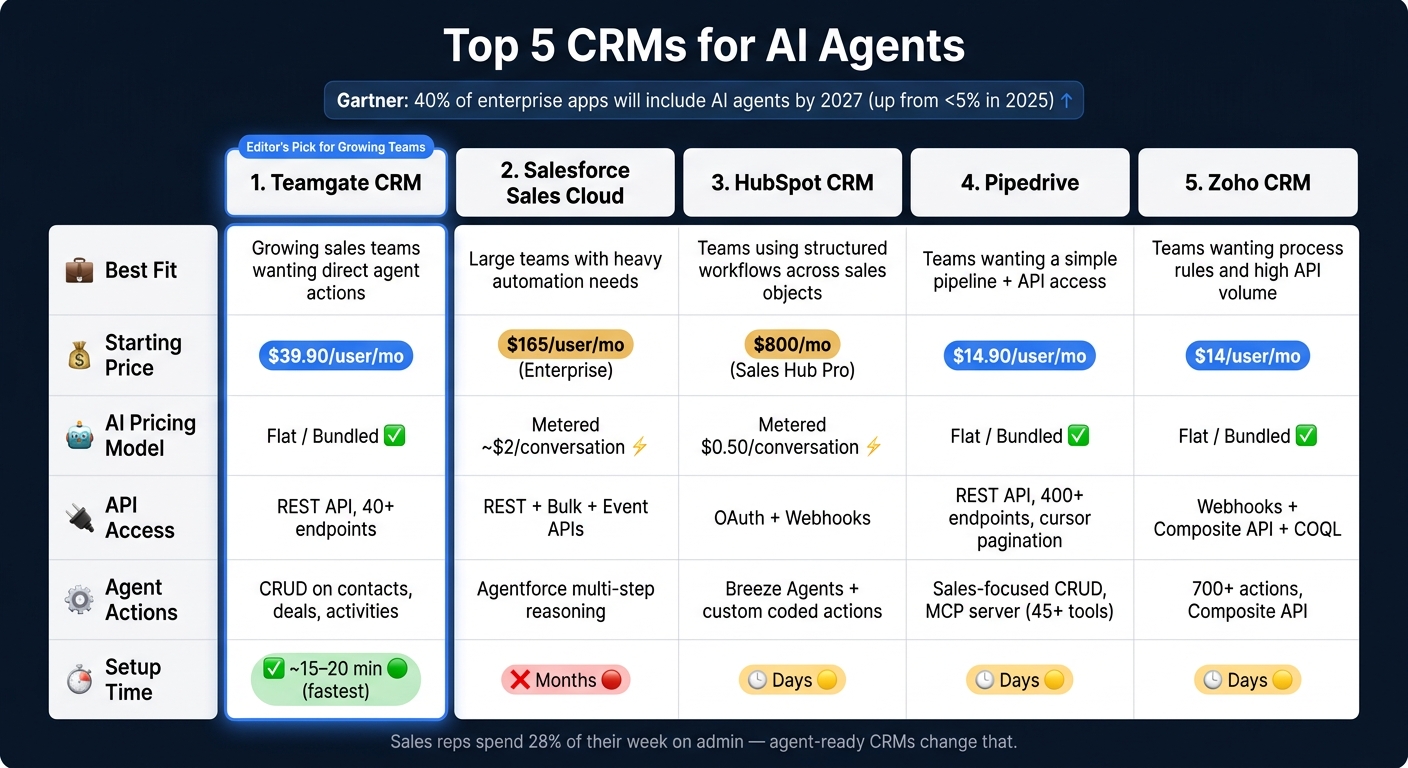
HubSpot’s growth into a multi-functional platform has added complexity and costs that don’t always align with the needs of sales teams. Its pricing, starting at $500/month for professional plans plus onboarding fees of $3,000–$12,000, can be a barrier. Sales reps often face challenges navigating its features, with additional tools required for dialing and sequencing, further increasing costs.

For teams seeking simplicity, Teamgate offers a focused CRM that prioritizes pipeline management and ease of use without hidden fees or unnecessary features. Starting at $39.90/user/month, it avoids the steep tier jumps and contact-based pricing of HubSpot. Teamgate helps sales teams maintain clarity and discipline, offering tools like lead scoring, real-time analytics, and AI-driven CRM workflows.

Quick Comparison

Feature/Aspect HubSpot CRM Teamgate CRM
Pricing Starts at $500/month + fees Starts at $39.90/user/month
Onboarding Fees $3,000–$12,000 None
Focus Area Marketing, sales, service tools Sales pipeline and forecasting
Ease of Use Complex for advanced features Intuitive, minimal training needed
Customer Rating 4.5/5 4.7/5
Scalability Enterprise-level, costly Small to mid-sized, affordable

Teamgate gives growing sales teams clarity, structure, and trustworthy pipeline insight – without enterprise CRM bloat or feature overload. If you’re looking for a CRM that prioritizes simplicity and helps your team stay focused on closing deals, Teamgate is a strong alternative.

HubSpot vs Teamgate CRM: Pricing and Features Comparison

HubSpot vs Teamgate CRM: Pricing and Features Comparison

1. HubSpot CRM

HubSpot

Scalability

HubSpot offers scalability, but it comes at a steep cost. While the Starter tier begins at an affordable $20 per user per month, moving to the Professional tier – necessary for advanced automation – can cost between $800 and $890 per month.

"The jump from HubSpot Starter ($20/user/mo) to Professional-tier marketing automation is where most small businesses hit the wall." – Sapt.ai

Adding to the challenge is contact-based pricing. For instance, a plan starting at $45 per month for 1,000 contacts can climb to over $4,000 per month as your contact list grows to 100,000. Essential tools like lead scoring and prioritization, custom workflows, and A/B testing are only available at the Professional tier. Additionally, HubSpot requires a 12-month contract with no prorated cancellations, which can make budgeting tricky for growing teams.

These pricing hurdles can lead to operational limitations, particularly in automation.

Automation Features

HubSpot’s higher tiers unlock automation for deal stages, tasks, and email sequences. However, sales teams focused on outbound efforts often find themselves relying on third-party tools for dialing and sequencing. For larger organizations, HubSpot’s permission settings can be another sticking point. As Sean McGauley from Growth Spurt Agency explains:

"One area where HubSpot has some work to do is in the granularity of their permissions… This becomes increasingly more important as your number of employees grows into the hundreds."

These constraints can hinder operational efficiency, especially as teams grow and their needs evolve. Hidden costs add another layer of complexity to the platform’s overall value.

Pricing and Value

HubSpot’s pricing structure extends beyond its base subscription, with additional costs for advanced features. For example, extra dashboards cost about $200 per month, custom reports add another $200 per month, and increasing API limits can run up to $500 per month.

"HubSpot’s free CRM hooks you in with a genuinely great product, then the upgrade path assumes you’re a mid‑market company with mid‑market budgets." – Sapt.ai

While using multiple HubSpot Hubs together has been linked to a 51% increase in deals closed, the bundled 25% discount for all five Hubs still represents a hefty expense. This can be a tough sell for sales teams that prioritize pipeline management over broader marketing tools.

2. Teamgate CRM

Teamgate

Scalability

Teamgate is tailored for small to mid-sized businesses, which make up 80% of its customer base. Its pricing structure is straightforward and flexible, avoiding the complexity of tier jumps or unexpected costs tied to database size. The Starter plan is free for teams of up to two users, while the Team plan costs $39.90 per user/month, offering a broad set of tools. For advanced features, the Growth plan is available at $59.90 per user/month. For example, a 10-user team on the Team plan would pay around $399 per month.

Teamgate also supports business growth through integrations with tools like LinkedIn, Mailchimp, and Zapier, allowing your tech stack to evolve seamlessly. To assist businesses looking to expand, Teamgate offers a free sales audit to help identify untapped revenue opportunities before scaling. This combination of predictable pricing and integration options ensures that businesses can grow without unnecessary complexity.

Automation Features

Teamgate leverages AI to streamline sales workflows, automating tasks like lead capture, scoring, analytics, and LinkedIn integration. These features reduce manual effort and enhance data accuracy. By 2026, Teamgate has become a leading choice for AI-enabled CRM solutions, recognized for improving workflow efficiency. While it holds an impressive 4.7/5 rating on G2, some users have mentioned occasional performance issues under heavy usage.

To ensure a smooth user experience, Teamgate provides 24/7 chat support and offers a 14-day free trial for all plans, giving teams a chance to test its features and responsiveness before committing. These automation tools and support options make Teamgate a practical choice for businesses aiming to optimize their sales processes.

Pricing and Value

Teamgate focuses on simplicity and quick setup, helping businesses minimize hidden costs related to training and onboarding. It boasts a 95% user satisfaction rating on FinancesOnline and scores 8.5/10 on SmartScore for its functionality and overall value. By centralizing key sales functions – such as pipeline management, lead tracking, and real-time analytics – Teamgate supports a disciplined sales approach from prospecting to deal closure.

The platform is versatile, serving industries like Research, Manufacturing, and Event Services. While the majority of its users are small to mid-sized businesses, about 20% of its customer base consists of enterprise-level organizations, demonstrating its ability to scale effectively.

The Best Hubspot Alternatives (for Growing Businesses)

Strengths and Weaknesses

Looking at the detailed features and pricing, the strengths and weaknesses of each platform provide further clarity on their positioning. Each CRM caters to a specific sales approach, and understanding their high points and limitations can help determine the best fit for your team.

Aspect HubSpot CRM Teamgate CRM
Primary Strength Combines marketing, sales, and service tools, with approximately 500 integrations and extensive learning resources through HubSpot Academy Designed with sales teams in mind, featuring a native SmartDialer, task-oriented workflows, and customizable pipelines
Usability Easy to use for basic tasks, though the abundance of features can feel overwhelming; rated 4.4/5 for customer satisfaction Highly intuitive with minimal training required; rated 4.7/5 and offers a task-first interface to keep reps focused
Cost Structure Offers a free tier, but professional plans start at $500/month with onboarding fees between $3,000–$12,000 Transparent pricing without hidden onboarding fees
Scalability Works well for enterprise-level needs but costs can increase sharply – for instance, managing 1,000,000 contacts could cost nearly $10,000/month Ideal for small to mid-sized businesses, with 20% enterprise adoption indicating reasonable scalability
Key Weakness Complicated pricing model and per-contact fees that can affect ROI negatively Limited focus on marketing and customer service features
Integration Risk Medium risk due to the complexity of its ecosystem Low risk with streamlined and essential integrations

This comparison highlights Teamgate CRM’s streamlined approach, making it particularly appealing to sales teams that prioritize efficiency over broader marketing capabilities.

As Erin Harris from Envysion, Inc. shared:

"Hubspot is being used by the organization for marketing communications and managing/hosting the company blog"

While Teamgate may lack some advanced marketing automation tools, its focus on pipeline management, forecasting, and ease of use makes it a practical choice for sales teams. This targeted design ensures simplicity and precision, aligning well with teams that value disciplined sales processes and clear insights.

Conclusion

Teamgate is designed with one goal in mind: helping sales teams close deals with consistency and clarity. By focusing on pipeline management and a task-first interface, it eliminates distractions and keeps sales reps zeroed in on their next steps, avoiding the pitfalls of overcomplicated tools.

Why Teamgate stands out: The platform prioritizes pipeline discipline and ease of use, earning it a 95% user satisfaction rating. It’s particularly favored in industries like Research (33%) and Manufacturing (27%), where structured processes and clear pipeline visibility are crucial for success.

Simple, transparent pricing: Teamgate avoids hidden fees and complex pricing structures. Unlike CRMs that charge for every contact or require costly onboarding, its straightforward plans grow with your team – no surprises.

Ease of adoption: With minimal training needed and an intuitive design, Teamgate ensures your sales reps actually use it daily. Its 4.7/5 customer satisfaction rating reflects how well it balances simplicity with functionality. Even enterprise teams (20% adoption rate) find it scalable without unnecessary complexity.

What Teamgate offers: If you’re looking for a CRM that supports disciplined selling, reliable forecasting, and customizable pipelines, Teamgate delivers. By centralizing key functions like lead tracking, pipeline management, and real-time analytics, it simplifies the entire sales process – from prospecting to closing deals.

Ultimately, the question isn’t about which CRM has the most features. It’s about which one ensures your team stays on track, follows up consistently, and keeps your pipeline data reliable. Teamgate’s focus on simplicity, cost clarity, and effective sales processes helps teams drive results without getting bogged down by unnecessary complexity. It’s a CRM built to protect your revenue and keep deals moving forward.

FAQs

Is Teamgate a good fit for my sales team size?

Teamgate is designed to support sales teams at every stage, whether you’re a small team just starting out or a growing team looking to scale. Its features are built to grow with your business, helping improve sales processes and efficiency as your needs evolve.

Does Teamgate include dialing and sequencing?

Yes, Teamgate includes a built-in SmartDialer, allowing you to make calls directly from the CRM. It also offers sequencing tools to help you organize calls efficiently and stay on top of follow-ups without missing a beat.

How hard is it to switch from HubSpot to Teamgate?

Switching from HubSpot to Teamgate is entirely doable with the right approach and preparation, though it does come with some challenges. Differences in data structures and the risk of data loss mean careful planning is essential. Key steps include auditing your data, mapping fields accurately, and thoroughly testing the migration process.

Teamgate offers helpful tools to ease the transition, such as real-time progress tracking, custom field mapping, and encryption for secure data handling. With these features and proper support, you can make the switch effectively and with minimal hassle.

Related Blog Posts

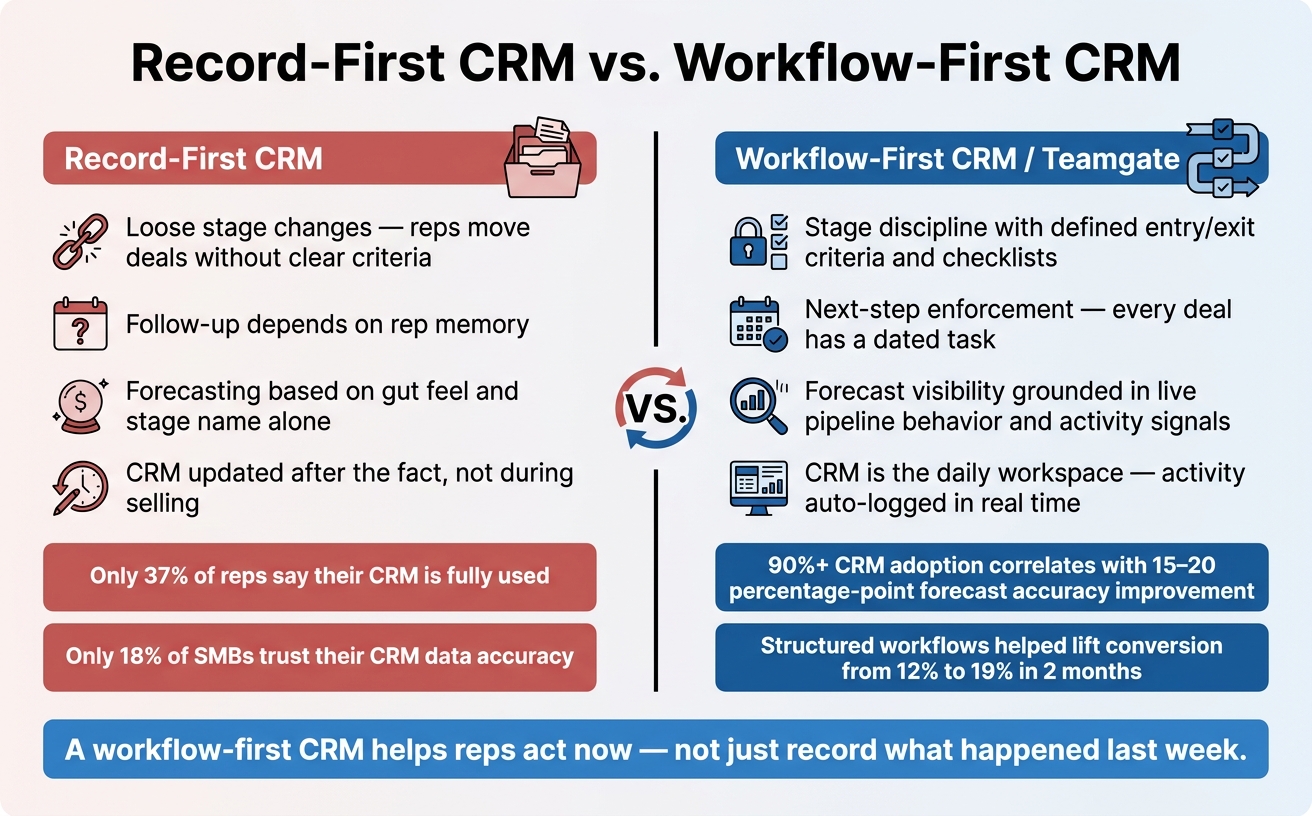
Most CRMs fail not because of missing features but due to poor usage and unclear value. Did you know companies using CRM are 86% more likely to exceed sales targets, and for every $1 spent, CRM systems generate $8.71 on average? Yet, only 37% of sales reps actively use their CRM, often due to overwhelming tools or manual tasks.

Here’s what you need to know:

  • CRM boosts productivity by 34% and reduces sales cycles by up to 14 days.
  • Mobile CRM users are 150% more likely to hit quotas.
  • AI in CRM increases sales target success by 83%.
  • Challenges persist: 63% of CRM initiatives fail due to poor adoption and implementation.

Teamgate helps growing sales teams gain structure, clarity, and accurate pipeline insights – without the complexity of bloated systems. Let’s dive into the key CRM stats that can transform your sales process.

25 Essential CRM Statistics for Sales Leaders in 2025

25 Essential CRM Statistics for Sales Leaders in 2025

The CRM Rollout Strategy Most Sales Leaders Miss

1. 91% of companies with 10+ employees use a CRM system. For small businesses, 74% have adopted CRM, with half of them starting in just the last three years. George El-Hage, Founder of Wave Connect, captures the momentum: "CRM statistics tell a wild story right now: the market’s racing toward $126 billion, 91% of mid-size companies already use one, and AI is rewriting the playbook for how sales teams work". These trends show how CRM continues to shape business operations across industries.

2. The tech industry leads CRM adoption, with other sectors catching up. Tech companies top the list with a 94% adoption rate. Other industries are also embracing CRM: manufacturing at 86%, education at 85%, healthcare at 82%, and human resources at 81%. Real estate lags slightly behind at 70%. When it comes to spending, banking, financial services, and insurance (BFSI) dominate with 24.48% of the market share, followed by retail at 18% and business services at 10%.

3. Cloud-based and mobile CRM dominate the market. A staggering 87% of CRM systems are cloud-based, while 70% of businesses rely on mobile CRM. Companies using mobile CRM see 150% higher chances of exceeding sales quotas. On-premise solutions remain common in sectors like government and healthcare, where regulations demand stricter control.

4. AI is transforming CRM functionality. AI features are becoming standard, with 83% of businesses integrating them into their CRM systems for automation. Generative AI is also gaining ground, with 65% of companies adopting it. Businesses leveraging generative AI in CRM are 83% more likely to surpass their sales targets. By 2025, over 70% of CRM platforms are expected to include AI capabilities.

5. The CRM market is growing at an impressive pace. The global CRM market is projected to grow from $112.91–$126.17 billion in 2026 to a massive $320.99 billion by 2034, at a 12.40% annual growth rate. Sophie Ricci from Salesso sums it up well: "CRM adoption isn’t optional anymore – it’s the price of entry".

2. Sales Productivity

CRM systems are not just tools for organization – they’re game-changers for boosting sales productivity. By automating repetitive tasks and providing real-time access to data, they free up time for what matters most: selling.

6. CRM implementation increases productivity by 34%.
Businesses that implement CRM software report a 34% rise in productivity. This improvement comes from automating routine tasks and allowing sales reps to focus on closing deals. Adding mobile CRM access boosts productivity even further – by 14.6% – as field reps can update records and interact with prospects on the go.

7. Sales reps spend only 30% of their time selling.
Shockingly, sales reps dedicate just 30% of their time to actual selling. The other 70% is consumed by administrative duties like data entry, meetings, and paperwork. High-performing teams, however, use nearly three times more sales technology to reclaim selling hours.

"An hour a day on data entry. That’s 250+ hours per year per rep that could be spent actually selling."

  • George El-Hage, Wave Connect

8. Mobile CRM users are more likely to hit their quotas.
Sales reps using mobile CRM outperform their peers, with 65% meeting their quotas compared to just 22% of those relying solely on desktop systems.

9. Top-performing reps prioritize CRM updates.
The best salespeople spend 18% more time updating their CRM than average reps. This attention to detail pays off – they close deals faster and forecast more accurately. Additionally, these top performers are 82% more likely to research prospects before reaching out. Keeping CRM records up-to-date also paves the way for automation to further enhance efficiency.

10. Automation and AI recover 20% of sales teams’ time.
CRM systems equipped with automation and AI can reclaim 20% of a sales team’s time by reducing manual data entry and automating follow-ups. For example, in 2025, CliqStudios adopted a Freshworks CRM, which sped up their sales cycles by 35% and improved team adoption. Marketing automation has also been shown to increase sales productivity by 14.5%.

These insights highlight how CRM investments do more than streamline operations – they directly drive stronger sales performance and better use of time.

3. Pipeline Management

A CRM transforms your sales pipeline from guesswork into a reliable system for driving revenue. When deals stall or forecasts feel uncertain, the right tool provides clarity, speed, and accountability across every stage of the sales process. This level of organization not only boosts productivity but also propels overall sales performance.

Key Benefits of Pipeline Management with a CRM

11. 74% of CRM users gain better access to customer data.
Nearly three-quarters of sales teams report that their CRM improves access to customer information. This enhanced visibility allows reps to track exactly where each opportunity stands in the sales journey, enabling faster communication and smoother deal progression. With everyone aligned, teams can avoid missteps and keep deals moving forward.

12. CRM reduces sales cycles by 8 to 14 days.
Time is critical in sales, and delays can cost deals. Around 34% of businesses state that a CRM shortens their average sales cycle by 8 to 14 days. Automation simplifies follow-ups, while AI tools like lead scoring help reps focus on the best opportunities. For instance, responding to a lead within five minutes makes them nine times more likely to convert.

13. Forecasting accuracy improves by 42%.
CRM systems boost sales forecasting accuracy by up to 42%. With real-time data on deal stages, engagement, and historical trends, sales leaders can distinguish between solid opportunities and wishful thinking. This precision makes it easier to allocate resources effectively and plan revenue with confidence.

14. Lead conversion rates can grow by up to 300%.
Teams using a CRM see lead conversion rates increase by as much as 300%. The secret lies in better lead qualification, timely follow-ups, and prioritizing prospects based on data. When reps focus on high-intent leads and maintain consistent outreach, more deals close. Companies with structured pipeline management also report 28% higher revenue growth.

15. 63% of companies make pipeline management a priority.
Pipeline management is a focus for 63% of organizations. To reliably hit revenue targets, you typically need three to four times your quota in pipeline value. Regular reviews help – companies conducting them achieve a 15% higher win rate. However, many pipelines get bogged down with unqualified leads or deals that sit inactive for over 30 days. To avoid this, clear qualification criteria and exit milestones for every stage are essential. This clarity not only drives revenue but also strengthens long-term customer relationships.

"You don’t have a business if you are not managing your pipeline."

4. Customer Retention

Once your pipeline is running smoothly, the next step to ensure sustainable growth is focusing on customer retention. Keeping your current customers is not only more cost-effective but also more profitable than acquiring new ones. A CRM transforms customer relationships into a well-organized, data-driven approach that minimizes churn and increases customer lifetime value.

Key Benefits of Customer Retention with a CRM

16. 53% of businesses report better retention with a CRM.
More than half of businesses notice improved customer satisfaction and retention after adopting a CRM system. By centralizing customer data, CRMs make it easier to understand individual preferences and deliver personalized experiences that foster loyalty.

17. CRM usage boosts customer retention by 27%.
Using a CRM to actively engage customers leads to a 27% improvement in retention on average. Retaining a customer is far cheaper than acquiring a new one – up to five times less expensive – and repeat customers tend to spend 67% more than first-time buyers.

18. A 5% retention increase can significantly raise profits.
Even a small 5% bump in retention rates can drive profits up by 25% to 100%. Selling to an existing customer is also more effective, with a success rate of 60–70%, compared to just 5–20% when targeting new prospects.

19. Positive experiences lead 94% of customers to return.
When customers have a positive experience, 94% are likely to make repeat purchases. CRMs enable businesses to craft personalized email campaigns, which can lead to a 29% rise in repeat purchases.

20. 73% of sales leaders focus on growing existing accounts.
A recent shift shows that 73% of sales leaders prioritize driving growth through their current customer base. Additionally, 88% of customers value the experience a company provides just as much as its products or services. CRMs play a key role here by automating follow-ups and tracking customer engagement to reduce churn.

"73% of chief sales officers (CSOs) put top priority on doing business with existing clients."

  • Daniel Hawkyard, Director Analyst, Gartner

5. CRM Challenges

While CRMs are designed to boost productivity, issues like adoption struggles, poor data quality, and integration difficulties can diminish their effectiveness. Understanding these challenges is just as important as recognizing the advantages of CRMs when aiming to improve sales performance.

21. Fewer than 37% of salespeople actively use their CRM.
Despite widespread implementation, fewer than 37% of sales reps consistently use their CRM systems. A major reason is the burden of manual data entry, which many reps see as a time-consuming task that takes away from selling. In fact, 32% of salespeople spend over an hour daily on manual data entry, and on average, reps lose about 546 hours each year searching for or correcting incomplete contact information.

22. 63% of CRM initiatives fail due to poor adoption.
Low user adoption is the leading cause of CRM project failures, with 63% of initiatives failing to deliver expected results. Overwhelming features and system complexity are key contributors – 48% of users emphasize usability as a critical factor, yet 43% of businesses use less than half of their CRM’s capabilities. Without consistent leadership support and ongoing training, adoption rates plummet, leaving 66% of the expected CRM benefits unrealized.

23. 91% of CRM data becomes outdated within a year.
Data quality is a persistent issue, with 91% of CRM data becoming incomplete, outdated, or duplicated annually. B2B data, in particular, decays at a rate of 30% to 70% each year due to factors like job changes and company rebranding. This problem costs companies between $12.9 million and $15 million annually and can lead to revenue losses of 10% to 27%.

24. Integration challenges affect 36% of buyers.
Many CRMs struggle to integrate seamlessly with tools like accounting software, e-commerce platforms, or marketing systems, leaving customer data siloed. This lack of integration creates inefficiencies for sales teams, with 55% of CRM implementations failing to meet their objectives.

25. 72% of sales leaders report low CRM usage, while 42% of reps feel overwhelmed by too many tools.
There’s a clear gap between leadership expectations and how reps use CRMs. Tool fatigue is a major issue, with 84% of sales teams without a unified platform planning to consolidate their tech stack. Interestingly, high-performing sales teams use three times more sales technology than underperforming ones, highlighting the importance of adoption and integration. Tackling these challenges is essential to unlock the full potential of CRM systems.

Conclusion

CRM systems play a key role in driving sales success. When properly utilized, they deliver impressive results, including an average ROI of $8.71 for every dollar spent and the potential to increase sales revenue by up to 30%. By leveraging AI features, ensuring mobile access, and maintaining accurate data, sales leaders can achieve and even surpass their quotas, as highlighted throughout this discussion on CRM adoption, pipeline management, and customer retention.

However, implementation challenges remain a hurdle for many. Around 55% of CRM projects fail to meet their goals due to issues like low adoption rates, difficulties with data entry, and insufficient training. Tackling these obstacles – such as automating repetitive tasks and choosing systems that are easy to use – can unlock the full potential of CRM tools.

Mobile access and AI capabilities are no longer optional – they’re necessities. Mobile CRM access significantly boosts performance, with 65% of reps meeting their quotas when they have it. AI-powered CRMs further amplify results, making organizations 83% more likely to exceed their sales targets. These features provide a clear edge in today’s competitive landscape.

Use these 25 statistics as a guide to assess and refine your CRM strategy. Pinpoint areas where manual tasks are slowing your team down or where better adoption and automation could save 5 to 10 hours weekly. The evidence is clear: a well-implemented CRM system can transform your sales outcomes. Focus on improving mobile access, integrating AI, and ensuring data accuracy to fully realize these benefits.

FAQs

What should I track to prove CRM ROI?

To show CRM ROI effectively, focus on tracking these key metrics:

  • ROI percentage: For instance, earning $8.71 for every $1 spent highlights the financial return.
  • Customer retention rates: CRM systems can boost retention by as much as 27%.
  • Pipeline health indicators: Metrics like deal velocity and stage conversion rates provide insight into pipeline performance.
  • Sales cycle length: Measure how quickly deals progress to understand efficiency.
  • Win rates: Track the percentage of deals closed successfully.
  • Overall revenue growth: Demonstrates how CRM contributes to increased profitability.

These metrics collectively illustrate the CRM’s influence on sales performance and financial outcomes.

How do I get reps to use the CRM daily?

To make daily CRM use a natural part of your team’s workflow, focus on showing its value and making it indispensable. Highlight how it boosts productivity, streamlines pipeline management, and drives better sales outcomes. Tailor role-based dashboards to meet individual team members’ needs, reducing unnecessary distractions and helping them focus on what matters. Demonstrate the ROI of consistent CRM use and provide continuous training to ensure it becomes an integral part of their daily routines.

How can we keep CRM data accurate automatically?

CRM data stays accurate when sales automation tools take over repetitive tasks like updates, lead routing, and follow-ups. By using workflows, triggers, and rules, these tools ensure data stays consistent, reduce manual errors, and save time – all while improving reliability.

Related Blog Posts

Most sales teams struggle with outdated pipelines, missed follow-ups, and inaccurate forecasts. Interactive KPI dashboards solve these problems by turning raw data into real-time, actionable insights. They connect directly to your CRM, highlight overdue tasks, and provide visual tools to track deals, saving time and improving productivity. For SMBs, this means fewer missed opportunities and more reliable forecasts.

Key Takeaways:

  • Real-time updates keep your pipeline accurate and actionable.
  • Dashboards reduce admin tasks, giving reps more time to sell.
  • Managers gain clear insights for coaching and forecasting.

Top Tools for SMBs:

  1. Teamgate CRM: Simple setup, clear pipelines, and actionable insights. Ideal for teams who want structure without complexity.
  2. Klipfolio: Customizable dashboards for multi-source data tracking.
  3. Geckoboard: Easy-to-read visuals for daily performance tracking.
  4. Power BI: Advanced analytics for teams in the Microsoft ecosystem.
  5. SimpleKPI: Straightforward tracking with budget-friendly pricing.

Quick Comparison:

Tool Best For Ease of Use Core Integrations Pricing (USD/month) Setup Time
Teamgate CRM Pipeline management, fast setup High MailChimp, QuickBooks, Zapier $0–$59.90/user Hours
Klipfolio Multi-source data tracking Moderate Salesforce, HubSpot, Pipedrive $99–$799 Moderate
Geckoboard Visual performance tracking High Salesforce, Google Analytics $49–$699 Under 1 hour
Power BI Advanced analytics, Microsoft users Moderate Excel, Office 365, Teams Free–Varies Less than 1 day
SimpleKPI Budget-conscious metric tracking Very High Zapier, Excel, Google Sheets $14–$129 Within 1 hour

Conclusion:
If your team struggles with pipeline clarity or wasted time on admin tasks, dashboards like Teamgate can help. Teamgate gives growing sales teams clarity, structure, and trustworthy pipeline insight – without enterprise CRM bloat or feature overload. Start with a pilot to see which tool fits your workflow best.

Make a Sales KPIs Dashboard in 15 minutes (+ Free Template)

Why SMB Sales Teams Need Interactive KPI Dashboards

For many SMB sales teams, revenue loss doesn’t happen in dramatic, obvious ways – it happens quietly, through missed follow-ups and overlooked opportunities. Without real-time insights, leads grow cold, deals stall, and forecasts lose accuracy. The result? Wasted effort on demand generation, inefficient use of sales hours, and pipelines that fail to deliver results.

Interactive dashboards tackle these challenges by turning scattered data into actionable insights.

Fixing Pipeline Management Problems

A clean and well-managed pipeline is the backbone of predictable revenue. Without visual tools and real-time alerts, deals can languish unnoticed. Interactive dashboards solve this by using features like color-coded closing dates to highlight overdue opportunities and metrics such as deal age, activity coverage, and stage velocity. These tools give managers the clarity they need to step in early – before small issues grow into major bottlenecks. This ensures that deals without clear next steps don’t fall through the cracks, reducing the quiet revenue drain caused by neglect.

Instead of relying on guesswork to assess the health of opportunities, teams can make decisions based on clear, data-driven signals about deal progress and viability.

Boosting Sales Team Productivity

Sales productivity often takes a hit when reps are bogged down with administrative tasks. Many CRMs unintentionally make this worse by turning selling into a data-entry marathon. Interactive dashboards simplify workflows by centralizing key activities – emails, calls, meetings, and notes – and automating routine tasks like follow-ups through reminders and workflow triggers. This means reps spend less time on updates and more time on actions that move deals forward.

Dashboards designed with "at-a-glance" visuals allow SMB sales teams to quickly assess performance without sifting through complex reports. By clearly showing which deals need attention and outlining next steps, dashboards naturally integrate into daily workflows, making adoption easier and more intuitive. These streamlined processes not only improve pipeline clarity but also empower teams to act on insights faster.

Supporting Data-Driven Decisions

When better follow-ups and clear metrics prevent silent revenue losses, sales leaders can make decisions that strengthen the pipeline. Real-time, evidence-based insights become the foundation for accurate forecasts. Interactive dashboards provide actionable metrics like deal age, activity levels, next-step coverage, and stage conversion rates. These indicators help leaders differentiate between realistic forecasts and optimistic guesses.

With visibility into which reps are hitting activity goals and which deals are stalling, coaching becomes more focused and impactful. Dashboards turn routine pipeline reviews into strategic discussions, helping teams identify trends, spot risks, and adjust tactics based on up-to-date data. This ensures that decisions are grounded in reality, keeping the pipeline healthy and reliable.

Best Interactive KPI Dashboard Tools for SMB Sales Teams

Choosing the right dashboard tool can be the key to transforming your sales pipeline into a well-oiled, deal-closing machine. For SMB sales teams, the priority lies in tools that are easy to set up, integrate seamlessly with existing workflows, and deliver rapid, actionable insights. Below are five standout options, each offering a unique combination of usability, integration, and insights tailored to SMB sales.

Teamgate CRM: Built for Predictable Revenue

Teamgate CRM

Teamgate CRM focuses on keeping a clean sales pipeline and minimizing revenue leaks. Its visual deal pipeline uses structured stages, color-coded indicators for overdue tasks, and aging deal alerts to ensure nothing slips through the cracks. Real-time activity tracking reduces the need for manual updates by automatically logging sales interactions.

Designed with sales reps in mind, Teamgate integrates effortlessly into daily workflows. It centralizes tasks like follow-ups, meeting notes, and conversations, so updates happen naturally instead of being forced by management. Automated reminders make follow-ups second nature, while managers gain insights into deal age, activity levels, and next-step coverage to coach and forecast effectively. Best of all, setup is quick – taking just hours, not weeks – so teams can start benefiting immediately. Teamgate is ideal for teams seeking clarity, discipline, and a CRM that’s easy to adopt.

Klipfolio: Real-Time KPI Visualization

Klipfolio

Klipfolio offers customizable dashboards with a simple drag-and-drop interface, perfect for tracking metrics like pipeline progress, conversion rates, and team performance in real time. It connects to over 130 CRMs and platforms, including Salesforce, HubSpot, and Pipedrive, through pre-built connectors and APIs for instant data syncing.

Its PowerMetrics feature ensures consistent KPI tracking across teams, eliminating discrepancies between sales and finance metrics like revenue attribution. For SMBs needing consolidated data from multiple sources, Klipfolio’s data blending capabilities create unified, actionable dashboards. Pricing starts at around $149 per month for small business plans.

Geckoboard: Simplified Sales Performance Tracking

Geckoboard

Geckoboard specializes in clean, TV-friendly dashboards that make daily sales performance easy to monitor. With pre-built templates, multiple chart types, and visual elements like target meters and traffic light indicators, teams can quickly assess their progress at a glance.

The platform integrates with over 90 tools, including Salesforce and Google Analytics, and allows dashboards to go live in under an hour using its drag-and-drop builder. Automated email reports and Slack notifications keep teams aligned on key metrics without the need for manual reporting.

Power BI: Advanced Analytics for Sales Metrics

Power BI

For SMBs already using Microsoft tools, Power BI offers seamless integration with Excel, Office 365, Teams, and SharePoint. It provides advanced visualizations, DAX formulas for complex sales calculations, and AI-powered anomaly detection to highlight trends in your pipeline data.

Power BI is cost-effective for Microsoft users and embeds directly into Teams or SharePoint workflows. With row-level security, sales reps only see data relevant to them. Setting up basic dashboards can often be done in less than a day, making it a practical choice for businesses already in the Microsoft ecosystem.

SimpleKPI: Easy Sales KPI Tracking

SimpleKPI

SimpleKPI is designed for SMBs that want straightforward sales metric tracking without the complexity of a full business intelligence platform. It features pre-built KPI templates, interactive charts, and goal tracking for metrics like revenue, deals closed, and pipeline health.

The tool integrates with Zapier, Excel, and Google Sheets for basic CRM connectivity. Its pricing is transparent, starting at $14 per user per month, with options for small teams ($49 per month) and unlimited users ($129 per user per month). A 14-day free trial is available, and most teams can start seeing results within an hour of setup.

These tools show how interactive dashboards can turn raw sales data into actionable insights, helping SMBs make smarter, faster decisions.

Comparing Interactive KPI Dashboard Tools

Interactive KPI Dashboard Tools Comparison for SMB Sales Teams

Interactive KPI Dashboard Tools Comparison for SMB Sales Teams

Choosing the right interactive KPI dashboard tool is crucial for SMB sales teams aiming to improve pipeline management through effective CRM implementation, track performance, and gain actionable insights from your sales data. This comparison highlights the key features, pricing, and implementation speeds of five popular tools, helping you decide which one aligns best with your team’s needs.

Feature and Pricing Comparison Table

The table below outlines how these tools perform across critical factors like ease of use, integration options, pricing, and setup time.

Tool Best For Ease of Use Core Sales Integrations Pricing (USD/month) Implementation Speed
Teamgate CRM SMBs needing pipeline discipline High – intuitive drag-and-drop MailChimp, QuickBooks, Xero, Zapier $0–$59.90/user Very fast (hours, not weeks)
Klipfolio Teams needing multi-source data Moderate (customizable) 130+ connectors (Salesforce, HubSpot, Pipedrive) $99–$799 Moderate
Geckoboard Visual performance tracking High – pre-built templates 90+ tools (Salesforce, Google Analytics) $49–$699 Very fast (under 1 hour)
Power BI Microsoft ecosystem users Moderate (requires DAX knowledge) Excel, Office 365, Teams, SharePoint Free (individual); Pro pricing varies Fast (basic dashboards in <1 day)
SimpleKPI Budget-conscious SMBs Very high – simple setup Zapier, Excel, Google Sheets $14–$129 Very fast (within 1 hour)

Key Insights on Features and Use Cases

The differences between these tools become more apparent when considering how they impact daily sales operations. For example, Teamgate CRM stands out for its simplicity and quick adoption. Jack Hodges, Sales Manager at FiveCRM, shared:

"With Teamgate’s intuitive interface, our user adoption was immediate. Even with a remote team… we were onboarded and up and running within hours".

When it comes to pricing, scalability is a major factor. SimpleKPI offers an unlimited user plan for $129/month, making it a cost-effective option for growing teams. Meanwhile, Teamgate provides a free tier for up to two users, scaling to $59.90/user/month for advanced features. Krish Sivanathan, Director of Operations at Packagecloud, highlighted how actionable insights can drive results:

"Utilizing sales insights we have been able to conduct targeted experiments, enabling Packagecloud to increase engagement rates by 18% through the refinement of scripts and lead targeting".

Real-Time Capabilities and Advanced Analytics

For real-time data visualization, Klipfolio and Geckoboard are excellent choices, offering seamless integration with multiple data sources. Power BI, on the other hand, leverages AI to detect anomalies and surface trends automatically. In contrast, SimpleKPI focuses on straightforward metric tracking, ideal for teams without the need for complex analytics.

Choosing the Right Tool for Your Needs

Your choice depends on your team’s priorities:

  • Fast implementation: Teamgate, Geckoboard, and SimpleKPI let you build dashboards quickly, often within an hour.
  • Advanced analytics: Power BI and Klipfolio provide deeper insights for data-driven strategies.
  • Budget-friendly options: SimpleKPI’s unlimited user plan and Teamgate’s free tier cater to cost-conscious teams.

For SMBs without dedicated data teams, tools that enable non-technical users to create dashboards quickly can be game-changers. These comparisons offer a strong foundation for identifying the right tool to enhance your sales operations, setting the stage for the next discussion on optimizing your processes.

Choosing the Right Interactive KPI Dashboard for Your SMB Sales Team

What to Look For

The difference between a dashboard that becomes a daily tool and one that gets ignored boils down to three key factors: adoption and implementation, quick setup, and seamless integration. These aren’t just extras – they’re the foundation of whether your team will rely on the dashboard or leave it unused.

  • Adoption rates: A dashboard packed with features won’t matter if it’s too complicated to use. An intuitive design ensures your team can track pipelines easily without feeling overwhelmed, which leads to consistent usage.
  • Setup speed: Time is critical for SMBs. Look for dashboards with pre-built templates and drag-and-drop interfaces that allow you to create live dashboards in hours instead of days.
  • Integration capabilities: A dashboard should fit into your existing workflow, not disrupt it. Check for compatibility with your CRM, email tools, and accounting software. For instance, Power BI connects to multiple data sources for real-time updates, while Geckoboard pulls in data from various applications, reducing manual input and saving time.

By focusing on these factors, you can match the tool’s features to your sales team’s specific needs.

Matching Tools to Your Sales Process

The features you prioritize should align with how your sales team operates. For example:

  • Pipeline management: If your team focuses on moving deals through the pipeline, choose dashboards with visual tools like Kanban boards and enforced next steps. Teamgate CRM, for instance, ensures every deal requires a defined action, keeping opportunities from stalling.
  • Forecasting accuracy: Teams prioritizing accurate forecasts should consider dashboards with AI-driven analytics. Power BI’s anomaly detection highlights trends that manual tracking might miss, while other tools offer custom metrics tailored to your sales goals.
  • Budget considerations: Pricing matters, especially for SMBs. SimpleKPI offers an unlimited user plan for $129/month, suitable for growing teams. Teamgate provides a free tier for up to two users, allowing smaller teams to try its disciplined pipeline management features without upfront costs.

Before committing, run a pilot test. Monitor rep login rates (aim for 80% or higher), track how quickly the dashboard is set up, and gather feedback from your team after one or two weeks. The goal is to ensure the tool supports daily selling activities rather than adding unnecessary tasks. Dashboards that centralize emails, calls, and activity histories tend to see higher adoption rates because they enhance productivity instead of creating extra work.

Conclusion

Interactive KPI dashboards help small and medium-sized businesses (SMBs) protect their revenue by turning raw data into actionable insights. They tackle common sales challenges like stalled deals, inconsistent follow-ups, and unreliable forecasts by highlighting key metrics – such as deal age, activity levels, and next-step coverage – in real time. This shift from guesswork to data-driven decision-making allows managers to coach effectively and ensures follow-up processes are consistent and reliable.

The right dashboard enhances three key areas that directly affect revenue: pipeline discipline, sales rep productivity, and forecast accuracy. As Teamgate states, "Accurate CRM reports and analytics are essential for identifying strengths and weaknesses among a sales team… and any shortcomings in sales cycles".

When choosing a tool, SMBs should prioritize fast setup, CRM integrations, and ease of use. Teamgate CRM is specifically designed to prevent revenue loss by eliminating "no next step" scenarios and flagging aging opportunities before they expire. Its pricing supports quick adoption without unnecessary complexity, including a free tier for up to two users.

To get started, consider running a short two-week pilot with your team and collecting their feedback. The goal isn’t to find the tool with the most features – it’s to find one your team will actually use because it makes their jobs easier. When dashboards centralize emails, calls, and activity histories in one place, adoption becomes effortless, and your pipeline becomes more predictable.

FAQs

Which KPIs should an SMB sales dashboard track?

An SMB sales dashboard should focus on tracking key metrics that provide a clear picture of sales performance, pipeline health, and team productivity. Important indicators include:

  • Sales trajectory: Monitors progress toward revenue goals.
  • Win/loss rates: Highlights how often deals are closed successfully.
  • Sales cycle length: Measures the average time it takes to close a deal.
  • Pipeline coverage: Ensures there are enough opportunities to meet targets.
  • Lead conversion rates: Tracks how effectively leads turn into customers.
  • Activity metrics: Includes data on calls, emails, and meetings to assess team effort.

Additional data points, such as top reasons for lost deals, forecasted revenue, and sales velocity, can reveal problem areas, improve forecasting accuracy, and ensure the pipeline remains clean and actionable for steady revenue growth.

How do I get reps to actually use the dashboard?

To get your sales reps to actively use the dashboard, make sure it aligns with their daily workflow. Keep it simple to update and packed with insights they can act on. Tailor the metrics to their roles – like tracking daily productivity for reps or monitoring team trends for managers. Add visual tools, such as pipeline aging indicators and clear next steps, to make the process intuitive. When reps see how it streamlines their tasks and speeds up closing deals, they’ll be much more likely to use it regularly.

What should a 2-week dashboard pilot include?

A 2-week dashboard pilot should center on key milestones: setup, testing, and training. The process involves configuring critical KPIs such as sales activity, deal progression, pipeline health, and forecasts. Once set up, testing ensures the data is accurate and the dashboard is easy to use. Product demonstrations play a crucial role, helping users understand how to interpret the data effectively and turn insights into actionable steps.

Related Blog Posts